JETPACK CRM INTEGRATION NOT WORKING

Status
Not open for further replies.

ndakena

SMB User
Basic Certified
Joined
Sep 19, 2022
Messages
38
Reaction score
4
Hello Team,

I integrated 3cx with Jetpack CRM using the integration template. It was working initially, but suddenly stopped two days ago. I have tried to do the same integration on different 3cx instance and different Jetpack CRM, but it's still not woirking. Though jetpack is still listed as supported CRM, I am wondering if anyone change??

Regards
 
Jetpack CRM is still a supported CRM integration. What is the exact issue that you have at this point?
Can you please provide some more details?
 
  • Like
Reactions: edossantos
I did the integration as per the documentation, it was working initially and suddenly stopped. There is no error, when I receive an incoming call, the icon to open the contact in the CRM does not appear again. No new contact was created in the CRM, and no event was created whereas I have enabled all features in the integration template.

I decided to use a different instance of 3cx and a different instance of Jetpack. The new integration did not work at all, no errors. I am not sure what's happening.
 
In order to investigate the issue, please enable verbose logs from the 3CX Console > Dashboard > Activity Log > Settings. Then make a test call where you reproduce the issue, and check the 3cxSystemService.log file that you can download from the 3CX Console > Dashboard > Activity Log > Logs button > Instance folder.
 
Thanks for your reply. Attached is what I got from the logs.

NB: Check the following lines extracted from the file

- 2023/06/26 15:39:39.211|16000|0015|Verb|CRM: Not processed. Number=+1315XXXXXXX, connection=105, state=Dialing
- 2023/06/26 15:39:39.211|16000|0020|Trac|CRM: Ordering configuration not found, using scenario entity order 0 for entity 'Contacts'
 

Attachments

Can you please ensure that under Dashboard<<Advanced<<Contacts<<Options the matching strategy is set to Match Exactly instead of match at least 6 digits that it is set now?
 
  • Like
Reactions: edossantos
Hello there.

I did that already and it did not change anything.
 
From the logs, we can see that Jetpack is not returning any data, but it's not throwing any error. So it seems the CRM doesn't have a matching contact for the phone number being searched.
 
Yes, but it's supposed to create a new contact if it doesn't exist. It's not doing so.
 
Did you upgrade your system to Update 8 by any chance? In 3CX v18 Update 8 contacts are not created automatically anymore, you need to do this from the Web Client / Desktop App.
 
Ohh, I see. our 3cx is on automatic update, so I guess it's the issue. With this, it implies that the integration is no longer working. Because if we have a new call and fail to create the contact, there will be no information in the CRM. What about call journaling? I am really wondering how this can be made to work again. Or is the integration template with jetpack supposed to be updated? Is there any way the team can test the integration and see if it's still working or not??
 
Ohh, I see. our 3cx is on automatic update, so I guess it's the issue.
U8 is still in beta, so automatic updates should not be applied. In any case, can you tell me the version you see in your 3CX Dashboard?

With this, it implies that the integration is no longer working. Because if we have a new call and fail to create the contact, there will be no information in the CRM.
No, this is not correct. We didn't remove the contact creation feature, we're just changing the way it works, so in 3CX v18 Update 8 you can decide if you want to create a contact or not, and set the correct name, instead of creating contacts with a default name, which you need to change later.

What about call journaling?
Call journaling will work as long as you have a matching contact, or you create the contact from the web client / desktop app.

I am really wondering how this can be made to work again. Or is the integration template with jetpack supposed to be updated?
When you upgrade 3CX to Update 8, the template will be updated automatically. But if you don't click the "Add contact" link in the Web Client, the contact will not be created....

Is there any way the team can test the integration and see if it's still working or not??
Let's start by checking the 3CX version, so we know if this is the issue.
 
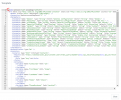
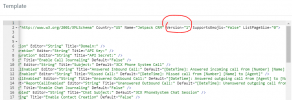
Also, please tell me the version of the template you have. You can check this from the Management Console > Settings > CRM > Jetpack CRM > Show Template button, and then you will see the version attribute in the second line of the XML.
 
Let's start by checking the 3CX version, so we know if this is the issue.

It's showing V18 update 8 as you rightly said.

Edited by a moderator: The screenshot has been removed as it was showing your license key and fqdn.
 
Last edited by a moderator:
Also, please tell me the version of the template you have. You can check this from the Management Console > Settings > CRM > Jetpack CRM > Show Template button, and then you will see the version attribute in the second line of the XML.

The integration template says version="1.0"


1688069206972.png
 
That's the XML version, you need to check the Version attribute in the second line, which is probably 2.

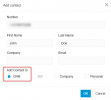
In any case, this is the expected behavior for U8. Contacts are not created automatically anymore. You will need to click "Add contact" from the Web Client when you receive the call, then fill the details and check the CRM option. This way the contact is added to the CRM.

Please try that and let me know.
 
  • Like
Reactions: Evolute IT
In any case, this is the expected behavior for U8. Contacts are not created automatically anymore. You will need to click "Add contact" from the Web Client when you receive the call, then fill the details and check the CRM option. This way the contact is added to the CRM.
When I do this, the number only gets added to 3CX contacts and not in the CRM.
 
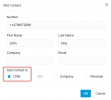
Are you checking the CRM option? It should look like this:
1688121413592.png
 

Attachments

  • 1688121386609.png
    1688121386609.png
    21.4 KB · Views: 4
Are you checking the CRM option? It should look like this:
Yes, I am doing so. That is the first option I check when creating any contact manually. Yet, nothing shows up in the JETPACK CRM
 
Status
Not open for further replies.