Solved Large backup unable to restore

Status
Not open for further replies.

CloudAware

Bronze Partner
Advanced Certified
Joined
Feb 22, 2021
Messages
45
Reaction score
20
We are running a self-hosted v18 installation. The daily backup file is around 15Gb. This is mainly because of the recordings (which are important to use for legal reasons).
Restoring a 15Gb file does not work (the backup.zip is uploaded to the correct folder on forehand) What can we do to restore such a large file?
Thank you very much!
 
  • Like
Reactions: Evolute IT
To first get a bit more information on this:

• What is the 3CX Host, is it a Debian instance deployed using the 3CX ISO or a Windows machine?
• Are you using the 3CX Web installation wizard or CLI installation wizard?
• What happens when you try and restore, do you get an error of some sort?
 
This is a already installed Debian instance. We are trying to recover the backup from the webgui using the "Backup And Restore" menu option. Then we select the backup (15Gb) and click on "Restore".
No error is shown.
 
This is a already installed Debian instance. We are trying to recover the backup from the webgui using the "Backup And Restore" menu option. Then we select the backup (15Gb) and click on "Restore".
No error is shown.
If you get no error then it's probably still restoring. How long have you left it?
 
  • Like
Reactions: ChrisC_3CX
...about 2 days :)
 
I have to agree with @kieferschild on this, it might take hours for such a large backup to restore.

Since this is a Debian machine, you could try SSHing to it and then run the following command after you've initiated the restore task:

Code:
top -i 1 -u phonesystem

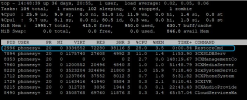
You should see a process called "RestoreCMD". As long as it's still there, it means the restore process is running:
1635335564161.png
 
No that is not running. I already check that.
 
Even right after you've initiated the restore task?

If not, what happens when you try to restore, does it not even log you out of the Management Console? Do you not receive an email stating that the restore failed?

Note: The email should be sent to the administrator of the PBX. The email address is set in "Settings >> Email >> Notifications".
 
Right after i click restore, that task IS running, but it seems it cannot handle really large backups
 
Right after i click restore, that task IS running, but it seems it cannot handle really large backups
For how long does it run?

Also, does it log you out of the Management Console? Do you receive an email stating that the restore failed, if yes, how long after and what does the log in the email say?
 
It logs me out of the console then it runs for about 2 minutes.
I get no emails from the PBX
 
We had a similar issue last week. We had a 4GB backup to restore (one that had recordings in it and all) and it was doing the same.

During setup, I uploaded it and it crashes during "Restoring backup" (in the setup part.) I also tried using the command line setup and it did the same, crashing about "resource not available" (the VM was big enough!)

We had to edit the backup file by deleting the recordings from it, upload it to restore and THEN, we uploaded our recordings via SSH.

I cannot reproduce this as the customer is always running now but it was a similar problem.
 
This is exactly the solution we have chosen (split the recordings into another file and do them manually). We also have more than 32GB of RAM in this VM, so that is not the issue. We are restoring to an SSD with 200Gb of free space. I really think this is a bug in V18. I THINK i can remember we had no issues recovering in V16 (although the files were back then more like 10GB, but still....
 
  • Like
Reactions: Evolute IT
This is exactly the solution we have chosen (split the recordings into another file and do them manually). We also have more than 32GB of RAM in this VM, so that is not the issue. We are restoring to an SSD with 200Gb of free space. I really think this is a bug in V18. I THINK i can remember we had no issues recovering in V16 (although the files were back then more like 10GB, but still....
Yup, I agree. Never did this in v16.
 
We've went ahead and tested this with a 15+GB backup file on 3CX v18 both Windows and Linux and could not reproduce the issue neither by restoring during installation nor after installation so please do let us know if this ever comes up again.

In any case, since you've managed to sort this out I'll be marking this thread as resolved.
 
  • Like
Reactions: Evolute IT
Status
Not open for further replies.

Members Online Now

No members online now.

Forum statistics

Threads
111,831
Messages
589,277
Members
164,660
Latest member
RJenkinsROCK