live chat plugin version

Status
Not open for further replies.

Nikos To

New User
Joined
Jun 22, 2021
Messages
13
Reaction score
0
Good afternoon ,


I am trying to install the wordpress plugin for live chat and my technician informed me that he wants the compatible version which is wordpress WordPress 4.9.6, which can I find please?
 
Hi @Nikos To! If your Wordpress version is 5.3 or higher, you can. If it is not, you should update. If you do not wish to update, you won't be able to.
 
  • Like
Reactions: Nikos To and jed
Good evening ,

I put the plugin but can you help me with something else?

I do not find click 2 talk anywhere in the plugin to connect with the user.
 
@Nikos To

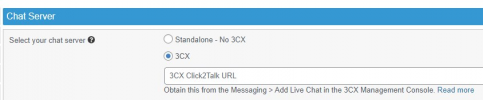
You will have to access the Wordpress admin panel, on the left click on "Live Chat >> Settings", click on "Advanced Features", select 3CX and then a field will appear to add the "3CX Click2Talk" URL which you can get from the 3CX Management Console:
1624545005943.png
 
  • Like
Reactions: Nikos To
@Nikos To

You will have to access the Wordpress admin panel, on the left click on "Live Chat >> Settings", click on "Advanced Features", select 3CX and then a field will appear to add the "3CX Click2Talk" URL which you can get from the 3CX Management Console:
View attachment 22694
Good morning and thank you very much for the answer.

It seems in the version I have there is no such option.
 
It seems in the version I have there is no such option.
Have you not updated as per VasilisV_3CX? Which version of Wordpress and which version of the 3CX Live Chat plugin are you running?

Wordpress: Check under Dashboard >> Updates
3CX Live Chat plugin: Check under Plugins >> Installed
 
Have you not updated as per VasilisV_3CX? Which version of Wordpress and which version of the 3CX Live Chat plugin are you running?

Wordpress: Check under Dashboard >> Updates
3CX Live Chat plugin: Check under Plugins >> Installed
I put a version 8.2 maybe I will save the upgrade but Mitsotakis did it for me ..
 
I put a version 8.2 maybe I will save the upgrade but Mitsotakis did it for me ..
Do you mean Wordpress 4.8.2? If yes, you will have to upgrade to Wordpress 5.3 or higher as mentioned previously and as mentioned here.
 
Do you mean Wordpress 4.8.2? If yes, you will have to upgrade to Wordpress 5.3 or higher as mentioned previously and as mentioned here.
in the version of the plugin I was referring to
 
in the version of the plugin I was referring to
In that case, do note that the current version of the 3CX Live Chat plugin is 9.3.1 so you will have to upgrade to that. Before upgrading it though, do make sure that your Wordpress version is at least at 5.3 or higher. Check Wordpress version in Dashboard >> Updates.
 
  • Like
Reactions: Nikos To
Status
Not open for further replies.

Forum statistics

Threads
112,149
Messages
590,965
Members
165,170
Latest member
SupportRock