Live Chat with WIX goes to admin/one user only

Status
Not open for further replies.

voice11

Bronze Partner
Basic Certified
Joined
Jul 15, 2016
Messages
78
Reaction score
2
Hello, I use 3CX 18.0 (build 461) and have been using the SMS service for a while. It works flawlessly, so far so good there.
Yesterday I set up LIVE CHAT with my WIX site and it's kinda working but broken. There are 4 members in the queue and I am the only one who constantly gets the message. No one else ever got any message. If I remove myself from the queue, it still does not go to the next user but shows the agent offline instead.
By reading blogs, I have addressed the https://mysite.com.filesusr.com issue.
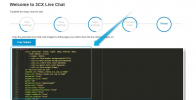
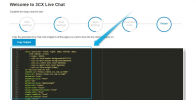
To be honest I couldn't follow through with all the instructions until the very end. I got stuck at "Embedding the widget" because I couldn't figure out what next to do once the <link> is pasted there.
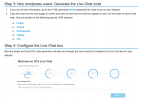
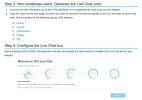
Meaning I never got this far to see this screen. Never saw it.Screen Shot 2022-04-20 at 7.00.33 PM.png
And on this screen below, I had only one webhook string that is "https://mysite.3cx.com:5001/callus/#chat", not so much jibberish.
From step 5, it seemed that it was going to work but once I publish, the icon wasn't clickable. It was there but I couldn't click or link it to an icon that could be clicked.
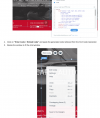
Screen Shot 2022-04-20 at 7.04.32 PM.png
So I don't know what else to do, so I used webhook and linked with a chat icon instead and it seemed to be working. The only problem I am running into is that only I and no one else are getting the messages. Thanks.
 
To be honest I couldn't follow through with all the instructions until the very end. I got stuck at "Embedding the widget" because I couldn't figure out what next to do once the <link> is pasted there.
Meaning I never got this far to see this screen. Never saw it. Screen Shot 2022-04-20 at 7.00.33 PM.png
I'm not sure I fully understand what you mean here, did you not reach the end of the HTML Generator and got the html to copy on your site?
1650527185430.png


And on this screen below, I had only one webhook string that is "https://mysite.3cx.com:5001/callus/#chat", not so much jibberish.
Do you mean you only pasted the link in the box that says "Add your code here" ?


The only problem I am running into is that only I and no one else are getting the messages. Thanks.
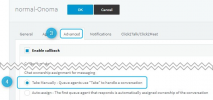
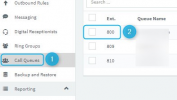
Make sure all agents are logged into the Queue and that the Queue is not set to automatically assign chats:
1650527399803-png.29660

1650527388918.png

Note: Before testing again after making the above changes, log into your extension that actually received the chats and delete those chats.
 

Attachments

  • 1650527399803.png
    1650527399803.png
    60 KB · Views: 53
Hello Chris, Thank you for the reply.
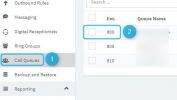
So, NO I never reached this screen. I've looked everywhere. Can you tell me where is this menu?
Meaning Settings > Chat etc., but I can't find this path.
1650549228020.png

Do you mean you only pasted the link in the box that says "Add your code here" ?
Yes, I pated only the link.


Make sure all agents are logged into the Queue and that the Queue is not set to automatically assign chats:
1650549653120.png
I never saw this screen.
I think my problem will be resolved once I am able to do the HTML generator. Can you tell me the steps to get there? Thanks
 
UPDATE: I was able to find the HTML code. And the chat icon appears on the bottom right of the site. So, that looks great but I still CAN NOT click on the icon.
The chat icon is there but it's greyed out. Please advise. Thanks
 
Any input guys?
 
make sure you are using the following format for the website URL in 3CX:

https://xxxxxx-wixsite-com.filesusr.com

they use dashes. It will be different from the one I pasted.
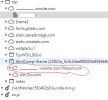
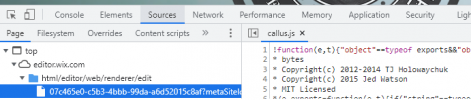
Look in the inspector. It should be displayed as below:

1650666298142.png

See if that helps.
 
Thank you, David, but no it didn't help. Sorry :(
 
Look in the inspector. It should be displayed as below
What did you mean by this, David?
if you right click in your browser, on the page you want the chat to be, you'll see a context menu appearing, select "inspect" (for Chrome, Brave) and then it will display a new panel with a bunch of stuff. Like so:

1650669880995.png
 
Great, thank you so very much, David. Yes, that was indeed the issue.
Anyone in the future should look there what David pointed to.
in my case the string was https://www-myfqdn-com.filesusr.com. That made ti chat icon come to life :)

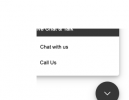
I do however still have one issue. my chat window seems to be cut out.
 

Attachments

  • Screen Shot 2022-04-22 at 9.07.36 PM.png
    Screen Shot 2022-04-22 at 9.07.36 PM.png
    12.2 KB · Views: 4
Walla...seems like I had jumped the gun. Simply expanding the box shows full text.
Thank you again for all your help, David.

Consider it resolved. Close etc.
 
  • Like
Reactions: DavidM84
GOSH!! Sorry, I take my words back.
So, the chat icon is fine and it chats, looks way better than before because of embedding it properly.
BUT ... the original issue remains.
That the messages still come to one user only (me). There are 4 members in the queue and I am the only one who constantly gets the message. No one else ever got any message. If I remove myself from the queue, it still does not go to the next user but shows the agent offline instead.
 
GOSH!! Sorry, I take my words back.
So, the chat icon is fine and it chats, looks way better than before because of embedding it properly.
BUT ... the original issue remains.
That the messages still come to one user only (me). There are 4 members in the queue and I am the only one who constantly gets the message. No one else ever got any message. If I remove myself from the queue, it still does not go to the next user but shows the agent offline instead.
Try to purge the messages in the 3X management console, in the Dashboard. I had the same problem.
 
Hi David, thank you for the reply, but sorry it didn't work.
I enabled the chat logs in the dashboard & purged all the messages but still, I am the only one who gets the messages and nobody else does. :(
 
Hi 3CX support, can someone respond? I've spent a few days on this without success.
Th problem is that the messages still come to one user only (me). There are 4 members in the queue and I am the only one who constantly gets the message. No one else ever got any message. If I remove myself from the queue, it still does not go to the next user but shows the agent offline instead.

Thank you in advance
 
Hi!

2 Questions:
  • In the HTML Code Generator, it asked you for a "callus" link. What did you input and where did you get it from in the Management Console?
  • Are the other Queue Members that are not receiving messages logged in? If you are unsure, create a brand new extension, open a new WebClient in your browser, log in with the new extension and check if Queue messages go there.
 
Status
Not open for further replies.

Forum statistics

Threads
112,149
Messages
590,965
Members
165,171
Latest member
Mahlon