Livechat doesn't work in wordpress

Status
Not open for further replies.

Audrey

Platinum Partner
Advanced Certified
Joined
Jan 23, 2018
Messages
90
Reaction score
18
Hi,

I'm now testing livechat, my 3CX is V18 Update5 Alpha.
I tried both methods.

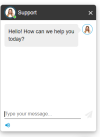
1660795086042.png

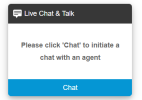
1. Install 3CX livechat plugin and enable in our test page. Livechat button appeared and we can start a chat.
However, I enabled chat and call and made some customization for styles, nothing was reflected, only the default style of 3CX livechat.
1660795444648.png1660795470500.png

2. Copy the HTML code and save as a HTML file.
The code I copied includes 2 parts. Call us and script.
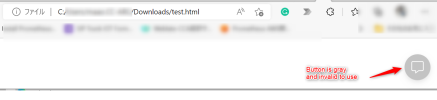
Opening the html file, I can see a gray button appeared on the bottom right. But I can't click it or start a livechat.
1660796806523.png
Any ideas about this case, pls kindly share with me!
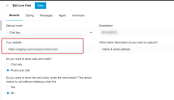
 
I had a similar problem. It looks like the EMBED code does NOT work when the website URL contains a path. I suspect that the ADD YOUR WEBSITE field in your case is https://www.domain.com/somepath? If you change it to just https://www.domain.com, it should work even if your actual website path is https://www.domain.com/somepath/test.html.

At least, it did on mine.

If this is indeed the way it is supposed to work and it's not a bug, then it would pose a problem for those of us who use Google Sites because the main URL for all sites will all be https://sites.google.com with the independent sites showing up as paths such as https://sites.google.com/website1.domain.com/, https://sites.google.com/website2.domain.com/, https://sites.google.com/website3.domain.com/ and so on.
 
Last edited:
I had a similar problem. It looks like the EMBED code does NOT work when the website URL contains a path. I suspect that the ADD YOUR WEBSITE field in your case is https://www.domain.com/somepath? If you change it to just https://www.domain.com, it should work even if your actual website path is https://www.domain.com/somepath/test.html.

At least, it did on mine.

If this is indeed the way it is supposed to work and it's not a bug, then it would pose a problem for those of us who use Google Sites because the main URL for all sites will all be https://sites.google.com with the independent sites showing up as paths such as https://sites.google.com/website1.domain.com/, https://sites.google.com/website2.domain.com/, https://sites.google.com/website3.domain.com/ and so on.
Hi,
Thank you for your sharing, is the website you mean the below item?
Actually, no path is included there.
1660887945239.png
 
Hi,

Running it on your computer locally will not work. You need to add the code on the site which is running on the URL you have specified under the Live Chat's settings (the one in the screenshot you posted).
 
@Audrey Yes, that's the one I meant.
 
Hi,

Running it on your computer locally will not work. You need to add the code on the site which is running on the URL you have specified under the Live Chat's settings (the one in the screenshot you posted).
Hi

Thank you for your help!

I copied the code to our wordpress page, now part of the settings are reflected. However some styles don't work as setting.
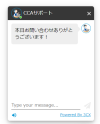
I set as "Phone and Chat", but I can only chat in my page. And color is different.
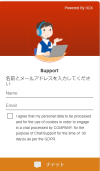
Below is the one I configured in webclient.
1660900662997.png
While I got the the below one.
1660900823788.png
 
If you added the code to your page then you need to disable the WordPress plugin.

You can have one of the two, not both.
 
If you added the code to your page then you need to disable the WordPress plugin.

You can have one of the two, not both.
Hi,
I have disabled and even deleted 3CX Live chat plugin. But nothing changed.
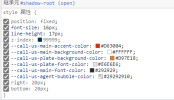
Confirming the developer tool, the styling config seems to be read normally. However, it didn't work.
1661136540736.png
 
Status
Not open for further replies.

Forum statistics

Threads
112,149
Messages
590,965
Members
165,170
Latest member
SupportRock