local 3cx , cisco spa 303 , spa 3102 , outbound problem?

Status
Not open for further replies.

ekipnet

New User
Joined
Aug 12, 2022
Messages
2
Reaction score
0
hi, i am using spa 3102 as fxo. I installed cisco spa303, 3cx works locally. I can receive calls in spa 303 and I receive internal calls. but when I want to make an outgoing call, it makes a call but the call comes back to the same phone, where do you think I should look for the problem?

There is also a working sip trunk in the system. Spa303 has sip trunk set as internal 1, and my analog fxo line is set as internal 3 and spa 3102.
 
in your outgoing rule set first route to SPA and second to SIP Trunk, like this SPA will be the first to be targetted for outgoing calls and if already in use then a second call will go using route 2 (your SIP Trunk)
Well, if we set it this way, wouldn't all calls go through the spa? How can I sip what I want and how can I choose to send what I want via spa?
 
You can do this with prefix. But first try to fix your spa for outgoing calls.
 
in your outgoing rule set first route to SPA and second to SIP Trunk, like this SPA will be the first to be targetted for outgoing calls and if already in use then a second call will go using route 2 (your SIP Trunk)

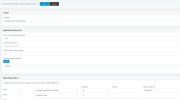
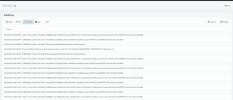
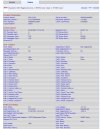
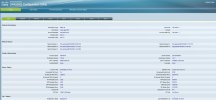
I did as you said and the calls came from the number on the sip. spa jumped so , aktivity log screen shots
 

Attachments

  • Screenshot_4.jpg
    Screenshot_4.jpg
    109.3 KB · Views: 5
  • Screenshot_5.jpg
    Screenshot_5.jpg
    191.6 KB · Views: 4
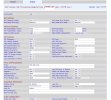
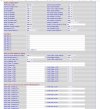
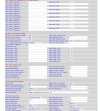
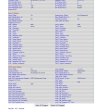
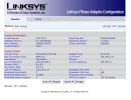
SPA 3102 , I am sharing the images of my spa 3102 current settings. When you review, maybe there are places where I went wrong, you can let me see
 

Attachments

  • pstn-line-1.jpg
    pstn-line-1.jpg
    150.6 KB · Views: 5
  • pstn-line-2.jpg
    pstn-line-2.jpg
    192 KB · Views: 5
  • pstn-line-3.jpg
    pstn-line-3.jpg
    213.5 KB · Views: 5
  • Screenshot_1.jpg
    Screenshot_1.jpg
    102.5 KB · Views: 5
  • Screenshot_2.jpg
    Screenshot_2.jpg
    74.5 KB · Views: 5
  • Screenshot_3.jpg
    Screenshot_3.jpg
    183.5 KB · Views: 4
  • Screenshot_4.jpg
    Screenshot_4.jpg
    182.7 KB · Views: 5
A couple of things...On the PSTN tab under PSTN to VoIP Gateway setup, you have PSTN ring thru Line 1 set to yes, since you said you were not using Line 1, that should be NO. Just below that, PSTN CID for VoIP CID, you want set to YES.

You have line 1 disabled, right?

Looking at your outbound rules.. the call to numbers starting with, is a bit "general" for calls going to a gateway.You may need to be more specific as a PSTN provider will only accept a certain number of digits. The gateway can't handle a + unless you strip the digit, in the rule. You have also specified that number s are all 11 digits long, which will prevent any other length number being dialed. You cannot specify caller ID on calls to a PSTN gateway, that is set by your provider.
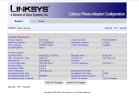
As far as the 404 not found logs, this indicates that 3CX is unable to "find" the gateway, when it sends the Invite. The destination is set in the trunk settings that you created for the gateway. It looks to be correct...192.168.1.24 and port 5061, but 3CX cannot reach the gateway for some reason. Why is the Invite coming from the same IP (192.168.1.24) but port 5060? Each device (phone) should have a unique IP unless they share a common device , like Line 1 on the 3102.
 
A couple of things...On the PSTN tab under PSTN to VoIP Gateway setup, you have PSTN ring thru Line 1 set to yes, since you said you were not using Line 1, that should be NO. Just below that, PSTN CID for VoIP CID, you want set to YES.

You have line 1 disabled, right?

Looking at your outbound rules.. the call to numbers starting with, is a bit "general" for calls going to a gateway.You may need to be more specific as a PSTN provider will only accept a certain number of digits. The gateway can't handle a + unless you strip the digit, in the rule. You have also specified that number s are all 11 digits long, which will prevent any other length number being dialed. You cannot specify caller ID on calls to a PSTN gateway, that is set by your provider.
As far as the 404 not found logs, this indicates that 3CX is unable to "find" the gateway, when it sends the Invite. The destination is set in the trunk settings that you created for the gateway. It looks to be correct...192.168.1.24 and port 5061, but 3CX cannot reach the gateway for some reason. Why is the Invite coming from the same IP (192.168.1.24) but port 5060? Each device (phone) should have a unique IP unless they share a common device , like Line 1 on the 3102.
A couple of things...On the PSTN tab under PSTN to VoIP Gateway setup, you have PSTN ring thru Line 1 set to yes, since you said you were not using Line 1, that should be NO. Just below that, PSTN CID for VoIP CID, you want set to YES.

- I applied what you said above, by the way, something that passed these settings was stuck while I was researching while I was researching, yes I did as you said.

You have line 1 disabled, right?

- Yes, yes, it's disabled anyway, you said at the beginning of the topic that we don't have anything to do with Line 1, that's why I closed it.

You cannot specify caller ID on calls to a PSTN gateway, that is set by your provider.
- i fixed that. I left the caller id blank

It looks to be correct...192.168.1.24 and port 5061, but 3CX cannot reach the gateway for some reason. Why is the Invite coming from the same IP (192.168.1.24) but port 5060? Each device (phone) should have a unique IP unless they share a common device , like Line 1 on the 3102.

- I changed my ip address from 192.168.1.24 and made 192.168.1.34 so that there would be no problem with what you said. maybe he's obsessed with something
 
- I changed my ip address from 192.168.1.24 and made 192.168.1.34 so that there would be no problem with what you said. maybe he's obsessed with something
You changed the IP, on what? The phone you are placing the call from? If that was the same IP as the gateway, then that is what should have been changed. I don't know if that is going to solve the problem, but is is certainly not a good practice (to say the least), to have the same IP on two different devices
 
You changed the IP, on what? The phone you are placing the call from? If that was the same IP as the gateway, then that is what should have been changed. I don't know if that is going to solve the problem, but is is certainly not a good practice (to say the least), to have the same IP on two different devices
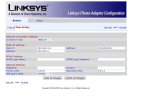
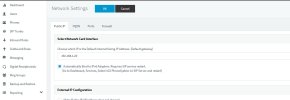
I understood what you said, so I'm sharing the part where the ip information of the devices is.

I'm sure it seems to me too; we do the missing things at spa 3102. I watched a lot of videos on the internet and youtube, unfortunately there is no proper information on FXO in any of them.

But I'm hoping someone can technically explain to us why the SPA doesn't redirect to the ip address when we make a call.
 

Attachments

  • Screenshot_1.jpg
    Screenshot_1.jpg
    189.3 KB · Views: 3
  • Screenshot_2.jpg
    Screenshot_2.jpg
    58.3 KB · Views: 3
  • Screenshot_3.jpg
    Screenshot_3.jpg
    94.8 KB · Views: 3
I solved it, hey guys, I solved it :)) it's like I'm flying into the air with joy, finally I managed to search
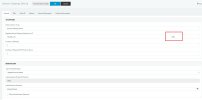
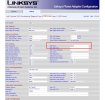
 
I don't know why but I made the sip ports 5062 and I was able to make outgoing calls. I'm sleepy now and I'm tired of dealing with it for days, I'll look at the rest tomorrow. I share my joy with you again.
 

Attachments

  • Screenshot_1.jpg
    Screenshot_1.jpg
    109.4 KB · Views: 8
  • Screenshot_2.jpg
    Screenshot_2.jpg
    164.1 KB · Views: 10
Were those two ports, in both the 3102 and the 3CX trunk settings, the same previously? If not, or port 5061 had been assigned to Line 1 on the 3102, and the line enabled, then that would cause issues.
 
PSTN SIP port has to be the same on SPA and 3CX side, so if it was set with 5060 on one side and 5061 on other side then for sure 3Cx couldn't find your SPA
 
PSTN SIP port has to be the same on SPA and 3CX side, so if it was set with 5060 on one side and 5061 on other side then for sure 3Cx couldn't find your SPA
I shared a lot of screenshots about what you said, when no one said anything, I thought what we did was right and we were moving forward, but after trying hard in the evening, I noticed it and when I fixed it, it worked. Thank you to everyone who supported.

By the way ; When my sip line is set as router 1 , how can I make a call from my analog line whenever I want ? related to this, like setting a key on my ip phone and making a call on my analog line when I press that key.

e.g ; like sip trunk when I call directly, 9 when I press the line and make a call from my analog line.

Or

from my ip phone; When you press Line 1 and get a line, sip trunk call

Like when I press Line 2, it makes a call from the analog line.
 
Were those two ports, in both the 3102 and the 3CX trunk settings, the same previously? If not, or port 5061 had been assigned to Line 1 on the 3102, and the line enabled, then that would cause issues.
I think the source of my problem was that the analog line was port 5060 in 3cx, and my sip port was 5061 in spa 3102. The main reason why I can't see it either, I don't look at the basic settings much, I think it's because I always look at the advanced settings.

sometimes people can't see the mistake right under their nose ;)

Special thanks to you for your support.
 
I shared a lot of screenshots about what you said, when no one said anything, I thought what we did was right and we were moving forward, but after trying hard in the evening, I noticed it and when I fixed it, it worked. Thank you to everyone who supported.

By the way ; When my sip line is set as router 1 , how can I make a call from my analog line whenever I want ? related to this, like setting a key on my ip phone and making a call on my analog line when I press that key.

e.g ; like sip trunk when I call directly, 9 when I press the line and make a call from my analog line.

Or

from my ip phone; When you press Line 1 and get a line, sip trunk call

Like when I press Line 2, it makes a call from the analog line.
You use a outbound rule to select the outbound trunk and use a prefix that you strip with the rule to "choose" it
 
  • Like
Reactions: bitn2
You use a outbound rule to select the outbound trunk and use a prefix that you strip with the rule to "choose" it
Can you give an example with a picture? Our dial number is 11 digits. sample ; like 02122100250
 
I think the source of my problem was that the analog line was port 5060 in 3cx, and my sip port was 5061 in spa 3102. The main reason why I can't see it either, I don't look at the basic settings much, I think it's because I always look at the advanced settings.
By Analog Line, do you ,mean the trunk settings, for the gateway in 3CX? That is where the IP and the port, of the gateway is put in, and both must match what you have set in the PSTN line settings of he 3102, as I mentioned back in post #27
 
I couldn't understand it fully but, I tried it and it didn't work for some reason, we need to adjust it according to the search conditions of Turkey, I think we are making a mistake because you are in another country and it is normal that you do not know the specific number lengths here, I think I will solve it after some effort. thank you for your help.

Edit ; I created a rule for mobile-gsm calls for the outgoing call rule, which I made in the attached image. but when I make a call, it calls from Ekipnet sip trunk again, when I make a call, I search for 9xxxx xxx xx xx. If it is 11 digits, it is for Ekipnet, if it is 12 digits, use the analog line because it has a 9 at the beginning.
 

Attachments

  • Screenshot_5.jpg
    Screenshot_5.jpg
    118.6 KB · Views: 5
Last edited:
Unless you don't care if calls overflow from one trunk to the other, when the first choice is engaged, you will want to create specific rules for each trunk. Perhaps each with it's own prefix...so 9+ could route to the SIP provider, and 8+ could route to the 3102. You might also need to create multiple rules to correctly deal with variable digit length numbers. It all depends on your local dialing scheme.
Keep in mind, that the rules are read from the top down, with the first match being used.
 
Status
Not open for further replies.

Latest Posts

Forum statistics

Threads
112,324
Messages
591,897
Members
165,476
Latest member
awan05