Local Lan change

Status
Not open for further replies.

bennuss1

Customer
Joined
Aug 12, 2020
Messages
24
Reaction score
0
I am running ver 16 which i understand you can change without having to reinstall. Where do I change it ? Under parameters and are there other parameters i need to change?
 
Hi,

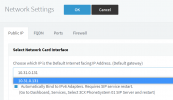
You just want to change the IP of the 3CX machine? Once you change it in the operating system, restart your system and then login to the management console. You will see a red warning on the right regarding the IP address.

Click on it and and it will bring you here:
1622009663245.png

Once the correct (or new) IP is selected, simply press OK above to confirm.
 
I am running linux so will probably reinstall. I dont have any phones installed yet on the system but I want to keep my fqdn that i was given by 3cx and they created the certificates. Do I have do backup anything or I can just delete and reinstall it. and how do i connect it up to use the same fqdn. Thanks
 
Hi,

The FQDN is already tied to your key, so reinstalling with that key will automatically assign your FQDN without asking.

The certificates will also be re-issued automatically during the setup process so you don't need to do anything about that either, some of the perks of using a 3CX FQDN ;)

However, a reinstall is not really needed if the LAN IP just changed, the system is able to adapt to that as per my first post. You don't need to reinstall unless you have other reasons you think might make it necessary.
 
Not really linux proficient to manually change the int to static and assign an ip
 
I've tried this and it works - TAKE A BACKUP OF 3CX FIRST.

In this example my network range is 192.168.1.1

Code:
Nano /etc/network/interfaces

From:

# The primary network interface
allow-hotplug eth0
iface eth0 inet dhcp

To:

# The primary network interface
auto eth0
allow-hotplug eth0
iface eth0 inet static
address 192.168.1.202
netmask 255.255.255.0
gateway 192.0.1.1
Network 192.168.1.0
Broadcast 192.168.1.254

If you need to configure DNS

Code:
Configure DNS
Nano /etc/resolv.conf

Nameserver 8.8.8.8
Nameserver 8.8.4.4

Restart network services

Code:
sudo service network restart

You may need to force the ethernet back online

Code:
ifup eth0

Check your IP set up

Code:
ifconfig eth0

Then log in to 3CX and change network adapter.

If there is an easier way to acheive this in Linux im happy for the input.
 
Last edited:
  • Like
Reactions: VictorYourITGroup
Ok.Will try that. How do I set the interface to auto so if it reboots it comes up automatically.
 
You will only need to bring it back up manually once after the change.
 
Auto on is now the default in linux? My understanding is that if the network int isnt set to auto and the machine restarts it wont come up by itself
 
Auto on is now the default in linux? My understanding is that if the network int isnt set to auto and the machine restarts it wont come up by itself
I just gave mine a reboot and the network is still there.

you could have auto eth0 in there too, i've modified the code above.
 
Follow up:

I believe the "allow-hotplug eth0" is doing auth eth0 by the way
 
I ended up having to do a new install. In the linux version there is no capability during the install to set the local ip on the box to static. It just pulls the ip that the adapter has. Also when you change the local the ip the phone provisioning ip doesnt change.
 
Last edited:
I ended up having to do a new install. In the linux version there is no capability during the install to set the local ip on the box to static. It just pulls the ip that the adapter has. Also when you change the local the ip the phone provisioning ip doesnt change.


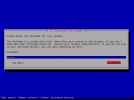
Not quite, what happens is that the Debian Linux installer automatically tries to pick up an IP and that happens pretty fast so you might not even see that step. However, as soon as you get to the first screen here
1622123120936.png

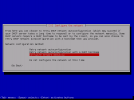
you can select the "Go Back" option, and you will now have the choice to configure your network manually

1622123233494.png
 
Status
Not open for further replies.

Forum statistics

Threads
111,973
Messages
590,071
Members
164,892
Latest member
Phone1stStop