


- Joined
- Jan 7, 2009
- Messages
- 41
- Reaction score
- 0
Hello dear community.
We installed a 3CX at our customer's site last week.
It is hosted as a virtual machine at Microsoft Azure.
We don't use SBC for the 5 IP phones and don't want to install it.
Everything is working fine, except that some extensions (Grandstream GXP2135 with the latest firmware) are randomly logging off the PBX.
In the PBX this extension appears "red" and in the phone itself the sip account is correctly registered "green".
By restarting the phone everything will work again for a while.
According to 3CX support, this is because the local sip port of the phone - see table below - is replaced by the firewall/router.
Configured in 3CX PBX for each phone
00 - | Sip local 5065 | RTP local Audio 14000 - 14012
01 - | Sip local 5066 | RTP local Audio 14013 - 14023
02 - | Sip local 5067 | RTP local Audio 14024 - 14035
03 - | Sip local 5068 | RTP local Audio 14036 - 14047
04 - | Sip local 5069 | RTP local Audio 14048 - 14059
According to 3CX support, the phone must register on the local port e.g. 01 with sip:[email protected]:5066 (port preservation)
In the log of the PBX the IP phone is registered with sip:[email protected]:35398.
The X.X.X.X is the public static IP of the customer's Internet connection

The "Barracuda" firewall is managed by another company.
The Grandstream phones are connected and configured on the firewall in the DMZ.
Yesterday the technician configured NAT rules for the individual IP phones:
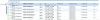
But these had no effect, the internal SIP port is still replaced by the router / firewall.
Yesterday he tried an outgoing rule - see blue arrow above - but it had the effect that the phones did not register with the PBX anymore.
Do you have a tip or can you help me to solve the problem with the goal that the IP phones communicate with the local port (SIP RTP)?
Thank you very much and have a nice day.
Andreas
We installed a 3CX at our customer's site last week.
It is hosted as a virtual machine at Microsoft Azure.
We don't use SBC for the 5 IP phones and don't want to install it.
Everything is working fine, except that some extensions (Grandstream GXP2135 with the latest firmware) are randomly logging off the PBX.
In the PBX this extension appears "red" and in the phone itself the sip account is correctly registered "green".
By restarting the phone everything will work again for a while.
According to 3CX support, this is because the local sip port of the phone - see table below - is replaced by the firewall/router.
Configured in 3CX PBX for each phone
00 - | Sip local 5065 | RTP local Audio 14000 - 14012
01 - | Sip local 5066 | RTP local Audio 14013 - 14023
02 - | Sip local 5067 | RTP local Audio 14024 - 14035
03 - | Sip local 5068 | RTP local Audio 14036 - 14047
04 - | Sip local 5069 | RTP local Audio 14048 - 14059
According to 3CX support, the phone must register on the local port e.g. 01 with sip:[email protected]:5066 (port preservation)
In the log of the PBX the IP phone is registered with sip:[email protected]:35398.
The X.X.X.X is the public static IP of the customer's Internet connection
The "Barracuda" firewall is managed by another company.
The Grandstream phones are connected and configured on the firewall in the DMZ.
Yesterday the technician configured NAT rules for the individual IP phones:
But these had no effect, the internal SIP port is still replaced by the router / firewall.
Yesterday he tried an outgoing rule - see blue arrow above - but it had the effect that the phones did not register with the PBX anymore.
Do you have a tip or can you help me to solve the problem with the goal that the IP phones communicate with the local port (SIP RTP)?
Thank you very much and have a nice day.
Andreas


