looking for a 3cx help link that seems to be dead

Status
Not open for further replies.

imcgraw

Silver Partner
Advanced Certified
Joined
Oct 10, 2022
Messages
14
Reaction score
0
hello,

in looking through the forums i have seen this link multiple times:

https://help.3cx.com/help/en-us/9-ip-phones/197-why-are-my-stun-phones-not-working

but the link seems to be dead,

anyone have the page that it linked to?
 
You are not supposed to use STUN but an SBC?
 
we are using SBCs when we have 4 or more users at one site. i just saw this link referenced multiple times in the forums and wanted to see what it said.
 
I pointed that out in a thread a few weeks ago and 3CX responded that the site has "been taken down, we don’t have any information whether it will be back." The Wayback Machine does not have it either. I had also saved the shortcut not realizing the site would go away.
 
Thanks Steve. to make me feel better, i'll just assume that there wasn't much in there that wasn't in the threads and forget about it.
 
As @SteveITS mentioned this link is not working at this point but in any case this was a link for basic troubleshooting regarding the STUN provisioning. Regarding provisioning guidelines you may refer to the below complete list of the 3CX Supported IP Phones and provisioning guidelines:
https://www.3cx.com/sip-phones/
 
  • Like
Reactions: GeorgeP_3CX
See below copy and paste from December 2021:

Let me know if you need any more KB articles.

Why are my STUN phones not working?​

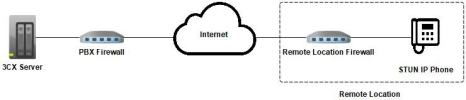
Remote STUN IP Phones usually require more configuration outside of 3CX therefore we recommend the use of the 3CX APPs in home offices, or using the 3CX SBC whenever deploying remote phones.

When this is not possible and you need to deploy phones in STUN you can follow our checklist below:
1666809218951.png

Prerequisites:
  • Access to the PBX Firewall
  • Access to the Remote Location Firewall

3CX Server Configuration:
  • Your SIP, HTTPS, RTP ports must be open: https://www.3cx.com/docs/ports/
  • Firewall checker must pass on all checks: https://www.3cx.com/docs/troubleshooting-firewall-checker/
  • Edit your extension, under Options > Restrictions and disable "Disallow use of extension outside the LAN (Remote extensions using Direct SIP or STUN will be blocked)"
  • Edit your extension, under Options > Troubleshooting and enable "PBX Delivers Audio"
  • For each IP Phone installed at the same Remote Location, set a:
    - Unique SIP port not shared with any other phone
    - Unique range of RTP ports, not overlapping with any other phones
    - Use our phone guides to see how to setup your specific model in Remote/RPS mode: https://www.3cx.com/sip-phones/

Remote Location Configuration:
  • Assign a static IP to each phone (or use DHCP reservation)
  • Port forward each phone's unique SIP port and RTP port range on the Remote Location Firewall
  • Disable any SIP ALG or SIP Helpers running on the Remote Location Firewall
 
  • Like
Reactions: Evolute IT
Thanks Nathan!
 
Status
Not open for further replies.

Forum statistics

Threads
111,974
Messages
590,081
Members
164,899
Latest member
mazet