Looking for assistance tracking down daily issues with call quality

Status
Not open for further replies.

CFMtech

Customer
Basic Certified
Joined
Apr 16, 2019
Messages
38
Reaction score
2
Hello everyone,

I'm hoping you folks can help me shed some light on what seem to be daily issues with call quality the past week or two. End users report that some inbound calls will be dead air upon pickup, sometimes it will take multiple inbound attempts to establish audio, attempting to pickup calls parked in shared parking will sometimes lead to a busy signal, poor call quality.

PBX Background:

  • 3CX ver. 15.5.15502.6
  • Running in a VM on Windows Server 2012 R2 - VM is gen1 w/ 2 cores (out of 24 cores) 4GB of RAM, 100GB. Storage array is completely SSD.
  • VM has a dedicated NIC solely for the PBX
  • No antivirus is installed
  • Windows firewall is disabled on the VM
  • Firewall checker has passed every time I've run it
  • Using Flowroute as our sip provider w/ authentication
Network Background
  • MPLS circuits between HQ (where the server is located) and branch offices provided by ISP
  • SIP ALG is disabled and not used by any firewall policies
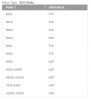
  • Watchguard M370 providing main firewalling - configured per 3cx documentation. All required ports are open, including some suspected as being helpful by threads here on the forums:

    10298
Phone background
  • Roughly 60 deployed Grandstream GXP2130's
  • All using static IP's
  • All on the latest 3cx supported firmware (1.0.9.102)
  • Call recording is disabled
  • "PBX delivers audio" is disabled on the extensions (enabled on the trunk as it should be)
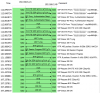
I have placed a windows 10 SBC at one of the locations to see if that would help alleviate some of the issues. It has not appeared to make any difference. There are 7 phones at that site and all are provisioned to connect to the SBC rather than "local lan." When I look in the SBC logs I see the following:

10299

In some forum posts I have come across I've read that these errors are logged on call termination as the RTP stream is closed, however I cant find any confirmation this is the case?

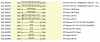
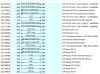
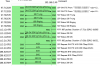
Here are a few screen shots from the wireshark > voip calls > flow sequence (I'm not sure how helpful these are, I wasnt sure if I should be posting the capture files themselves)

inbound (external to PBX)
10300
10301

outbound (PBX to world)
10303
10304

I'm at a bit of a loss on where to focus, can anyone suggest anything to try?
 
Last edited:
Hello everyone,

I have asked our end users to be more diligent about reporting call failures. In the below example an inbound call was placed in a shared parking space and when it was picked up by an end user they received a busy signal. I have pulled the call from the 3cx log viewer:


Does this shed any light on the "busy signal upon pickup" from shared parking spaces?
 
Last edited by a moderator:
Is there anyone from 3cx that would care to weigh in on our issues? I see a lot of activity on the forums for other questions. I believe I have provided all necessary information and background.

Thank you,
 
Hi CFMtech

From what I see here what happened was

- EXT 0705 picked up the call that came to the RingAll group/queue

- EXT 0704 tried but got kicked out because the call was already taken (busy signal justified)

Since you are familiar with the 3CX binlog viewer I think you will need to isolate specific calls and filter for those calls in the viewer to get your answers, there was nothing about shared parking in any of the above information of the log.

Could the parked call have been picked up or ended (which would normally give a busy signal if the SP spot was empty)
 
Hi CFMtech

...

Could the parked call have been picked up or ended (which would normally give a busy signal if the SP spot was empty)

Thank you JohnS for the response. I will go back through the logs and try to find the specific instance where the call was placed into shared parking. There were 3-4 attempts from this number within the same few minute time frame and I believe I grabbed a different example. I will post a follow up. Thank you very much.
 
Here is an example of an inbound call into a call queue where the end user reports upon pickup there was no inbound audio stream (dead air). The log entries are over the 10,000 character limit so I will need to post them in chunks.
 
Last edited by a moderator:
7-8 seconds after the Extn:0315 has joined entry there is a Extn:0315 is terminated. The end user's ticket reports they answered the call, got "dead air" waited a few seconds to see if the audio would come through then disconnected.
 
Last edited by a moderator:
@CFMtech

I removed a lot of sensitive information - please avoid posting anything that can compromise your security

I will also take a look and see if I can guide you based on the logs
 
So based on the logs we see that the call came in, was picked up by 0315, while all other extensions ended their session (the PBX will tell them to do so since 0315 now has the call). Then we see that 0315 ended the call (probably the user heard no audio and hang up).

These logs tell us what happened by they don't tell us anything that would indicate no audio - they look exactly like a normal call so they don't shed any light. This is not an easy one to solve because there is no clear evidence of the cause.


At this point you have a few options:

1. What you can do is look at captures and follow the whole trail of a specific call to see which side is failing to send the audio. If you cannot replicate it on demand, you will need to use tshark for this in the hopes of catching a problematic call or two, and then analyzing step by step using WireShark (do not publicly post the captures here please, they will include your sensitive information)

2. Your provider might also be able to help - they can check from their end too and see if they find anything unusual, you will have to give them numbers and timestamps so they can look at specific problematic calls

3. Open a ticket so that Support can do the analysis for problematic calls, you will need to provide them some captures that contain problematic calls and they will tell you exactly what you need to submit to them

4. You can also get help from a 3CX partner, they have a lot of experience and can help you out if they get a chance to look into your whole setup. We can get you in touch with partners if you wish.
 
Status
Not open for further replies.

Forum statistics

Threads
111,923
Messages
589,749
Members
164,796
Latest member
Dame24