Lost Call in Queue test (0000) from Caller ID 1111

Status
Not open for further replies.

Harrisonm

Silver Partner
Advanced Certified
Joined
Mar 26, 2019
Messages
50
Reaction score
2
Good day ,

why i am getting abandoned calls even though the all agents are logged in to the queues.
it looks like these calls do not ring on queue as well.
When I check the SIP log i can see the calls dropping 3cx pabx.
 
Hi @Harrisonm

The PBX is ultimately the one who has to drop the call, but according to whatever call flow you designed.

I would check see the following as a start:

  1. Check Queue Destination if no Answer (points to why the call was dropped)
  2. Check that agents are logged in to queues both Globally AND Explicitly (very important)
  3. Check that there is no conflict between the Ring Time and Maximum Queue Wait Time
  4. Check that the agents are reachable (ie. Registered and not on DND / or device rejecting calls)
 
Good day, thanks for the feedback

  1. Check Queue Destination if no Answer (points to why the call was dropped) -- it is set to a queue and the queue is working
  2. Check that agents are logged in to queues both Globally AND Explicitly (very important) - only Global - how do is check if agent logged in Gloablly or Explicitly or Both ?
  3. Check that there is no conflict between the Ring Time and Maximum Queue Wait Time : I have 20 seconds ring time and maximum waiti time to 100s , should this times be the same and why
  4. Check that the agents are reachable (ie. Registered and not on DND / or device rejecting calls) - agents are reacheable 100%
 
Hi @Harrisonm

First, go to your extensions, select the agent(s) and click "Status". Change them to "logged in" and this takes care of the Global Login

Then, make yourself a manager of their queue, and open your webclient, and go to the Switchboard.
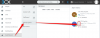
Select your queue and look at the agents. Here, you see agent 001 who we already know is logged in globally, but he is not logged in explicitly in queue 803. You have to click the small grey "Q" button to log them in (at least the first time).

1581587455496.png

Some things to look out for:
- Agents can be part of many queues, and remain logged in globally, while expluding them selves from some other queues. Explicit login is the feature that allows this
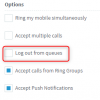
- Sometimes if your extension forwarding rules are changed, you can be automatically logged out Globally so it's good to check this:
1581587692405.png
- Auto-switching profiles based on time of day can also trigger a Status that has "Log out from queues" enabled
 
Thank you very much , I saw calls not failing over to when no agent available , I am busy rectifying
 
No problem, let us know how it goes
 
Status
Not open for further replies.

Latest Posts

Forum statistics

Threads
111,937
Messages
589,831
Members
164,819
Latest member
mechelle