Malformed SIP request received

Status
Not open for further replies.

zetronuser

New User
Joined
Feb 1, 2024
Messages
5
Reaction score
0
Hello,
When we look at the 'Activity Logs' in our 3cx on-prem Windows instance, I am seeing all the REGISTER requests marked as "Malformed SIP request" (see attached screenshot). Could someone please tell me specifically what is wrong with this packet? What does 3cx not like in the request? What is it expecting? And example of a good, well-formed REGISTER request packet would be helpful in addition to any explanations.
Thanks.
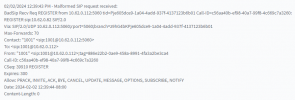
1706907001799.png
 
Hello,

We are more than willing to assist you, but this cooperation necessitates an effort from your side as well.

The initial step involves using a phone that is supported by 3CX. Once that is ensured, please provision this supported phone and compare the diagnostic SIP logs. Our commitment is to aid those who have diligently sought out solutions but, regrettably, find themselves stuck and unable to proceed.

From the information provided, it appears there may not have been an attempt to thoroughly investigate the issue from your end.

If you are genuinely experiencing a problem, we need you to share detailed information with us:

- Which model and brand of phone are you using, ensuring it is supported by 3CX?
- Have you tried auto-provisioning?
- What firmware version is the phone running? Have you verified that it's the correct, supported version?

With these details, we can better assist you in resolving the issue.
 
Hi Guillaume,
Thank you for your response. We are not using a physical phone or even a soft phone. We have an Asterisk-based Telephony Gateway that we are trying to connect to the on-prem Windows instance of 3cx. I think these are REGISTER requests coming from just starting the Gateway application. In this thread, we are simply trying to understand why these packets are marked as 'malformed' innt eh 3cx Activity Logs. Is there any other information I can gather for you?
Thanks.

 
For certain reliability, you should use equipment that has passed the 3CX interoperability tests.

If you want to know what is happening, you should change the "Activity logs" mode to VERBOSE, restart the services, and reproduce the situation.

Consult the logs for more information.
Contact the gateway provider for further assistance.
You can send them the list of tests that should be completed to ensure compatibility.

Remember to reduce the Activity logs level to "Low" after reproducing the problem. VERBOSE consumes a lot of energy.

https://www.3cx.com/docs/sip-trunk-test-plan/
This is a test plan for SIP Trunk, but the result should be equivalent for your gateway.

Unfortunately, I cannot assist you further with unsupported products.
 
Status
Not open for further replies.

Forum statistics

Threads
111,933
Messages
589,810
Members
164,808
Latest member
jsbjsb