Manually Change Office Hours

Status
Not open for further replies.

TagleRock

Silver Partner
Basic Certified
Joined
Apr 24, 2018
Messages
160
Reaction score
16
Hello everyone. We are setting up a new customer and they have unique operating hours in that they don't have a set closing time, although they do have a set opening time. This means that I can't use the normal office hours to have their phones go to the after-hours destination, they have to manually do it each night they leave, which could be 10 PM, other times it might be 3 AM. Is there a quick way built in way to manually switch from office hours routing to after hours routing?

If there is no easy built in way to do this, then I'm thinking I can do one the following.

The way they want inbound calls routed is to have them go to two extensions, then ring all other phones after a set period of time, easy enough to do with ring groups. So what I was thinking is I can put a third ring group in front of it with a 1 second time to voicemail. Then I would have them change it from going to the first ring group that rings two phones during office hours, and voicemail box of a general voicemail box extension during after hours.

My other thought would be to setup a dummy extension and have inbound calls routed to it, then have it so that if the status is set to one thing during office hours and set to something else during after hours. But I can't seem to find away to easily change an extension's status from the PWA client. Also I'm not sure if that would require a phone provisioned for it to not just default to voicemail.
 
The correct way to do this is that the last person to leave the office or close the shift will set the company to out of office. This can be triggered by receptionist or higher user roles from the web client. Then have in or out of office hours as usual.
 
The correct way to do this is that the last person to leave the office or close the shift will set the company to out of office. This can be triggered by receptionist or higher user roles from the web client. Then have in or out of office hours as usual.
Sorry for the late reply, Internet was out for a good portion of our city yesterday and resulted in a ridiculously busy day lol. Can you let me know how to do this? I was trying to find it in the PWA client but I couldn't find it. Unless it has to be done in the web client, but I though the PWA client is basically the same as the web client...unless I'm wrong on that.
 
Thanks for the reply. Thats for the entire system if I'm not mistaken. We plan to use one PBX server for 4 different locations including where it will be hosted. We'll use an inbound rule for each location's number and route the calls to the appropiate extensions/ring groups. Is there a way to set a dial code to change one inbound rule to after hours? I know you can set specific office hours on a rule.
 
  • Like
Reactions: N_G
@TagleRock
☝️
that is a better way if you have groups, then each can have their own people with the correct roles. One or more people can be a Receptionist or higher role in each.
 
I'm playing with the groups now, but I can't find where to change office hours for the group. When I go into 3cx in the admin console and via the web interface all i see is group name, whether to publish to other extensions, whether it can be routed calls, the rights of the group, the group members, and outbound routes. Still going to keep looking for it, but perhaps yall know where its at?
 
Actually i think i found it, the office hours settings for groups are in the office hours settings page.
 
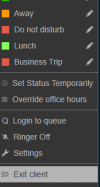
Ok so I think my plan will be set their open hours to 24 hours a day for each group and then instruct the users to override the office hours at the end of the day and set it to something like 2 days or a week or something and then switch it back to default when they come in. Was hoping there was an indefinitely option for the override, but maybe in a future update.

I'm noticing something though that I'm not sure if its a bug or if I'm missing something. When I'm testing this out I'm noticing that if i try to set the group to being open 24x7 (leave all days unconfigured in office hours) it acts like its closed. To test this i went in and removed all office hour configurations under global rules, sip trunks, and for inbound rules and then routed an inbound call to a ring group. It worked. But if I route that same call to a user that is part of a group with unconfigured office hours, it sends it to the closed destination for that group instead of open. Am I doing something wrong here?
 
@TagleRock Yes i meant it as @SweetAction suggested it although you can also use dial codes as @SteveITS suggested but i think the webclient is easier and more flexible. I suggest setting default office hours for the morning and evening and then hitting override otherwise there is nothing to override. Its hard for me to understand the exact scenario but i can just guide you in the correct direction and then you are going to have to try it out in different ways i am afraid. :)
 
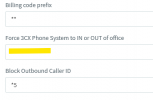
Yea looks like it'll have to be the 3CX client. Was hoping that I would be able to use the dial code to switch it between in and out of office and have it apply only to the group the extension part of. They've been doing that for many years now so it would have made the transition smoother. I found though when testing that the dial code switches the entire phone system to out of office, not just the group.
 
So here is another issue that I just came across. This client has multiple locations and would like hold music for each location (example: "thank you for calling 'business of city' please hold and we'll be with you as soon as possible"). I can't seem to find a way to add hold music for specific extensions or groups. Obviously there is the sledge hammer approach of putting in a separate system at each location, but that pretty much removes all the selling points that we used to get this client on board with 3CX. Pretty sure there is something I'm missing like with the office hours since this is a super basic function, can yall point me in the right direction for this?
 
Whoah...that's really surprising considering the size of customers 3CX says they support. Call queues won't work, the customer wants callers to hear a separate music on hold for everything depending on which number they call, and the person who placed the call on hold needs to be able to retrieve the call if they need to take a message or something. This is NOT going to be a fun phone call to this customer.....I hope 3CX realizes soon that many businesses have more than one location, and have more than one department.
 
I'm trying to salvage this with the customer. I read about bridges between systems, can I setup multiple bridges? Like if there are four locations can I connect the systems all together so they can transfer between each other?
 
After research I found that I can bridge them together in a mesh style topology, so that will work.

Does anyone know though if when the call is transferred from one system to another where does the audio come from and get sent to? To the PBX it was transferred to? Or does it stay at the originating PBX?

EDIT: Also does BLF work across a bridge? I'm doing my own research into this as well.
 
So I figured out that BLF does not work, but the 3cx app equivalent of BLF works so those that do need to see if other people are on the phone can use that.

Last question...hopefully...is the one about where the audio from the calls come from when they're transferred. If the audio stays at the PBX that transferred it, or if it goes to PBX it was transferred to. In other words when its transferred is the audio flowing across the bridge, or is the call transferred and then the audio flows from the PBX it was transferred to?
 
I would make a separate thread about the bridging questions so more people will see them.

You probably found https://www.3cx.com/docs/manual/connecting-pbx-bridges/ but just in case there it is. Audio flows over the "SIP trunk" bridge. The bridge call IIRC uses one SC on each end. If the call is transferred I don't recall offhand but I'd guess it counts as 2 SC on the one end (in and out like a conference call) and 1 SC on the receiving end. Don't have one up to test, sorry.
 
Status
Not open for further replies.

Forum statistics

Threads
111,972
Messages
590,064
Members
164,886
Latest member
784