• We do not provide troubleshooting help for unsupported phones. Please try with a supported phone.
  • V20 Update 10 Alpha 2 Learn more

Manually provisioning SPA525G

Status
Not open for further replies.

Nazrul

Free User
Joined
Jul 20, 2021
Messages
17
Reaction score
1
Hi All,

Kindly advise parameters for Manually provisioning of IP Phone SPA525G with 3CX .

Thanks
Naz
 
Hi Nazrul,

I have got you from your previous forum conversation : https://www.3cx.com/community/threads/zoiper-sip-softphone.82831/

Please try the following steps to configure the 3CX extension manually.

1627276572886.png

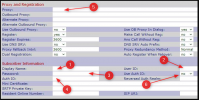
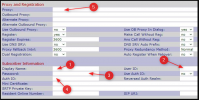
1. Enter the Extension User Name or EXT number as Display Name.
2. Enter the Extension number
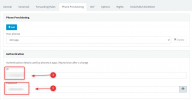
3 & 4. Get the details as I mention in the following image.
5. Enter FQDN:SIP PORT (Example: test.my3cx.sg:5060)
6. You have to change "YES" in Use Auth ID:

1627276124485.png

Thanks,
RA.
 

Attachments

  • 1627275945123.png
    1627275945123.png
    221 KB · Views: 5
Last edited:
Thanks RA,
i will give a try and Update you the Outcome.
is that any reason , i am unable to ping FQDN ?

Thanks
Naz
 
Hi Naz,

Where did you host your PBX?

...
 
Hi RA,

I have hosted in AWS Cloud.

Thanks
 
Hi Nazrul,

That is a different matter, but if you google "cannot ping AWS instance" you will learn more information.

Firewalls do not allow all traffic by default, you might need to add a rule for it.
 
Hi JohnS,
is Firewall rules require to add inside 3CX Server ?
Thanks
Naz
 
Hi,

No, this has to do with the AWS instance - not the 3CX Server running inside of the instance.

I would recommend to research it online and learn more on how it works.
 
  • Like
Reactions: Cal4care | RA
Thanks JohnS , Sure i will find out.
 
  • Like
Reactions: Cal4care | RA
Status
Not open for further replies.

Forum statistics

Threads
112,149
Messages
590,964
Members
165,170
Latest member
SupportRock