MCU Connection Failed (0x0020)

Status
Not open for further replies.

Rodolfo Olvera Villarreal

Free User
Joined
Jun 28, 2021
Messages
6
Reaction score
0
Hello All,

We recently changed from v16 to 18, but now we are getting the error "MCU Connection Failed (0x0020)" every time when we try to connect to a WebConference
 
What version of v18 are you using? Also, what client/browser are you using to connect to WebMeeting?
 
What version of v18 are you using? Also, what client/browser are you using to connect to WebMeeting?
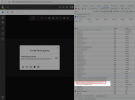
Hi this is the version, we have been using webclient on chrome and edge, as well the app desktop.

1648499573842.png
 

Attachments

  • 1648499560296.png
    1648499560296.png
    8.2 KB · Views: 9
0x0020 commonly means that the client was not able to connect to the server.
Do you perform strict outbound filtering of web-traffic?
 
0x0020 commonly means that the client was not able to connect to the server.
Do you perform strict outbound filtering of web-traffic?
Actually we have removed any possible filter on our firewall, it is like if we have any-any, even the firewall test on the 3CX looks all on green.

We have the split dns too and on v16 everything was working fine.
 
Where are you connecting from?

Can you try connecting to a scheduled meeting from another location? You could also asking someone to disable WiFi on their Mobile Phone and enable only Mobile Data, then schedule a meeting and invite them, and from their phone join the meeting via Mobile Data using the WebMeeting app.

Could you please try this and let us know if this works?


Also, in the Management Console --> Settings --> Conferencing, in the "Video" tab, what region do you have selected?
 
Where are you connecting from?

Can you try connecting to a scheduled meeting from another location? You could also asking someone to disable WiFi on their Mobile Phone and enable only Mobile Data, then schedule a meeting and invite them, and from their phone join the meeting via Mobile Data using the WebMeeting app.

Could you please try this and let us know if this works?


Also, in the Management Console --> Settings --> Conferencing, in the "Video" tab, what region do you have selected?
Hi Nick,

We have tested connecting into our LAN, outside of the LAN and on both ways this is failing, already tried changing the region, do you know if i need to do something special with v18? i mean, everything was working fine on v16.
 
Hi Nick,

We have tested connecting into our LAN, outside of the LAN and on both ways this is failing, already tried changing the region, do you know if i need to do something special with v18? i mean, everything was working fine on v16.
Hi!

I'll send you a PM shortly to ask for some more data so we can check this with you.
 
Hi,

We are experiencing the same error since we upgrade to v18 (v18.0.2). Desktop app or old 3cx client get the same behavior. This occurs also from a computer which is not in our LAN, and with no AV, so I think our firewall (IPS, web filtering, etc.) is not the root cause.
The only difference : 1 times out on 10, it works...

Thank you for your support
 
Hi,

We are experiencing the same error since we upgrade to v18 (v18.0.2). Desktop app or old 3cx client get the same behavior. This occurs also from a computer which is not in our LAN, and with no AV, so I think our firewall (IPS, web filtering, etc.) is not the root cause.
The only difference : 1 times out on 10, it works...

Thank you for your support
Your first move needs to be to upgrade to V18 U3 Hotfix 1 (build 461).

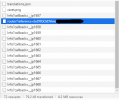
Once you do that, open a WebClient, go to "Meet" and before you press the "Join Now" button, press F12 in Chrome and switch to the "Network" tab. Then press the "Join Now" button.

Right after the highlighted entry below, what do you see when it doesn't work?
1649331854701.png

Do you get a "mcu-wmr-XX-XXXX.3cx.net" request?
 
We plan to upgrade.

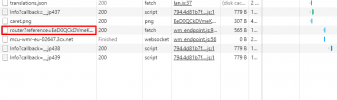
For the debug mode, here is what I captured on a 0020 error :


1649404983939.png.

The entry "Info?..." get an entry every 1 or 2 seconds.

Thank for your support
 
Last edited:
We plan to upgrade.

For the debug mode, here is what I captured on a 0020 error :


View attachment 29360.

The entry "Info?..." get an entry every 1 or 2 seconds.

Thank for your support
What seems to be happening is that your 3CX Server can't get the list of MCUs from the 3CX WMR server.

The high level of how this works is that each time you Create/Join a meeting, the 3CX Server queries wmr.3cx.net and downloads the list of active MCUs, then chooses the best one and tells the WebClient to connect to that one.

By the time you are not seeing a "mcu-wmr-XX-XXXX.3cx.net" request, your server is probably never getting this list.

On the network where your 3CX Server is installed, are you blocking outbound traffic to wmr.3cx.net?
Note that the IP of this FQDN constantly changes (TTL 5 minutes), so if you are restricting outbound traffic on your Firewall, you might want to start by allowing all outbound traffic for the 3CX Server.
 
We are not blocking or filtering the outbound traffic of the 3cx server. And to be sure the issue does not come from our internal DNS servers, we are setting up DNS on Google's one.I let you know the result soon.
 
  • Like
Reactions: NickD_3CX
Not better this morning. Here a new capture :

1649661281235.png

1649661293131.png

So I think DNS was not the cause
For information, the server has rebooted this w-e.

Thank you for your support.
 
Hi!

I'll PM you shortly for some extra information.
 
For others reading this, what may be happening is that your PC where the 3CX WebClient/Desktop App might not be resolving the MCU FQDN correctly.

What you can do to check this is:
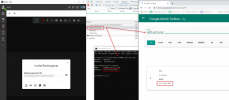
  1. Press F12 in Chrome or the Desktop App and go to Network
  2. Click on "Meet" and press "Join Now"
  3. In the Network Panel find the "router" connection and right below you should see the MCU address you are connecting to.
  4. Now do 2 things:
    a) From your PC, open a command prompt and type: nslookup <MCU address>
    b) Go to https://toolbox.googleapps.com/apps/dig/ and paste the address here as well and resolve it
  5. If the IP that is resolved isn't the same in both places, most likely your Internal DNS Server is caching the wrong IP or for whatever reason, returning the wrong result.
Example:
1649747757407.png
 
Note that the IP of this FQDN constantly changes (TTL 5 minutes)
Are we the only one to have an internal DNS with cache ? if IPs change every 5 minutes, the spread time could be 10 or 15 minutes. I do not understand how this could work.

The root cause has been found, but I do not have any solution to solve it ! I have changed our DNS redirectors to Google DNS to limit the occurence, but it does not solve the issue at 100%.
 
Are we the only one to have an internal DNS with cache ? if IPs change every 5 minutes, the spread time could be 10 or 15 minutes. I do not understand how this could work.

The root cause has been found, but I do not have any solution to solve it ! I have changed our DNS redirectors to Google DNS to limit the occurence, but it does not solve the issue at 100%.
The IP that can changes very frequently is wmr.3cx.net, but strangely in your case this wasn't the problem, this was resolved correctly.

Your problem from what we saw was the FQDN of the actual MCU that doesn't change constantly. We dynamically create MCUs to keep up with the load. Each created MCU gets and FQDN. when the load decreases, we remove those MCUs again (scale down).
What may happen is that the FQDN is re-used later or the next day for a new MCU.

If you use an Internal DNS, you need to make sure that it respects and follows the TTL.
 
Yes, our internal DNS respects TTL. But what about redirectors...we cannot know.
 
Status
Not open for further replies.

Forum statistics

Threads
111,973
Messages
590,077
Members
164,896
Latest member
sameage