- Joined
- Apr 6, 2023
- Messages
- 6
- Reaction score
- 2
Good morning all,
I have a client which I configured with the trial hosted PBX system for the last year and it has worked perfectly. Now the free hosting is about to expire, I went to purchase the hosting (which had increased in price) but then was told the system also had to be upgraded to the full system. This was not how it was marketed a year ago and I spoke with 3CX and they suggested switching to startUP 10 Free as all calls are internal, just a ring group to open the door (Paxton).
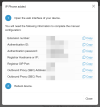
I have exported and imported the users from the current system to the startUP system however the Phone Provisioning section on current system, which displays the Authentication ID I need for the Paxton configuration, is missing on startUP.
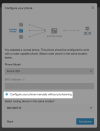
Under IP Phone, which I presume is the equivalent, I can 'Configure a phone' but this appears to need a router phone purchased and configured with valid MAC address before 'Normal phones' can be added. From Normal phones I believe I can then configure manually and see the Authentication ID for the Paxton door entry.
Is there any advanced menu to unlock the 'Phone Provisioning' page on the startUP system, this would be perfect but expect unlikely. Is there are way of creating a dummy Router phone so that I can then create Normal phones? The system does not need a SIP trunk or any external calls or routing. Everything is done using internal extensions.
It seems like I need to purchase and configure a basic router phone (Fanvil V62 or Yealink T53) and then I can add the Normal phone options to the Door Entry user.
Any thoughts from anyone that has done similar?
Thanks,
Mike
I have a client which I configured with the trial hosted PBX system for the last year and it has worked perfectly. Now the free hosting is about to expire, I went to purchase the hosting (which had increased in price) but then was told the system also had to be upgraded to the full system. This was not how it was marketed a year ago and I spoke with 3CX and they suggested switching to startUP 10 Free as all calls are internal, just a ring group to open the door (Paxton).
I have exported and imported the users from the current system to the startUP system however the Phone Provisioning section on current system, which displays the Authentication ID I need for the Paxton configuration, is missing on startUP.
Under IP Phone, which I presume is the equivalent, I can 'Configure a phone' but this appears to need a router phone purchased and configured with valid MAC address before 'Normal phones' can be added. From Normal phones I believe I can then configure manually and see the Authentication ID for the Paxton door entry.
Is there any advanced menu to unlock the 'Phone Provisioning' page on the startUP system, this would be perfect but expect unlikely. Is there are way of creating a dummy Router phone so that I can then create Normal phones? The system does not need a SIP trunk or any external calls or routing. Everything is done using internal extensions.
It seems like I need to purchase and configure a basic router phone (Fanvil V62 or Yealink T53) and then I can add the Normal phone options to the Door Entry user.
Any thoughts from anyone that has done similar?
Thanks,
Mike