- Joined
- Jan 9, 2021
- Messages
- 122
- Reaction score
- 20
All,
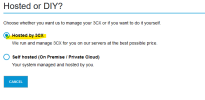
Since my Raspberry Pi setup is no longer going to be supported I chose to upgrade to the hosted solution. Now I have two major issues.
1) I have create a SBC Device... not a problem I have a spare Raspberry PI for this... The problem is do I create it from my EXISTING Raspberry Pi server OR for the new HOSTED server? I tried the Raspberry Pi server and I get a out of data SSL Cert error. So I am going to try to do the setup from the hosted solution. I hope that is the correct way. Please let me know...
2) SIP Trunk Port - I have my current SIP trunk via Ahoy telecom...which is NOT a supported SIP trunk vendor for the Hosted solution... So I need to port them... I have to get the SBC up and running first from the instructions but once I do... is there a good resources as to have the SIP Trunk ported? Typically I have my vendors workout the porting for our new phone systems once we acquire a new business for my day job... but this is for my personal use and I am not sure of the process.
3) Is there anything that will be a BIG GOTCHA from a migration from a Raspberry Pi to a Hosted solution I need to be concerned with?
Any input is helpful.
Since my Raspberry Pi setup is no longer going to be supported I chose to upgrade to the hosted solution. Now I have two major issues.
1) I have create a SBC Device... not a problem I have a spare Raspberry PI for this... The problem is do I create it from my EXISTING Raspberry Pi server OR for the new HOSTED server? I tried the Raspberry Pi server and I get a out of data SSL Cert error. So I am going to try to do the setup from the hosted solution. I hope that is the correct way. Please let me know...
2) SIP Trunk Port - I have my current SIP trunk via Ahoy telecom...which is NOT a supported SIP trunk vendor for the Hosted solution... So I need to port them... I have to get the SBC up and running first from the instructions but once I do... is there a good resources as to have the SIP Trunk ported? Typically I have my vendors workout the porting for our new phone systems once we acquire a new business for my day job... but this is for my personal use and I am not sure of the process.
3) Is there anything that will be a BIG GOTCHA from a migration from a Raspberry Pi to a Hosted solution I need to be concerned with?
Any input is helpful.