Migration - On-Prem to 3CX Hosted - Backup Question

Status
Not open for further replies.

PhoneEP

Premier Customer
Joined
Feb 15, 2023
Messages
68
Reaction score
15
I watched a YouTube video on on-prem to hosted and seems pretty self-explanatory. Question though...video is over a year old and it says if the on-prem backup is over 1GB then you need to make a blank PBX and use the Restore feature in the console manager. Our backup right now is 3.03GB, is the 1GB limit still in place? In video I watched it says you need to use FTP/SFTP for anything over 1GB.

If so, what is process regarding uploading via FTP/SFTP to get that backup into 3CX? During switch to hosted, leave the backup field blank I assume, but when I go into restore once signed in I am not sure of next steps to get that file uploaded.

Thank You
 
Hello

You can log in to your account via customer.3cx.com

select your instance and then choose "Switch to hosted"

1702477831276.png

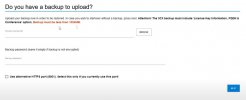
you get the option to upload your backup, no mention of a limit so I think you'll be ok. It might just take a litttle while so keep the page open.
1702477872027.png
 
  • Like
Reactions: jed and PhoneEP
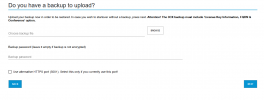
Interesting! Wonder if they removed the limit then. Screen shot I attached is from video I found on YouTube on on-prem to hosted where I saw the 1GB limit.
 

Attachments

  • 2023-12-13_08-34-17.jpg
    2023-12-13_08-34-17.jpg
    30.9 KB · Views: 6
Aye I guess that was before then ramped up the cloud presence I imagine.
 
  • Like
Reactions: PhoneEP
Makes sense. This works out then! This way I can move everything...including VM.

Thanks!
 
  • Like
Reactions: Alphabetic
Hello

You can log in to your account via customer.3cx.com

select your instance and then choose "Switch to hosted"

View attachment 38667

you get the option to upload your backup, no mention of a limit so I think you'll be ok. It might just take a litttle while so keep the page open.
View attachment 38668

We have a FQDN on-prem. When I pick a backup from current system and it starts migration, does it switch to 3CX FQDN at that point?
 
Youre using your own FQDN and not a 3CX supplied one?
 
  • Like
Reactions: N_G
Correct, on prem.
 
https://www.3cx.com/docs/switch-hosted-pbx/

Im not entirely sure then tbh but the article states you must use a 3CX FQDN so I wonder if it will either fail or force you to set up a 3CX FQDN.

You can only try.

Failing that.. you'll have to do a full backup without the license and fqdn information.

Release the custom FQDN from your customer portal.

Reinstall your 3CX and use your license key to create your 3CX FQDN and then move to hosted.
 
Thanks! Will give it a try!
 
Regarding your question, the limit of a backup that can be restored to a hosted instance is 3GB; if the backup is more, you can choose to deploy a new system. Without restoring a backup, upload the backup to a remote location (e.g., FTP, Google buckets) from where it can be set as a location within the 3cx system and restore it post-install.
 
Thank You!
 
  • Like
Reactions: jed
You are welcome.
 
Hi Charles,

my DNS is still coming back as the old (hosted) IP.

does 3CX hang on to it until the hosted instance is deleted?
 
Open a ticket please so we can check.
 
Regarding your question, the limit of a backup that can be restored to a hosted instance is 3GB; if the backup is more, you can choose to deploy a new system. Without restoring a backup, upload the backup to a remote location (e.g., FTP, Google buckets) from where it can be set as a location within the 3cx system and restore it post-install.

Can system be restored if file is over 3GB saved to a sharepoint site? If so, how does that work for 3CX to restore?

Thanks
 
Status
Not open for further replies.

Forum statistics

Threads
111,974
Messages
590,081
Members
164,899
Latest member
mazet