Minimum Requirements - Update - Disruption?

Status
Not open for further replies.

Rushfelt33

New User
Joined
Nov 25, 2021
Messages
3
Reaction score
0
Hello There,

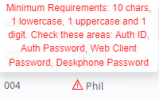
(Bear with me as I'm fairly new to 3CX) - I’ve got a query regarding a couple of extension that have a warning symbol next to their name.

Whilst I appreciate it would be easy to remove these warnings via the ‘regenerate’ option, I'm conscious of the end user. I've spoken to our Account who advised it would be less disruptive to delete the extension and re-add it, but if I do that, what would I need to tell the end user once I've re-add them? To log back in with new credentials?

Alternatively, is there any prerequisite’s that I need to do in order to make this as seamless as possible?

Many Thanks,

James
 

Attachments

  • Minim.png
    Minim.png
    7.3 KB · Views: 21
Hi @Rushfelt33,

The warning symbol displays because the password is not complex enough - as mentioned it requires 10 characters, 1 upper, 1 lower and a digit.

Regenerate solves the issue because it creates a new password. I'd ask them to design a password in mind given these parameters stated in the warning - and provide them with Management Console access to edit their own extension only. They can make the change and then you can revoke their access to the Management Console.
 
Hi @Rushfelt33,

The warning symbol displays because the password is not complex enough - as mentioned it requires 10 characters, 1 upper, 1 lower and a digit.

Regenerate solves the issue because it creates a new password. I'd ask them to design a password in mind given these parameters stated in the warning - and provide them with Management Console access to edit their own extension only. They can make the change and then you can revoke their access to the Management Console.
Hi @VasilisV_3CX - Thanks I should clarify a little further. There are those that have a strong password to access their 3CX webclient and this warning would refer to their AuthID (as some are still using their extension numbers which do not meet the minimum requirement) If I (or they if we provide access) change the AuthID, what impact would it have on them?
 
Hi @Rushfelt33,

What applications are your users using? Desktop App, Windows App, IP Phones etc? Knowing that I could be a little more accurate.

In any event, you can change the AuthID and then tell your users to exit and re-launch their App and it should automatically reprovision.

For IP Phones, you can reprovision manually from the Management Console.
 
Hi @Rushfelt33,

What applications are your users using? Desktop App, Windows App, IP Phones etc? Knowing that I could be a little more accurate.

In any event, you can change the AuthID and then tell your users to exit and re-launch their App and it should automatically reprovision.

For IP Phones, you can reprovision manually from the Management Console.
Hi @VasilisV_3CX,

We have users that utilise the 3CX app and also desktop phones - Fanvil X3S.

Ah OK - So I can regenerate the user and ask him to relaunch his app he wouldn't notice anything?

Is there any link on how to reprovision the phone once I've done that?

Many Thanks,

James
 
Hi @Rushfelt,

Yes if you regenerate only the SIP ID and Authentication Passwords, then they can just log out and log back in of their 3CX Apps.

As an FYI, the Windows App and Mobile Clients will be disrupted, while the Desktop App and Web Client will not. If using the Windows Client you can just click Settings >> Reregister and it will resolve itself in seconds.

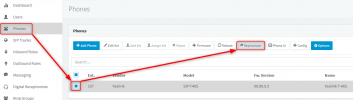
For the Deskphones, you can just reprovision them manually as show in the screenshot below:

1637835777039.png
 
Status
Not open for further replies.

Forum statistics

Threads
111,974
Messages
590,083
Members
164,901
Latest member
Silent_Guru