


- Joined
- Nov 26, 2019
- Messages
- 21
- Reaction score
- 5
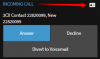
I stole this pic off of another thread because it illustrates exactly what my issue is. Since the upgrade to 16.0.641 I am not getting this icon. The CRM will not automatically pop-up if set to auto-popup. 3cx is querying my database and pulling the information and adding it to the 3cx contact list correctly. I can click the CRM link within the contacts and it works. We just do not get the icon showing in the active calls. I have seen several posts about this, and it is a pretty important issue for my call center. Are there other people having issues with this? Has anybody with this issue been able to fix it?
I have a temporary fix of using the Auto Launch Custom URL within the webclient, but it is a very frustrating work around as it opens popups for every call, even internal ones.


