MMS Image file extension missing

Status
Not open for further replies.

TopKick

Customer
Joined
Oct 14, 2021
Messages
2
Reaction score
0
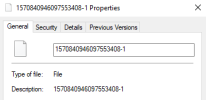
I've notice that in the 3CX cell phone app and the 3CX Desktop app that when you download the incoming MMS image it does not have a file extension and hence the device does not know how to open the file. We are using Flowroute for our service provider using v3. Is this a bug with the 3CX system or a configuration issue? If I add the .jpg file extension windows can open the file just fine.

We are running on-premise version 18.0 (Build 965).
1663591314178.png1663591346290.png
 
Seems the after updating the file extension works now.
 
Hey, we're also using Flowroute for our messaging and this also just started happening to our inbound MMS messages. Outbound seems to work fine, but inbound strips the extension type. Not sure if this is on the 3CX side or the Flowroute side, but I suspect it's on the Flowroute side since we haven't made any changes to our 3CX platform between when it was working correctly and now.
 
May we inquire as to the following please
- What 3CX version are you running ? Please let me know
- Also with regards to this did it suddenly start happening now or was it happening before as well?
 
3CX version: 18 build 5 (Build 418)
We just noticed in mid last week, but it was working before. I have a support ticket open with Flowroute as well, I suspect the issue is on their end since we haven't changed any configs or our 3CX version.
 
I had a very similar issue with MMS and Twilio. The issue is actually with 3CX not supporting HTTP Auth on Media URLs. I had to turn this off on Twilio in order for MMS messages to be received properly.

This is not documented and when I opened a support ticket with 3CX and we found the root cause, I suggested documentation be updated. The response definitely felt like "no, that won't happen".

Save yourself the headache and see if you can find and disable a similar setting with your provider.
 
Quick follow up, I opened a ticket with Flowroute and they were able to determine it was a change their messaging partner made. They were able to fix it about 24 hours after I opened the ticket and confirmed they had other (non-3CX) customers experiencing the same issue.
 
  • Like
Reactions: Vali_3CX
I am also experiencing this problem. I shared this thread with Flowroute and they claim it's a 3CX problem. They had me try sending a mms photo named photo.jpg and 3cx shows the photo but the file name as a bunch of random characters with no extension.
 
I am also experiencing this problem. I shared this thread with Flowroute and they claim it's a 3CX problem. They had me try sending a mms photo named photo.jpg and 3cx shows the photo but the file name as a bunch of random characters with no extension.
What PBX version are you running? Are SMS working properly? Do you have issues with inbound or outbound MMS?
 
What PBX version are you running? Are SMS working properly? Do you have issues with inbound or outbound MMS?
Using 3cx v18u6
SMS works fine
MMS sends fine.
MMS inbound file names are altered and extensions are missing. The images are viewable in the app but have no extension when downloaded.
 
I'm seeing the same behavior on my 3CX/Flowroute solution: "MMS inbound file names are altered and extensions are missing. The images are viewable in the app but have no extension when downloaded." I have confirmed that you can simply add .jpg to the end of the file name after downloading and it will open correctly though.
 
We did some troubleshooting on our end and we managed to replicate your issue.
The problem is that we can only replicate this with Flowroute. When we send the same MMS picture to all the other supported providers the picture arrives normally with the correct file extension.

Our logs indicate that the file is received without a file extension from Flowroute where we see the file name from other providers.

With that in mind I would contact Flowroute and ask them why this is happening.
We will also contact them internally so we can investigate this behavior.
 
  • Like
Reactions: nopoi
I can open a ticket too so that they know it's not just one customer.
 
I'm seeing the same behavior on my 3CX/Flowroute solution: "MMS inbound file names are altered and extensions are missing. The images are viewable in the app but have no extension when downloaded." I have confirmed that you can simply add .jpg to the end of the file name after downloading and it will open correctly though.
I agree that downloading the file and adding the extension can be a temporary solution but knowing the file type is also a challenge for example the file could be a .mov or other.

This is an example of a renamed file from 3CX: 44def069d6ea460aa002a56a8093b905-1
 
I agree that downloading the file and adding the extension can be a temporary solution but knowing the file type is also a challenge for example the file could be a .mov or other.

This is an example of a renamed file from 3CX: 44def069d6ea460aa002a56a8093b905-1
Agreed, I opened a ticket with them.
 
I have opened a new ticket with Flowroute.

This is their response to a previous ticket I had with them on the same issue:
"That is not the file name that we sent. Can you please check with 3CX support to see if the file name is getting chnaged or if any specific settings need to be done on the server to receive it correctly."
 
I am also experiencing this problem. I shared this thread with Flowroute and they claim it's a 3CX problem. They had me try sending a mms photo named photo.jpg and 3cx shows the photo but the file name as a bunch of random characters with no extension.
It's technically a 3CX issue as 3CX doesn't support authentication with MMS. When the MMS message is sent to 3CX, it's also sent with authentication which 3CX does not reply to.

The solution is in Twilio or whom ever you're using. You will need to disable "Enforce HTTP Auth on Media URLs" under Messaging -> Settings -> General.

Once you turn this off, MMS messages will be received without issue.
 
Got a reply back to my ticket that Flowroute that they are working with 3CX on the issue.
 
It's technically a 3CX issue as 3CX doesn't support authentication with MMS. When the MMS message is sent to 3CX, it's also sent with authentication which 3CX does not reply to.

The solution is in Twilio or whom ever you're using. You will need to disable "Enforce HTTP Auth on Media URLs" under Messaging -> Settings -> General.

Once you turn this off, MMS messages will be received without issue.
Where are you seeing the "messaging -> settings -> general"? I don't see those in the SIP trunk config and there aren't specific messaging settings anymore that I can find after the 18.6 upgrade. Or does this need to be done with the MMS provider?
 
Where are you seeing the "messaging -> settings -> general"? I don't see those in the SIP trunk config and there aren't specific messaging settings anymore that I can find after the 18.6 upgrade. Or does this need to be done with the MMS provider?
He is talking about the providers side however Flowroute does not have such settings. Also Twilio MMS are working fine.

Got a reply back to my ticket that Flowroute that they are working with 3CX on the issue.
We are working with Flowroute and we will have an update for you soon.
 
  • Like
Reactions: Christian SCG
Status
Not open for further replies.

Latest Posts

Forum statistics

Threads
111,973
Messages
590,075
Members
164,895
Latest member
jasonkkrause