module of zoho CRM to sync contacts of 3CX

Status
Not open for further replies.

HiroNikuyama

Bronze Partner
Joined
Jul 20, 2020
Messages
77
Reaction score
7
Hi Thank you for your support.
Now, this is a question about the integration of 3CX with zoho CRM.

Does contacts of 3CX always sync with contacts of the 'contacts' module of zoho CRM?
It does not sync with contacts of the 'leads' module which also deals with telephone numbers in zoho CRM.?

Best regards
 
Hello @HiroNikuyama,

The integration performs the lookup on Zoho contacts, leads and accounts. Any contact, lead or account matching the caller's number will be added to 3CX Contacts.

Kind regards.
 
Hi, thank you for the info.
>Any contact, lead or account matching the caller's number will be added to 3CX Contacts

Okay understood.
On the other hand, new numbers of incoming calls are added to "contacts" on zoho, not to others(lead, account)?
Am I correct?

Regards
 
Hello @HiroNikuyama,

The integration performs the lookup on Zoho contacts, leads and accounts. Any contact, lead or account matching the caller's number will be added to 3CX Contacts.

Kind regards.
Thank you for the info.
If 3CX received new calls, will it be always add to "contacts" on zoho CRM? Is it possible to change the setting to either "leads" or "accounts"?

Best regards,
Hiro
 
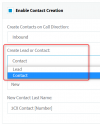
You can select if you want to create Contacts or Leads, but not accounts:
1631796750900.png
 
  • Like
Reactions: HiroNikuyama
The synchronization happens when you make or receive a call to your contacts.

You should first check that the contact lookup works by using the Test button from the 3CX Console > Settings > CRM. Do you see your contact details back when you run this test lookup?
 
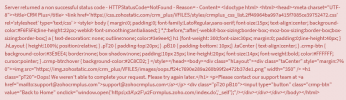
When I click the Test button, it shows an error. Server returned a non successful status code "NOT FOUND". How Can I fix this?
1632268674688.png
 
Last edited:
This is pretty sure a misconfigured integration. How are you configuring the "Accounts Server URL" and "Zoho CRM URL"?
 
  • Like
Reactions: Psalms
I just check it now, New error comes up "BadRequest"
1632316332703.png

I also followed this step, however the error still pop up:
Go to the 3CX Console > Advanced > Contacts > Options, and select "Exact match" there.

And also for the Phone Field is already visible
 
Last edited:
The error is very clear, the field "Home_Phone" is not visible for the entity being queries. Please check it for Leads as well, maybe you made it visible just for contacts.
 
No matter the what is name in field as long as it's visible or It should be specific "Home_Phone"

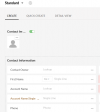
See image below for my layout: I used Phone field
1632318323519.png
 
  • Like
Reactions: Evolute IT
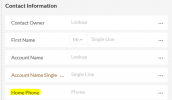
I add now the Home_Phone field in standard contacts and its also visible, I check it already gear > Layout permission. Still the error pop up when I click the Test.
1632319140645.png
 
Check if it's exactly the same error, or if it's complaining for a different field. Also, check which entity is being queried (contacts, leads or accounts).
 
Aww. sorry I didn't check that, the error now is "Other_Phone"
1632320010826.png
 
  • Like
Reactions: edossantos
OK, check that until you get it working. The error can change to a different field, or the same field for a different entity.
 
You mean, I will check all the layout?
 
You mean, I will check all the layout?
No, check with the Test button from 3CX until you get it working. If you get an error, add the missing field.
 
Now It's worked. Thank you for your great support

It means all the number should be input in the Phone Number field, so that it will sync in 3cx Contacts? I'm Right
 
  • Like
Reactions: Evolute IT
Status
Not open for further replies.