MS Teams Direct Routing License Question

Migrate_to_ThreeSeeAches

Free User
Joined
Feb 9, 2024
Messages
11
Reaction score
3
From this link:
https://www.3cx.com/docs/manual/microsoft-365-v18/

I see the following language:

1708716085958.png
The second bullet point states:
  • Requires Microsoft 365 E5 subscription plan or Microsoft Teams + Microsoft Phone System (add-on) for those teams users that wish to call or be called.
If we want our existing MS Teams users to be able use MS Teams for both INTERNAL and EXTERNAL calling - what MS365 license option do we need? The "or" in the above bullet point seems to imply you have a choice of:

1. MS 365 E5 OR
2. MS Teams + Microsoft Phone System.

Our current license level is MS365 E3 and obviously, the goal is to try to reduce any additional licensing costs from MS.

TIA!

 

Attachments

  • 1708715927701.png
    1708715927701.png
    93.4 KB · Views: 3
Hi Again,

I have followed all the steps in the document about integrating 3CX with Microsoft Teams completely and without errors, but I get the following error. Can you help me with this?

Thanks,
Screenshot 2024-07-26 at 14.10.23.png
 
Hi Again,

I have followed all the steps in the document about integrating 3CX with Microsoft Teams completely and without errors, but I get the following error. Can you help me with this?

Thanks,
View attachment 42809
Could be many things. Check that the SBC entry in Teams Admin is connected and that your port 5062 is opened on your PBX. Also, make sure the certificate is not a wildcard one.

Finally, enable verbose logging and check the Activity Log for troubleshooting.
 
  • Like
Reactions: eMind
Could be many things. Check that the SBC entry in Teams Admin is connected and that your port 5062 is opened on your PBX. Also, make sure the certificate is not a wildcard one.

Finally, enable verbose logging and check the Activity Log for troubleshooting.

Hi,

The certificate is not wildcard and was bought from ssl.com specifically as the guide. 5062 port is opened.

However, I can't understand verbose logging. I'm using a Mac and can grab weblogs from the Teams app. Is there any specific log file that I need to dive deep into?

PS: When I tried to call from the Teams Mobile App, I got a policy restriction popup. I didn't change any policy except 3CX needs from PowerShell.

Thanks,
 
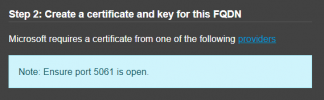
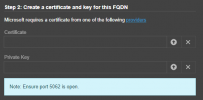
If you are using your own FQDN and SSL certificate for the PBX and the Teams SBC, you will need to open port 5061. This should be shown in your teams integration page.

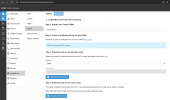
OWN FQDN

1721999002831.png

3CX FQDN

1721999081705.png
 
The firewall checker will check only UDP ports, port 5061, in your case, since you are using the same FQDN for the 3cx system and the team's side, which also needs to be open for TCP. The transaction between trams and 3CX will be via TLS.

So first, ensure that the port is open and forwarded for TCP 5061. If it already is, and assuming that everything else here is correct, then this leaves only that you have not populated the Secure sip section within the 3cx System with the certificate, intermediate, and root certificate for the CA and the private key.

You may check here for this requirement, which is found in version 20 under the admin console >Advanced > secure sip section.
 
The firewall checker will check only UDP ports, port 5061, in your case, since you are using the same FQDN for the 3cx system and the team's side, which also needs to be open for TCP. The transaction between trams and 3CX will be via TLS.

So first, ensure that the port is open and forwarded for TCP 5061. If it already is, and assuming that everything else here is correct, then this leaves only that you have not populated the Secure sip section within the 3cx System with the certificate, intermediate, and root certificate for the CA and the private key.

You may check here for this requirement, which is found in version 20 under the admin console >Advanced > secure sip section.


We are sure that port 5061 is open on our company firewall. But I don't know how to open port 5061 on the 3CX server.

I am also attaching the following screenshots in case it helps if there is a faulty installation.

WhatsApp Image 2024-07-26 at 22.16.38.jpeg

WhatsApp Image 2024-07-26 at 22.08.34.jpegWhatsApp Image 2024-07-26 at 22.13.03.jpeg
 
You do this on your firewall/router, the same place you open and port forward all other ports toward the 3cx system.

It's already open within the NF tables on the 3cx OS.

Have you also checked that the secure sip section is enabled and populated as described in my previous reply?
 
  • Like
Reactions: Evolute IT
You do this on your firewall/router, the same place you open and port forward all other ports toward the 3cx system.

It's already open within the NF tables on the 3cx OS.

Have you also checked that the secure sip section is enabled and populated as described in my previous reply?
@Charles_3CX
First of all, I don't know how to thank you for your quick responses..

I hope we can solve the Teams integration issue. Afterward, many of our customers are considering switching to 3CX because of this issue.

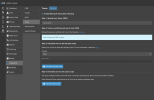
Images of Secure SIP and Teams Integration pages are as follows.

Screenshot 2024-07-26 at 22.36.32.pngScreenshot 2024-07-26 at 22.36.56.png
 
No problem at all. You are welcome.

Okay, so you need to follow the guide I sent, which details the requirement to add the contents of both the certificate pem file to the certificate section within the secure sip section in your screenshot and the private key file contents to the private key section; this will enable the secure sip.

Note: The private key you would use is the same one you used to create the certificate. It will be the same one used and uploaded when you installed this system.

Open both the certificate pem file and key file with Notepad, copy and paste the contents into the appropriate sections, and then restart the 3CX SIP server service.
 
  • Like
Reactions: Evolute IT
No problem at all. You are welcome.

Okay, so you need to follow the guide I sent, which details the requirement to add the contents of both the certificate pem file to the certificate section within the secure sip section in your screenshot and the private key file contents to the private key section; this will enable the secure sip.

Note: The private key you would use is the same one you used to create the certificate. It will be the same one used and uploaded when you installed this system.

Open both the certificate pem file and key file with Notepad, copy and paste the contents into the appropriate sections, and then restart the 3CX SIP server service.

Which service activates ports 5061 and 5062?
 
Once you have uploaded the certificate and key into the secure sip section, press Save, There will be a pop-up informing you that SIP server services will be restarted.

Which is this service
1722026322548.png
 
Once you have uploaded the certificate and key into the secure sip section, press Save, There will be a pop-up informing you that SIP server services will be restarted.

Which is this service
View attachment 42841
I’ve already did it per the guide and restarted the service but nothing has changed.
 
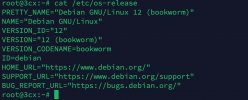
This is nginx cert

1b247873-60bb-4348-8be8-faf1ebc1c173.jpeg

1b247873-60bb-4348-8be8-faf1ebc1c173.jpeg

These are the services

0e2917ad-f438-4ae9-a213-462df7e91707.jpeg
 
  • Like
Reactions: Evolute IT
I'd be happy to check it out with you if you're interested. We have good experiences with the Teams integration.
Hi,

How can we get in contact with you?
 
Hi,

How can we get in contact with you?
You can DM me on the forums, or chat with us via our website, or send an email. Either way it gets through me.
 
  • Like
Reactions: eMind
Can this integration be done with the Professional 3CX license (8 SIM calls)?
 
Can this integration be done with the Professional 3CX license (8 SIM calls)?
I asked this question several times but no clear answer from vendor side?
Still I'm not able to integrate MS Teams also :(
 
  • Wow
Reactions: rakesh poddar

Forum statistics

Threads
112,147
Messages
590,961
Members
165,167
Latest member
Finatra.us