- Joined
- Jan 19, 2016
- Messages
- 151
- Reaction score
- 0
How do I setup Multicast Paging
In dial codes I have set *77 for paging
If I select Multicast vs SIP for paging how do we setup soft phones if we use multicast. Windows, iPad and Andriod
How would you setup yealink phones for Multicast
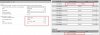
Attached is a view of the Yealink Multicast Setup
In the Yealink Multicast Tab there is a list (Table) for Multicast Listening. Multicast Address which would be the address we use when we setup a multicast ring Group. Is this correct.
For example we could setup a warehouse ring group with 224.0.0.252 and another called Garage with an address of 224.0.0.253. Now if I enter both IP addresses in the Multicast Listing table that phone would receive a page from either of the ring groups. (Correct)
It also has a paging List what is this used for.
In dial codes I have set *77 for paging
If I select Multicast vs SIP for paging how do we setup soft phones if we use multicast. Windows, iPad and Andriod
How would you setup yealink phones for Multicast
Attached is a view of the Yealink Multicast Setup
In the Yealink Multicast Tab there is a list (Table) for Multicast Listening. Multicast Address which would be the address we use when we setup a multicast ring Group. Is this correct.
For example we could setup a warehouse ring group with 224.0.0.252 and another called Garage with an address of 224.0.0.253. Now if I enter both IP addresses in the Multicast Listing table that phone would receive a page from either of the ring groups. (Correct)
It also has a paging List what is this used for.