Multicast Ringroup not working

Status
Not open for further replies.

ESA-AT

Customer
Joined
Mar 10, 2022
Messages
11
Reaction score
1
3cx version: 18.0 Build 441

We had a Paging Ringroup configured in which every extensions was registered as a group member. The purpose being that in emergencies (e.g. fire), one could call that ring group and notify everyone at once. Recently we hit the maximum number so now not every extension will get the announcement.
We wanted to address this by using a paging multicast ringroup instead. (multicast IP: 224.0.1.75, port: 50001, codec: G729, packet time: 20ms)
This multiclass is set at <user> -> phone provisioning -> Enable Multicast Paging Ring Group provisioning.
Only problem is it doesn't work. When calling the ring group the multicast packets are arriving at 3cx but the "call" is not being distributed.
 
Hi,

This multiclass is set at <user> -> phone provisioning -> Enable Multicast Paging Ring Group provisioning.

- Firstly make sure the phones have been reprovisioned so the above setting will be applied.
- Then you have to make sure that the 3CX machine and the phones are on the same network.

1. Run a capture on 3CX and call the multicast group
2. Check the capture to make sure the traffic is transmitted by 3CX on 224.0.1.75
3. Now make another capture on your phone and call the multicast group from another phone
4. Check the capture to see if anything arrived on 224.0.1.75

Multicast packets will usually be stopped by your network setup (so they don't propagate further than needed).
If your network does not allow them to reach the phones then nothing will be heard
 
I did a bit of troubleshooting:
When calling the ringgroup, the traffic is transmitted by 3cx on 224.0.1.75. The multicast does NOT reach the phones.

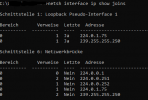
I configured one of the yealink phones via their webinterface to be able to send the multicast with same IP and port as 3cx (at multicast-ip -> paging-list). This does work. If the multicast is sent by one of the phones directly it gets received by the other phones. I don't really get where the difference is, since 3cx itself should do the exact same thing. They're all on the same network. We also checked the multiclass groups (screenshot).

mcgroups.PNG
 
If it is transmitted from 3CX, then the rest will depend on your network.

Phones and PBX must be on the same subnet:
  • Will work:
    • PBX 192.168.0.1 Mask: 255.255.255.0
    • Phone 192.168.0.28 Mask: 255.255.255.0
  • Will Not work
    • PBX 192.168.0.1 Mask: 255.255.255.0
    • Phone 192.168.1.28 Mask: 255.255.255.0 (different subnet)
 
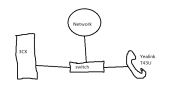
Phones and PBX are on the same subnet. We tested a very basic setup. Connecting the receiving phone and PBX directly via an unmanaged switch, the phone still does not receive the multicast. There has to be something else afoot here.
3cx network test.png
 
Status
Not open for further replies.

Latest Posts

Forum statistics

Threads
111,973
Messages
590,075
Members
164,895
Latest member
jasonkkrause