


- Joined
- Oct 15, 2021
- Messages
- 4
- Reaction score
- 1
- 3CX Version, 18.0 Update 1 Build 237
- Server OS, Debian 10
- Is the 3CX Server Hosted and where? On-premises
- IP Phone Make/Model/Firmware version: SBCs are Protectli FW4B
- Provisioning Method: SBC
- Trunk Provider or VoIP Gateway Make/Model, Voxtelesys
- Has the Firewall Checker passed: YES
- Are custom Phone Templates being used: NO
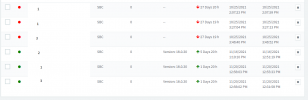
Hello, please see the above image for some insight on my current setup. I replaced the IP/name with 1, 2, and 3 based on the IP I have and the IP I expect. 1, 2, and 3 are separate networks at different physical locations. The bottom three SBCs are working while the top three are not. The way the bottom three SBCs were setup was by installing the 3cx SBC OS in a "lab" which is a totally different IP/location from 1, 2, or 3, then moving the SBC to the desired location, plugging it in, and that's it. I attempted the same with the top three SBCs with no luck, after plugging them in to the desired network they just stay down. The top three SBCs seem to not be communicating on the network at all because they aren't changing their public/private IP to what I would expect based on where they're plugged in at. Can someone point me in the right direction as to what I should be looking at here? Thank you.


