Multiple Sets of Office Hours

Status
Not open for further replies.

TSlocum

Premier Customer
Joined
Oct 15, 2013
Messages
215
Reaction score
16
We have some interesting routing that I need to figure out. I need to set up the following schedule and I can't quite figure it out.

00:00-05:00 IVR
05:00-07:00 Ring Group
07:00-17:00 Queue
17:00-23:59 Same Ring Group​

I have the inbound rule set to go to the Queue during office hours (07:00-17:00) then go to the ring group after hours. How can I set it to go to the IVR when the extensions in the ring group are unavailable (00:00-05:00)?
 
Last edited:
On your inbound rules in office hours point it at your ring group (you can add multiple sets of hours). Make a dummy extension called forward choose. Point your inbound rule to this outside of global office hours. Set up specific office hours on this extension, configure it to automatically change status based on its own office hours. In forwarding rules for when busy or unregistered point at the ivr when unavailable and queue when available.
 
On your inbound rules in office hours point it at your ring group (you can add multiple sets of hours). Make a dummy extension called forward choose. Point your inbound rule to this outside of global office hours. Set up specific office hours on this extension, configure it to automatically change status based on its own office hours. In forwarding rules for when busy or unregistered point at the ivr when unavailable and queue when available.

During office hours, inbound points to the ring group. Outside office hours inbound points to the dummy extension. When the dummy extension is unavailable, it points to the IVR. When the dummy extension is available, it points to the queue.

So I set the inbound office hours to 05:00-07:00 and then 17:00-23:59. Then I set the dummy extension office hours to 07:00-17:00. When the dummy extension is available (07:00-17:00), it points to the queue, and when it's unavailable (17:00-07:00) it points to the IVR.

Am I understanding this correctly?
 
Yup, that should work.
 
It looks like that will work. Thank you for figuring it out for me haha

I just love how we have to do all these ridiculous workarounds in 3CX for seemingly basic features. Why can't we just schedule different things for different hours?
 
  • Like
Reactions: jbryant84
I can't take credit for it, I found it through a Google search a while ago, happy to pass it along. Totally agree with you on fundamental features missing. I use dummy extension forwards a LOT, more than I should have to.
 
So it turns out we don't need the Ring group from 05:00-07:00. Do I still need to have the dummy extension?

00:00-07:00 IVR
07:00-17:00 Queue
17:00-23:59 Ring Group
 
You still have more than two sets of office hours so unfortunately you do. Just tweak the hours to match the new setup
 
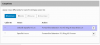
I led you astray on this. I couldn't get the office hours override for an extension to work. I ended up using the exceptions dialog box, see attached. Tested functional. Also you can do multiple sets of schedules on one dummy extension using this method.
 

Attachments

  • Capture.PNG
    Capture.PNG
    15.9 KB · Views: 211
I led you astray on this. I couldn't get the office hours override for an extension to work. I ended up using the exceptions dialog box, see attached. Tested functional. Also you can do multiple sets of schedules on one dummy extension using this method.

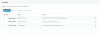
This seems like a simpler option. So basically I would forward the inbound rule to the dummy extension (in and out of office), then set up specific hours exceptions like I need:

00:00-07:00 IVR
07:00-17:00 Queue
17:00-23:59 Ring Group

Untitled.png
 
Last edited:
Yup should work fine.
 
Status
Not open for further replies.

Forum statistics

Threads
111,856
Messages
589,404
Members
164,693
Latest member
FLCC