- Joined
- Dec 29, 2021
- Messages
- 2
- Reaction score
- 0
On old 3cx client i could start a meeting and it would open in browser. Then, if I don't want to hear anyone speaking but still allow them to speak to each other I would put the site on mute.
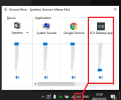
On the new windows app client when starting a meeting it opens inside the app not in browser and did not manage how I can stop hearing others but still allow them to speak to each other. I don't want to mute other participants as they still need to be able to speak to each other but I just want to stop hearing them during normal calls and before I could achieve that by putting site where conference was running on mute.
Thanks
On the new windows app client when starting a meeting it opens inside the app not in browser and did not manage how I can stop hearing others but still allow them to speak to each other. I don't want to mute other participants as they still need to be able to speak to each other but I just want to stop hearing them during normal calls and before I could achieve that by putting site where conference was running on mute.
Thanks