N670 Call transfer no sound

Status
Not open for further replies.

JnB_be

Customer
Basic Certified
Joined
Dec 22, 2017
Messages
13
Reaction score
0
Hi,

So we have 3cx (v16.0.676) on Google Cloud and running SBC at the HQ
We worked with N510 successfully in the past.

Today we upgraded to N670 but when an external call come's in and an attended transfer is made the sound goes dead.
The external guy can hear us but we can't hear him.

Putting the line on Hold and taking it back brings the sound back up.
Any ideas where to look or something we are missing ?

internal transfers work perfectly and external > blind transfer is also working

edit: In the meantime upgraded to 16.0.493 since it has an updated profile for the N670 but no luck so far
N670 on latest release: 2.26.0
 
Last edited:
Hi ,

SBC version please?
 
That's a bit strange then, because I have tested this and can confirm it solves the issue.

Is the N670 configured properly for SBC under the DECT/FXS section? Perhaps check this reset/reprovision from scratch to be sure?

Do the assigned Extensions have PBX Delivers Audio = OFF, Supports Re-invite and Replaces = ON ?
 
That's a bit strange then, because I have tested this and can confirm it solves the issue.

Is the N670 configured properly for SBC under the DECT/FXS section? Perhaps check this reset/reprovision from scratch to be sure?

Do the assigned Extensions have PBX Delivers Audio = OFF, Supports Re-invite and Replaces = ON ?

Hi doubled checked the extions and trunk for PBX Delivers Audio = OFF, Supports Re-invite and Replaces = ON

And did a factory reset on the N670, removed DECT/FXS section and recreated + reconnected handsets
Still same issue :x
 
Hi,

I've created a ticket for this since the Hold call on the T46s doesn't seem to function as well now.
 
Ok then, that would make sense why the SBC fix didn't produce the desired results.

Just wondering, is this only affecting external calls or can you replicate it with internal ones too?

If it's just external calls I would focus on the trunk rather than the devices and SBC.
 
Only external calls indeed, client just verified that even between the gigaset sl750h and yealink t46s the attended transfer is working internally.

I'm thinking 3cx <> SBC communication since the trunk didn't changed and only the N510 to N670 was changed. And now the T46s hold function isn't working after putting in the SBC beta firmware
 
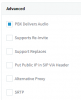
Can you show me your trunk Options tab? specifically the "Advanced" box

And also which provider is it?
 
Screenshot 2020-02-14 at 10.49.55.png

Provider is weepee with fixt switch (no dns-srv)
 
Can you try it like this and tell me if it works?
1581674036267.png
 
No this is on the trunk end. Our default Weepee settings template is like my screenshot. Please give it try now and let me know if it resolves the issue for you
 
No this is on the trunk end. Our default Weepee settings template is like my screenshot. Please give it try now and let me know if it resolves the issue for you

Seems to be working !
Client is testing some other scenario's as we speak.
 
No, this was just for testing purposes so I would recommend to go back to stable. We do not generally recommend to run any beta release on productions systems (it is meant only for testing).

Also just keep in mind for future reference that the beta releases are not covered by SLA hence in case any issue occurs may not be handled within the 3CX Technical Support SLAs.

So kindly revert back to our stable release, keep your trunk settings as I suggested, and do a quick test run to ensure everything is OK. Let me know how it goes ;)
 
Last edited:
Status
Not open for further replies.

Latest Posts

Forum statistics

Threads
111,937
Messages
589,831
Members
164,819
Latest member
mechelle