- Joined
- Dec 20, 2023
- Messages
- 13
- Reaction score
- 0
Exactly what does this mean? Details please....If i edit my outbound rules it works.
Try this for inbound callI'm also having trouble with this. I feel like I'm missing something basic, but there are so many settings on these grandstream FXO devices. Here's what I've done so far:
I set the HT841 to a fixed IP.
In 3CX I went to add a gateway in the voice and chat menu. I gave it whatever name and a default route pointing the calls to a ring group. I gave it a random Main Trunk Number. (Is there something the main trunk should be?) It made the authentication ID 10000 and I just made up a random authentication password. For the Registar/Server I put the HT841 IP address and left the port 5060. I didn't worry about DID numbers because I don't want to control them separately. In options I did 3 lines because we have 3 analog lines. I left Limit to as System Wide and SRTP Mode as disabled.
Then I logged into the HT841.
On the FXO Profile 1 tab I set the primary sip server and the Outbound proxy to: 192.168.1.5:5060
192.168.1.5 is the local address of 3CX
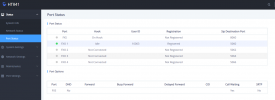
On the Port tab, I set Port 1, 2, and 3 of the FXO Port Settings to:
Sip User ID: 10000
Authentication ID: 10000
Password: the password I made up in 3CX.
Name: 10001 for port 1, 10001 for port 2, 10002 for port 3 (I just made this up, does it matter?)
Profile ID: FXO Profile 1
Hunting Group: Active (all 3)
Enable Port: Yes
I found somewhere to set the stage method to 1 so I tried that both ways.
It authenticates with 3CX, so I get a green square in 3CX. But if I try to call out it just rings and rings and never actually completes. If I call in, it just rings and rings and 3CX never gets the call. The call log shows outgoing calls as unanswered, but they never rang through. The incoming calls never get to the call log.
Anyone have any suggestions or could point me in the right direction? We fully pass the 3CX firewall test.
Did you figure out a resolution? I am having issues with outbound but was able to get inbound working. Please advise! Thank you!I'm also having trouble with this. I feel like I'm missing something basic, but there are so many settings on these grandstream FXO devices. Here's what I've done so far:
I set the HT841 to a fixed IP.
In 3CX I went to add a gateway in the voice and chat menu. I gave it whatever name and a default route pointing the calls to a ring group. I gave it a random Main Trunk Number. (Is there something the main trunk should be?) It made the authentication ID 10000 and I just made up a random authentication password. For the Registar/Server I put the HT841 IP address and left the port 5060. I didn't worry about DID numbers because I don't want to control them separately. In options I did 3 lines because we have 3 analog lines. I left Limit to as System Wide and SRTP Mode as disabled.
Then I logged into the HT841.
On the FXO Profile 1 tab I set the primary sip server and the Outbound proxy to: 192.168.1.5:5060
192.168.1.5 is the local address of 3CX
On the Port tab, I set Port 1, 2, and 3 of the FXO Port Settings to:
Sip User ID: 10000
Authentication ID: 10000
Password: the password I made up in 3CX.
Name: 10001 for port 1, 10001 for port 2, 10002 for port 3 (I just made this up, does it matter?)
Profile ID: FXO Profile 1
Hunting Group: Active (all 3)
Enable Port: Yes
I found somewhere to set the stage method to 1 so I tried that both ways.
It authenticates with 3CX, so I get a green square in 3CX. But if I try to call out it just rings and rings and never actually completes. If I call in, it just rings and rings and 3CX never gets the call. The call log shows outgoing calls as unanswered, but they never rang through. The incoming calls never get to the call log.
Anyone have any suggestions or could point me in the right direction? We fully pass the 3CX firewall test.
Founded in 2005, when VoIP was an emerging technology, 3CX has gone on to establish itself as a global leader in business communications.