Need help Grandstream HT841

Status
Not open for further replies.

MaximeDufour

Silver Partner
Basic Certified
Joined
Dec 20, 2023
Messages
13
Reaction score
0
Hi,

for the remplacement of grandstream 4104 I buy one Grandstream HT841.
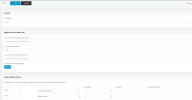
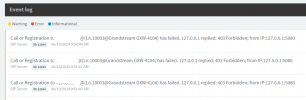
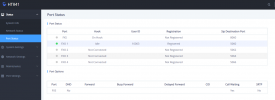
My gateway is provisionned and can receive call but im not able to made outbound call. If i edit my outbound rules it works. When trying to call i have the message : Call forbidden by administrator

Any idea ?

Thanks ! Capture d’écran 2024-06-10 101131.png
Capture d’écran 2024-06-10 100805.png


Capture d’écran 2024-06-10 101026.pngCapture d’écran 2024-06-10 100841.png
 
If i edit my outbound rules it works.
Exactly what does this mean? Details please....
How are you dialing the calls when it fails, and what are you changing in the outbound rules? What digits are required by your provider. If a call is forbidden it may be because the prefix is on a block list for some international regions. Are you using a country code, or dialing as a local number?
 
Update,
Work if i dialed the sip account registered for the grandstream (Authentication ID) Exemple, my id is 10003, i need to dial this number first, after i can dial the phone number. Just need to find how bypass this option ...
Activate Hunting Group from HT841, now i can dial 1 or any number and it does the same as dialing 10003 but still can go with only phone number.

And to answer "if I edit my outbound rules it works" want to tell ... if i use different provider it work, my bad :)
 
Not sure why you'd have to dial the trunk number first. This is an internal number assigned to the trunk and is not normally dialed by a user. It is used when the gateway "forwards" a call to 3CX. All internal dialing to outside trunks is configured in the outbound rules, so I assume that you still have to work on these.
 
Still not find my issue ... open a ticket with grandstream but they dont know either ...
 
Have you made use of the 3CX Activity Log to aid in troubleshooting?
 
Hi,
Yes tried but 3cx just see that i made the call and this is correct ... Dialing a number to go to the grandstream exemple dial 1 and call. After I ear the tone and can dial my phone number. Still with grandstream support for that ...
 
Find it !
You have to change "Stage Method (1/2)" in the grandstream on your fxo profil/channel dialing to 1.
 
I'm also having trouble with this. I feel like I'm missing something basic, but there are so many settings on these grandstream FXO devices. Here's what I've done so far:

I set the HT841 to a fixed IP.

In 3CX I went to add a gateway in the voice and chat menu. I gave it whatever name and a default route pointing the calls to a ring group. I gave it a random Main Trunk Number. (Is there something the main trunk should be?) It made the authentication ID 10000 and I just made up a random authentication password. For the Registar/Server I put the HT841 IP address and left the port 5060. I didn't worry about DID numbers because I don't want to control them separately. In options I did 3 lines because we have 3 analog lines. I left Limit to as System Wide and SRTP Mode as disabled.

Then I logged into the HT841.

On the FXO Profile 1 tab I set the primary sip server and the Outbound proxy to: 192.168.1.5:5060
192.168.1.5 is the local address of 3CX

On the Port tab, I set Port 1, 2, and 3 of the FXO Port Settings to:
Sip User ID: 10000
Authentication ID: 10000
Password: the password I made up in 3CX.
Name: 10001 for port 1, 10001 for port 2, 10002 for port 3 (I just made this up, does it matter?)
Profile ID: FXO Profile 1
Hunting Group: Active (all 3)
Enable Port: Yes

I found somewhere to set the stage method to 1 so I tried that both ways.

It authenticates with 3CX, so I get a green square in 3CX. But if I try to call out it just rings and rings and never actually completes. If I call in, it just rings and rings and 3CX never gets the call. The call log shows outgoing calls as unanswered, but they never rang through. The incoming calls never get to the call log.

Anyone have any suggestions or could point me in the right direction? We fully pass the 3CX firewall test.
 
I'm also having trouble with this. I feel like I'm missing something basic, but there are so many settings on these grandstream FXO devices. Here's what I've done so far:

I set the HT841 to a fixed IP.

In 3CX I went to add a gateway in the voice and chat menu. I gave it whatever name and a default route pointing the calls to a ring group. I gave it a random Main Trunk Number. (Is there something the main trunk should be?) It made the authentication ID 10000 and I just made up a random authentication password. For the Registar/Server I put the HT841 IP address and left the port 5060. I didn't worry about DID numbers because I don't want to control them separately. In options I did 3 lines because we have 3 analog lines. I left Limit to as System Wide and SRTP Mode as disabled.

Then I logged into the HT841.

On the FXO Profile 1 tab I set the primary sip server and the Outbound proxy to: 192.168.1.5:5060
192.168.1.5 is the local address of 3CX

On the Port tab, I set Port 1, 2, and 3 of the FXO Port Settings to:
Sip User ID: 10000
Authentication ID: 10000
Password: the password I made up in 3CX.
Name: 10001 for port 1, 10001 for port 2, 10002 for port 3 (I just made this up, does it matter?)
Profile ID: FXO Profile 1
Hunting Group: Active (all 3)
Enable Port: Yes

I found somewhere to set the stage method to 1 so I tried that both ways.

It authenticates with 3CX, so I get a green square in 3CX. But if I try to call out it just rings and rings and never actually completes. If I call in, it just rings and rings and 3CX never gets the call. The call log shows outgoing calls as unanswered, but they never rang through. The incoming calls never get to the call log.

Anyone have any suggestions or could point me in the right direction? We fully pass the 3CX firewall test.
Try this for inbound call
Port Setting / fxo profil 1 / Fxo termination / Number of Rings set to 2
This should help :)
 
Keep in mind that in the 3Cx trunk settings, the IP (and port) of the gateway has to be put in otherwise 3cx doesn't know where to send calls. Use the Activity log to see if the outbound calls are routing to the IP and port you expect it to.
An incoming call on the gateway basically "forwards" the call to the trunk number in 3CX.
 
I am trying to set up a new installation using an HT841 gateway. I was able to get it registered with 3CX. I can receive incoming calls but am unable to make outbound calls I continue to to get SIP: replied: Busy Here (486) in the event log. When calling out, I receive an audible 3CX message saying “the number you are trying to reach is busy, please try again later”. Unconditional Call Forward to VoIP is for routing inbound. How do I configure the Unconditional Call Forward to PSTN. I am assuming this is for outbound but I have tried numerous variations and nothing works. Anyone’s insight would be greatly appreciated.
 
I'm also having trouble with this. I feel like I'm missing something basic, but there are so many settings on these grandstream FXO devices. Here's what I've done so far:

I set the HT841 to a fixed IP.

In 3CX I went to add a gateway in the voice and chat menu. I gave it whatever name and a default route pointing the calls to a ring group. I gave it a random Main Trunk Number. (Is there something the main trunk should be?) It made the authentication ID 10000 and I just made up a random authentication password. For the Registar/Server I put the HT841 IP address and left the port 5060. I didn't worry about DID numbers because I don't want to control them separately. In options I did 3 lines because we have 3 analog lines. I left Limit to as System Wide and SRTP Mode as disabled.

Then I logged into the HT841.

On the FXO Profile 1 tab I set the primary sip server and the Outbound proxy to: 192.168.1.5:5060
192.168.1.5 is the local address of 3CX

On the Port tab, I set Port 1, 2, and 3 of the FXO Port Settings to:
Sip User ID: 10000
Authentication ID: 10000
Password: the password I made up in 3CX.
Name: 10001 for port 1, 10001 for port 2, 10002 for port 3 (I just made this up, does it matter?)
Profile ID: FXO Profile 1
Hunting Group: Active (all 3)
Enable Port: Yes

I found somewhere to set the stage method to 1 so I tried that both ways.

It authenticates with 3CX, so I get a green square in 3CX. But if I try to call out it just rings and rings and never actually completes. If I call in, it just rings and rings and 3CX never gets the call. The call log shows outgoing calls as unanswered, but they never rang through. The incoming calls never get to the call log.

Anyone have any suggestions or could point me in the right direction? We fully pass the 3CX firewall test.
Did you figure out a resolution? I am having issues with outbound but was able to get inbound working. Please advise! Thank you!
 
Hi,
Inbound : had to configure each port to a new Gateway
Exemple, port1 = gateway#1 port 5060
port2 = gateway#2 port 5061
port3 = gateway#3 port 5062
port4 = gateway#4 port 5063
(more if you have ht881 or 2 ht841)
For inbound it work. My problem goes on outbound rules cause I have to selec 5 route MAX.
So if i have 2 grandstream HT841 or HT881 how to make it work ?
 
We really need to find a way to made the ht841/881 work as a 4104/4108 with all port using 5060.
Opened a ticket with Grandstream ...
 
These grandsteams have been a real pain. I wish there was easier integration in 20 like 18. I have all of my ports as one gateway in 3cx, but I could only make 1 outgoing call because I didn't understand how to set the hunting group on the FXO ports page in the HT841. I think I got a busy message on the phones when I tried to make more than one outgoing call. But I could get multiple incomming calls.

In the HT841 I had all the ports set to Active for the hunt group which is wrong. You set your first line to active and then set the hunt group to 1 on the other lines that are in the same group with port 1. Then I could make multiple outgoing calls!
 
Hi Lisa,
2 step for outbound
1, in 3cx, set your ht841 to specify the number of line you have. Go to Voice & chat and select your grandstream, option and set your "number of sim calls per trunk"
2, in the 841, go to port settings then fxo ports.
port 1 is the link with 3cx so exemple 10001 with password. activate Hunting Group and enable port.
port 2, no entry on sip user id. Hunting group = 1 (same if you have port 3 and 4) Enable port.

Hope its help :)

Maxime
 
I don't need help. I have a working product. I was giving advice for the other people in the thread who only were able to make one call and how to set the hunt group.
 
Status
Not open for further replies.

Latest Posts

Members Online Now

No members online now.

Forum statistics

Threads
111,831
Messages
589,276
Members
164,660
Latest member
RJenkinsROCK