New AD Server, Small Windows client issue

Status
Not open for further replies.

chaznsc

Customer
Joined
Jan 22, 2016
Messages
32
Reaction score
2
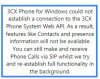
We successfully installed a new server this week via a consultant. Everything works EXCEPT the Windows client phones will not display status or the phone book. Calls still work however. I have attached the little warning we get on the client phone.
 

Attachments

  • provi.jpg
    provi.jpg
    21.9 KB · Views: 580
It sound as if the port, used by your system for presence, has not been opened (forwarded) at the 3CX PBX end router/firewall.

http://www.3cx.com/docs/3cx-phone-system-v14-ports/

Are you using other devices (remotely), for which this is working properly? (Is it only the Windows phones having this problem?)
 
The ports on the firewall are open. The only thing different are the local domain name has changed and the server has a different IP address.
 
Send each user the welcome email and then provision the softphone with the configuration file that came embedded in the email.
 
lneblett said:
Send each user the welcome email and then provision the softphone with the configuration file that came embedded in the email.

I tried this on my windows box and now my soft phone wont even connect.
 
If you have changed the Internal/External FQDN and/or Internal/External IP of the 3CX Phone System post-installation, the Welcome Email will contain the incorrect information so it will not work.

If this is the case, make a Full Backup, uninstall, re-install, then restore your Full Backup, then try re-sending the Welcome Email again.
 
Status
Not open for further replies.