New call queue just sends to VM or drops calls

Status
Not open for further replies.

TLCtech

Customer
Joined
Oct 12, 2020
Messages
263
Reaction score
29
Im hoping someone can help me figure this out.

So we currently have a call group to handle our calls between two people who take calls. One user is no longer with us and we are looking for a replacement, so that user is DND and all calls go to the other user. Unfortunately, any calls that they arent available to answer go to VM. So mgmt wanted me to set up a queue that would keep people on hold to wait for the next available person. There also may be a better way to handle this.

When a call comes in: IVR stating if caller has an ext, to dial it now or wait for an operator>Wait 10s, if no entry forward to ring group.

When the ring group hits, if operators are busy, they get no busy message, the call just goes to whatever VM the settings are set to.

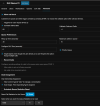
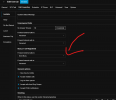
I tried to set up a busy signal for the user, but if I set the user to "busy" if no answer, the call is dropped.
1720824700071.png
So they dont get any call waiting or anything. Ok, fine. Lets build a queue then.

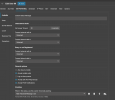
Here is how I set up the queue: re: https://www.3cx.com/docs/manual/call-center-queues/

If I set the destination to a VM, it just sends all calls there if no one is available. I tried setting it back to the queue but it doesnt work. I set the ring time out, But no one stays IN queue.
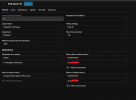
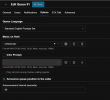
1720824940772.png 1720824972733.png 1720825014739.png

How do I a) keep calls in queue until someone answers and b) offer the call back like these settings seem to suggest is available and c) is there a way to have callers elect to go to VM in queue? Right now, all calls get sent to VM or dropped and we are spending lots of time calling people back. Also, this might be important, but when I go to pannel, no one is logged into any queue. I set the user's status to log out, like the doc says, but they cant log IN.

Thank you in advance.
 
Bumping this. Im not sure what I am doing wrong, but I cannot get call queues to work. All calls just go to voicemail when the queue is active.
 
You have your Queue destination if no answer to go to the same queue. If the Agent(s) are not logged in to the queue, it will trigger the Destination if no answer. As this will then send it to the same queue, you are essentially going into a loop, and the PBX s just dumping the call.

Ensure your agents are logged in. The queue will have the agents logging in and out accordingly. either manually or autmatically based on their profile.

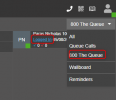
This can be checked from the PANEL where you can see the active queue calls.

1722857801045.png

How do I a) keep calls in queue until someone answers
You will need at least ONE agent logged in to the queue.

b) offer the call back like these settings seem to suggest is available
The callback is offered either when the caller presses 2 (this is a hardcoded option which cannot be modified) or after a specific time out.

They will follow the instructions to verify or change their number, and they remain in the queue until an agent answers their call. the PBX will then place the agent on hold until the PBX itself calls the person back.

I see that you put +1 as a callback prefix.

If a customer requests a callback to 19725551234 then the PBX will try to call back to +119725551234. That callback prefix is just a filtering prefix for your outbound rules so you can limit where you want callbacks to be made to.

no one is logged into any queue. I set the user's status to log out, like the doc says, but they cant log IN.
Ensure your users are in the Available state, and that they log themselves in, or you are a queue manager to log them in on their behaf.
 
You have your Queue destination if no answer to go to the same queue. If the Agent(s) are not logged in to the queue, it will trigger the Destination if no answer. As this will then send it to the same queue, you are essentially going into a loop, and the PBX s just dumping the call.

Ensure your agents are logged in. The queue will have the agents logging in and out accordingly. either manually or autmatically based on their profile.

This can be checked from the PANEL where you can see the active queue calls.

View attachment 42995


You will need at least ONE agent logged in to the queue.


The callback is offered either when the caller presses 2 (this is a hardcoded option which cannot be modified) or after a specific time out.

They will follow the instructions to verify or change their number, and they remain in the queue until an agent answers their call. the PBX will then place the agent on hold until the PBX itself calls the person back.

I see that you put +1 as a callback prefix.

If a customer requests a callback to 19725551234 then the PBX will try to call back to +119725551234. That callback prefix is just a filtering prefix for your outbound rules so you can limit where you want callbacks to be made to.


Ensure your users are in the Available state, and that they log themselves in, or you are a queue manager to log them in on their behaf.
Sorry for the long wait for a reply. Rebranding has been fun!
I think the issue here might be that I am not 100% sure how to log them IN. I have statuses log them out, but I dont see a way to have them log into the queue.
 
Based on my screenshot above, if you are the queue manager you will be able to see all the agents in the queue and clicking on the highlighted link, you will be ble to log them in on their behalf.

https://www.3cx.com/docs/pbx-queue-status/
 
  • Like
Reactions: TLCtech
Based on my screenshot above, if you are the queue manager you will be able to see all the agents in the queue and clicking on the highlighted link, you will be ble to log them in on their behalf.

https://www.3cx.com/docs/pbx-queue-status/
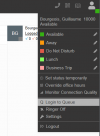
I missed the option where they can manually log in and out of the queue. Thanks! However I thought I had it set up for them to automatically log in when set to available. I see the check to log out when that status is chosen, but not to log in.

1724784948587.png
 
I missed the option where they can manually log in and out of the queue. Thanks! However I thought I had it set up for them to automatically log in when set to available. I see the check to log out when that status is chosen, but not to log in.

image.png

There is no option to force a "log in" in the queues.
The purpose of this setting is to prevent misunderstandings and ensure that a person does not mistakenly believe they have been logged out of the queues by selecting a different status.

Currently, you cannot force a login in Queue.

However, if the user does not manually log out from a queue, when they return to a status where the "Log Out from queue" option is unchecked, they will be automatically reconnected (login).

An idea has been proposed to add an option to disable the ability to disconnect from Queues. If this idea interests you, I invite you to go vote. https://www.3cx.com/community/threads/disable-queue-toggle-login-logout-option-in-3cx-client.50228/
 
There is no option to force a "log in" in the queues.
The purpose of this setting is to prevent misunderstandings and ensure that a person does not mistakenly believe they have been logged out of the queues by selecting a different status.

Currently, you cannot force a login in Queue.

However, if the user does not manually log out from a queue, when they return to a status where the "Log Out from queue" option is unchecked, they will be automatically reconnected (login).

An idea has been proposed to add an option to disable the ability to disconnect from Queues. If this idea interests you, I invite you to go vote. https://www.3cx.com/community/threads/disable-queue-toggle-login-logout-option-in-3cx-client.50228/
No I mean in the link Nicholas provided, there is an automatic log in. But that isnt happening to queue members here.

Automatically based on the user’s profile status​

An agent can be automatically logged in or out of queues, depending on the user’s profile status. For example, when the agent is “Available” the agent will be logged in to the Queues automatically. When the agent chooses “Away” or “Do Not Disturb” the agent will be automatically logged out from the queues.
 
That's exactly what I mean: if the user doesn't manually disconnect, their "status in the queue" (login / logout) will follow their profile status (Available, Away, DND) . Once connected, the user still has the option to disconnect manually. If the user does disconnect, they will not be automatically reconnected until they set themselves to "Login" and allow the system to manage their queue status based on their profile status.

1724787159483.png


In other words, the documentation refers to "automatic login" because this will occur provided that the user does not override their Queue status (login/logout).
 
  • Like
Reactions: Evolute IT
Status
Not open for further replies.

Members Online Now

Forum statistics

Threads
111,843
Messages
589,326
Members
164,679
Latest member
SamadMYK