New SBC install - cannot transfer Shared Park calls

Status
Not open for further replies.

NDGsystems

Bronze Partner
Basic Certified
Joined
Mar 2, 2019
Messages
45
Reaction score
0
Hi all,

After installing a SBC (windows 10) for one of our clients, the receptionist extension 000 (Grandstream GXP-2140 with GXP2200 extension board) cannot transfer a second parked call to anyone.

To clarify:
  1. Call 1 is answered by extension 000
  2. Call 2 comes in to extension 000
  3. Call 1 placed on Shared park extension 1 using BLF on extension board
  4. Call 2 is answered by extension 000
  5. Extension 000 tries to transfer call 2 to any other extension and fails
callers hear the hold music but are not transferred to destination extension.
Destination extension can see that 000 is calling but when picked up there is no audio. Extension 000 still says "Transferring"

We upgraded from V15 to V16 and installed the SBC at the same time.
3CX 16.0.2.910, Hosted on AWS
GXP-2140 1.0.9.135,

I would appreciate any help regarding this.

Joe
 
Hi all,

After installing a SBC (windows 10) for one of our clients, the receptionist extension 000 (Grandstream GXP-2140 with GXP2200 extension board) cannot transfer a second parked call to anyone.

To clarify:
  1. Call 1 is answered by extension 000
  2. Call 2 comes in to extension 000
  3. Call 1 placed on Shared park extension 1 using BLF on extension board
  4. Call 2 is answered by extension 000
  5. Extension 000 tries to transfer call 2 to any other extension and fails
callers hear the hold music but are not transferred to destination extension.
Destination extension can see that 000 is calling but when picked up there is no audio. Extension 000 still says "Transferring"

We upgraded from V15 to V16 and installed the SBC at the same time.
3CX 16.0.2.910, Hosted on AWS
GXP-2140 1.0.9.135,

I would appreciate any help regarding this.

Joe
You're still on V16 SP2. Update to SP4 and try again. Templates and firmwares are updated by the SP updates. Also a lot of bug fixes.
 
Thank you, but same issue persists,
3cx updated to latest version
GS GXP2140 factory reset and re-provisioned
Still cannot transfer the call to anyone while there is a call parked in Shared parking.
Any ideas?
 
Anyone from 3CX can comment please?
 
Hi Joe,

I can confirm that this scenario works. I think you may need to recheck everything just be sure:

  • Ensure the SBC is updated to V16.0.390 (with Setting for Security set to TLS)
  • Your PBX should be on V16.0.4.493
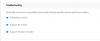
  • Your extensions behind SBC should have options set to 13959
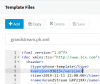
  • Your Grandstream templates should be updated too (don't use custom)
13960
 
Thank you for your reply,
I've reconfirmed the setting and all is as you mentioned above:

3CX: V16.0.4.493
SBC: V16.0.390 on TLS
GS GXP-2140: 1.0.9.135 template: 93615

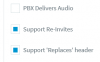
The only difference is that "PBX delivers audio" otherwise we do not have audio...

13966

Anything else I should try?
 
Thank you for your reply,
I've reconfirmed the setting and all is as you mentioned above:

3CX: V16.0.4.493
SBC: V16.0.390 on TLS
GS GXP-2140: 1.0.9.135 template: 93615

The only difference is that "PBX delivers audio" otherwise we do not have audio...

View attachment 13966

Anything else I should try?
Yes, disable PBX Delivers Audio and try again.
 
Done, same issue.
 
Anyone has a possible solution for this?
 
Hi Joe,

It's a bit strange that you have no audio without "PBX Delivers Audio" when we are talking about SBC-based phone.

You might have to sort this out before you check the shared parking, as it is probably the cause behind the issue here I would suspect..

Can you confirm that the phone is correctly provisioned via the SBC?
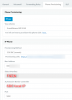
Your provisioning page must contain the local IP of the SBC (same range as the phone effectively) and must also have a valid FQDN as the provisioning interface.
14001


Your phone will also show the equivalent settings in the account information:

14003
 
  • Like
Reactions: Evolute IT
Thank you, sorry for the late replay, i'll test all by your suggestion and update here.
 
All settings checked and are are as you posted above. Still the same issue.
I have 4 questions:

1. are these router settings correct?
14014

2. are these transfer settings correct?
14015

3. The SBC is on a windows 10 VM with no firewall. Is that ok?

4. After an internet failure it may take a long time for BLF buttons to update (they are gray on all phones) sometimes up to a few hours. Anything I can do to speed this up?

Thanks again for your help.
 
  1. You need zero port forwarding on the SBC side so if that's the SBC side you can delete those.
  2. Sure if that's the transfer you want.
  3. Windows 10 is supported, firewall or no firewall is up to you. 3rd party firewalls is really there problems can happen but no firewall is fine for testing.
  4. Seems unusual, but may just be a Grandstream thing or may be indicative of other issues. See what hapepns when you get rid of the port forwards on the phone/SBC side if that's what you posted .
 
All settings confirmed as suggested here, still second call does not transfer when first call is in shared parking. Thank you for trying to help.
Anything else to try?
 
Hi Joe,

Do you by any chance use DHCP Client isolation? (most common in guest network scenarios)

For example, if we were to connect 2 PCs on the same network equipment and IP range, can they see each other and send files to each other?
 
It's a good question, but no. All phones are on static IPs on an internal open network.
There are a few things that may have caused this:
  1. The windows SBC
  2. The router used (Netgear nighthawk)
  3. The update from ver. 15 to 16.
Other then that there have been no changes and all was working well before.
I'm open to try anything...
 
What is the the internet access in front of the Netgear? Standard ISP modem/router with DHCP?
 
Status
Not open for further replies.

Latest Posts

Forum statistics

Threads
112,366
Messages
592,134
Members
165,538
Latest member
3K8iMGWviZ