New SBC - Unattended installation

Status
Not open for further replies.

Evolute IT

3CX MVP
Gold Partner
Advanced Certified
Joined
Feb 6, 2018
Messages
11,253
Reaction score
7,118
Hi,

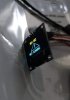
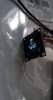
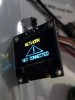
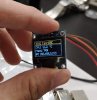
I am currently in the development of my own Raspberry Pi image for my customers with SBCs on-site. I am doing this to provide a better box with small OLED screen displaying basic diagnostic information as well as the support number.

I want to create an automated process that I simply tell the image: here's the FQDN, here's the Key. Then the script would install the SBCs with those parameters, set my Python deamon for the screen and set a few settings.

I am also trying to get the SBC name but it isn't provided in the SBC config file, would it be possible to add it? So I can display the MC SBC name on the OLED screen. Easier to know which is which when having multiple.
 
  • Like
Reactions: FS_Mathieu
Waoaw :D, good project , hope you can accomplish it, idea seems good.:p
 
  • Like
Reactions: Evolute IT
It looks promising , I order one when you have finished to package it
 
  • Like
Reactions: Evolute IT
Excellent work
 
is there always something displayed on screen or you can choose if you want it completly off (black)
 
is there always something displayed on screen or you can choose if you want it completly off (black)

right now it is always displayed but we are working on bettering the UI with overlay for support number and email sent on warnings.

the screen is dedicated to that so it might always be on, we want that as quick troubleshooting when a customer calls.
 
if screen is always on, it can burn no ? after hours and days working no end
 
if screen is always on, it can burn no ? after hours and days working no end

well, I suppose it will, but it is our intention to test the durability of that. The issue is that it isn't touchscreen so if it is off and the customer needs to see it, then how do I turn it on? Adding a button seems overkill.

however, it is a very fair point!
 
same display as touchscreen doesn't exist? or is it overpriced?
 
same display as touchscreen doesn't exist? or is it overpriced?

most displays are overpriced. This small OLED is 15$CAD for a 0.98inch. It is perfect for my needs tho.

however, I though about making the screen move a bit every minute to prevent burning
 
is it possible to have a " on software command" screen wake up?
 
is it possible to have a " on software command" screen wake up?

probably, you mean a remote wake? The problem with that is I want to prevent having to forward ports to the SBC. I would have to make a totally new program to remote control it.

the screen is simply running a Python script updating every 5 seconds
 
Make it move and it willbe alright ! The biggest problem with Oled is to leave the screen frozen !
 
  • Like
Reactions: Evolute IT
Right now our biggest issue is we want an installer script to run everything.

  • install the SBC using parameters or environment variables and get the freaking name in the Console to display on the OLED
  • install python
  • install the script deamon for the screen
 
...or perhaps, dim it a bit. It's not being used as a video display, where burn in would be noticeable when "normal" video is playing. It is an information display, given the low cost, any burn-in that happened over several years would not really be detrimental to it's function.
 
  • Like
Reactions: Evolute IT
@JohnS_3CX Do you know how I could unattend the install? Using either parameters or environment variables.
 
  • Like
Reactions: Evolute IT
Status
Not open for further replies.

Forum statistics

Threads
112,359
Messages
592,097
Members
165,533
Latest member
[email protected].