Hello
@Bob Erwin,
I have sent you a p.m.
I greatly appreciate your help and will work on what you sent me.
In the meantime, a quick update.
Our cable provider is Northland Cable and the modem is an Arris DG2460A
I configured port forwarding, the firewall test passed (except RTP > 9240). The sip trunk registered. But no incoming our outgoing calls. Voicemail and extension to extension calls OK.
Read on the internet that Arris modems don’t work and the modem needs to be put in bridge mode.
Put it is bridge mode and turned off the firewall.
Used a Dlink DIR850L which investigation says should work.
It also passes the firewall test but the sip trunk will not register. Also no incoming or outgoing calls.
Also tried re-enabling firewall on Arris (even though in Bridge mode). Firewall test passed. No trunk registration.
Other interesting info. When using the ARRIS cablemodem, firewall test passed, trunk registered and I could access control panel through another computer. With the Dlink 850, firewall test passed, no sip trunk registration and cannot access control panel from another computer. Get WARNINGS.SERVER_ERROR.
I have another router to try this morning but will do your test first and post the results.
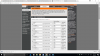
I also included a pic of port forwarding configuration to make sure I didn't miss something.
Thanks for your help.
Bob