No access to Microsoft 365 Settings after activation

Status
Not open for further replies.

Andreas Ebinger

Trainee Partner
Basic Certified
Joined
Feb 6, 2020
Messages
18
Reaction score
3
Hi,

today we activated the M365 Integration (successfully we think). But after the Step 4 Point 5 (https://www.3cx.com/docs/microsoft-365-integration/) we can not access the settings page anymore. All that happens if we try to access https://INTERNALIP:5001/#/app/settings/office365 is a more or less empty page with the headline "Microsoft 365-Integration", OK-Button and Cancel Button - nothing more. After some time we get a "Server Error" "The 3CX-Management Console is not responding. This may be a browser issue - clear your browser cache, refresh an try again" - Message. We tried that and even installed a new portable browser - no change. We are also waiting now for about 6 hours - I do not thing that we are to impaitent for the connection to be established. As far as we can see it from the azure side the connection seems to be established.
 
Hi again!

Judging from a case we explored earlier today, I am having serious doubts about how "unrestricted" the network you are working in is.

From what I can see, you are fairly new to the 3CX family, so as a friendly suggestion, I would recommend first installing 3CX somewhere where the network is not restricted and without HTTP/S proxies.

Why not put your 3CX System in the Cloud? Then if you want IP Phones, use an SBC.

Then once you have everything figured out, you can check setups with proxies, etc.

After some time we get a "Server Error" "The 3CX-Management Console is not responding.
The above was my general opinion. This error usually means that some service has stopped.
 
I am not new to the 3cx at all - I am a Voip System Engineer for 5 years now and I work with the 3cx in different setups for 3 years. Until now I was just lucky enough to not encounter any real problems which is a compliment to the documentation and ruggedness of the system.

We checked the possibility to move to a cloud setup earlier this year - it was not feasible because the customer is bound to a VOIP-SIP Trunk provider who is not 3CX-Cloud supported. When we checked the possibility to move to Azure or another cloud provider we found that the costs are still too high until the local Datacenter gets moved to the cloud completely in the comming years.

The M365 integration of that setup was up and running before we upgraded from v16 to v18 - if 3cx or Microsoft did not change ports or anything I do not see why the proxy should suddenly be the problem - esspecialy since it turned out to be innocent in the aforementioned case.

As far as I can tell all the services are running - would you be so kind as to tell me what the name of the system service on the cli is that handels the communcation to azure/M365?

Thanks for your help
 
As far as I can tell all the services are running - would you be so kind as to tell me what the name of the system service on the cli is that handels the communcation to azure/M365?
Sure, the service that handles most of the MS365 things is "3CXSystemService01", but if you are thinking or restarting it, you may also want to restart also "3CXPhoneSystemMC01" as that is also involved in some things.

General information, you can also start/stop all 3CX Services using commands:
/usr/sbin/3CXStopServices
/usr/sbin/3CXStartServices
 
A restart of the services or even the whole server made no difference. I have looked into the 3cxManagementConsole log and found the following:

2021/11/12 12:00:50.834|57767|0174|Trc|[Microsoft.AspNetCore.Hosting.Diagnostics] Request starting HTTP/1.1 GET http://172.18.7.58:5001/api/SystemStatus - -
2021/11/12 12:00:50.835|57767|0174|Trc|[Microsoft.AspNetCore.Authorization.DefaultAuthorizationService] Authorization was successful.
2021/11/12 12:00:50.835|57767|0174|Trc|[Microsoft.AspNetCore.Routing.EndpointMiddleware] Executing endpoint 'ManagementConsoleJS.Controllers.SystemStatusController.Get (3CXManagementConsole)'
2021/11/12 12:00:50.835|57767|0174|Trc|[Microsoft.AspNetCore.Mvc.Infrastructure.ControllerActionInvoker] Route matched with {action = "Get", controller = "SystemStatus"}. Executing controller action with signature System.Threading.Tasks.Task Get() on controller ManagementConsoleJS.Controllers.SystemStatusController (3CXManagementConsole).
2021/11/12 12:00:50.835|57767|0174|Trc|[Microsoft.AspNetCore.Authentication.Cookies.CookieAuthenticationHandler] Webclient was not authenticated. Failure message: Unprotect ticket failed
2021/11/12 12:00:50.835|57767|0174|Trc|[Microsoft.AspNetCore.Authorization.DefaultAuthorizationService] Authorization was successful.
2021/11/12 12:00:50.840|57767|0174|Trc|GetStatusInformation: 00:00:00.0049033
2021/11/12 12:00:50.840|57767|0174|Trc|[Microsoft.AspNetCore.Mvc.Infrastructure.ControllerActionInvoker] Executed action ManagementConsoleJS.Controllers.SystemStatusController.Get (3CXManagementConsole) in 5.412ms
2021/11/12 12:00:50.840|57767|0174|Trc|[Microsoft.AspNetCore.Routing.EndpointMiddleware] Executed endpoint 'ManagementConsoleJS.Controllers.SystemStatusController.Get (3CXManagementConsole)'
 
It may be related, because the process that happens in the background if you have configured the MS365 settings is not only for the 3CX to make and outgoing connection, but also at that point MS makes a connection to 3CX.

Seeing that all incoming connections go to nginx, I cannot rule out that whatever changes you have made are affecting this.

Modifying any system files is not recommended/supported, so I think the first thing you need to do is re-install 3CX and restore a backup and not touch any files.
This needs to be your first troubleshooting step.

If the 3CX Server is a VM by any chance, you can take a snapshot and always revert back to it after you test this.
 
Good morning - I did as you asked and reverted the nginx to its fresh installed config - but it made no difference. Same behavior as before :-(
Would would be the right log to look for clues? I looked at the 3CXManagementConsole Log -but perhaps there is another log from nginx or a system log?
 
All MS365 related logs are mainly in the SystemService log, and a few in the Management Console log, so that is where you would want to check for clues.

nginx logging is disabled by default.

I have sent you a PM though as well, check it out as well.
 
Hi,

I am having this exactly same problem. Fresh v18 install from azure marketplace. I enabled logging on nginx, nothing useful, just 504 timeout from 3CX service when accessing /api/office365

So if you have insight or places to look for answer, pm me also
 
Hi,

I am having this exactly same problem. Fresh v18 install from azure marketplace. I enabled logging on nginx, nothing useful, just 504 timeout from 3CX service when accessing /api/office365

So if you have insight or places to look for answer, pm me also
So, just to recap, you have:
  • Your 3CX installation is V18 Update 1 (build 237)?
  • Followed the guide: https://www.3cx.com/docs/microsoft-365-integration/
  • You have your HTTPS port open and forwarded on your Firewall to your 3CX Server with no restrictions (e.g. Geo IP)
  • You don't have any restrictions on your network or any AV software
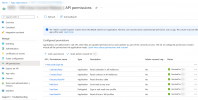
  • Do your app Registration Permissions look like this? (note there are 6 entries...)
    1637162963773.png
If all this has been checked, can you please tell me exactly where you are pressing and what error you are getting? Screenshot would be perfect.
 
Update:

I found the perpetrator. I think. Tenant AD has 16k+ users, it fetches them in 500u chunks, each chunk takes 1000+ms to load, so timeout is imminent.

Would be nice if it loaded those ad users asynchronously.
 
  • Like
Reactions: NickD_3CX
So, just to recap, you have:
  • Your 3CX installation is V18 Update 1 (build 237)?
  • Followed the guide: https://www.3cx.com/docs/microsoft-365-integration/
  • You have your HTTPS port open and forwarded on your Firewall to your 3CX Server with no restrictions (e.g. Geo IP)
  • You don't have any restrictions on your network or any AV software
  • Do your app Registration Permissions look like this? (note there are 6 entries...)
    View attachment 25925
If all this has been checked, can you please tell me exactly where you are pressing and what error you are getting? Screenshot would be perfect.
Yes. Also, consent is given successfully, and service principal login is successful.
 
Update:

I found the perpetrator. I think. Tenant AD has 16k+ users, it fetches them in 500u chunks, each chunk takes 1000+ms to load, so timeout is imminent.

Would be nice if it loaded those ad users asynchronously.
I seem to remember seeing this in an early version of V16, but not in V18 as it has been improved since.
I created a new MS365 Tenant with 21k users to test this, but I could not replicate the issue. Yes, when I clicked on Settings --> Microsoft 365, it does take 5-10 seconds to load, but it does not throw an error.
Could you please confirm that your 3CX Server is on 18.0.1.237 build?
 
Yes, 18.0.1 build 237.

And yes, this was actually the problem. I was able to circumvent the problem by adding 3CX nginx parameter to allow longer response times from proxy, now it loads for 3 minutes and eventually comes up with 1600+ pages of users. Not very convenient.

It’s shame that o365 users can’t seem to be whitelisted by their group memberships. We’re planning to circumvent this by automating the parametric whitelist; using cron job to query specific group members from graph api, and then updating the parameter table accordingly. Or is there more suitable method of maintaining the whitelist?
 
It’s shame that o365 users can’t seem to be whitelisted by their group memberships. We’re planning to circumvent this by automating the parametric whitelist; using cron job to query specific group members from graph api, and then updating the parameter table accordingly. Or is there more suitable method of maintaining the whitelist?
Sorry, can you explain what you mean when you say "..can't seem to be whitelisted...". Whitelisted where?
Maybe explain what you want to achieve so that we can consider if there are any alternatives.
 
Sorry, can you explain what you mean when you say "..can't seem to be whitelisted...". Whitelisted where?
Maybe explain what you want to achieve so that we can consider if there are any alternatives.
Sorry for being unclear. These are the facts:
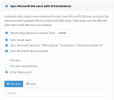
  1. we have AD with 16k+ users, of which approx. 100 are going to get access to pbx client
  2. some of those AD users are VIPs, it's mandatory that they are not visible in pbx
  3. access to application which enables o365 sso in 3cx is restricted to user group
It would be beneficial if 3cx extensions would be synced according to aforementioned group, so that when new user is added to the group, he would automatically receive 3cx extension as well. What I was proposing was, that if we create script which maintains this sync whitelist
1637921740140.png
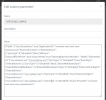
by making changes directly into parameter table
1637921955318.png
this would lead to situation, where all the group members will be automatically created as extensions. Only drawback is that when user gets removed from ad group, extension would remain, and it will need to be removed manually.

If there's some better way of achieving this, please tell me.
 
To be more clear about the problem that this thread considers directly; in my opinion, it is a design flaw in the UI application, specifically in the o365 settings page, that the request to open the page is not responded until the whole AD request loop has gone through. In my opinion, those paginating requests to fetch the entire userbase could as well be made in the background, and served to the frontend via websocket, or even better, initiated on demand by frontend async/await -type of script.
 
Sorry for being unclear. These are the facts:
  1. we have AD with 16k+ users, of which approx. 100 are going to get access to pbx client
  2. some of those AD users are VIPs, it's mandatory that they are not visible in pbx
  3. access to application which enables o365 sso in 3cx is restricted to user group
It would be beneficial if 3cx extensions would be synced according to aforementioned group, so that when new user is added to the group, he would automatically receive 3cx extension as well. What I was proposing was, that if we create script which maintains this sync whitelist
View attachment 26171
by making changes directly into parameter table
View attachment 26172
this would lead to situation, where all the group members will be automatically created as extensions. Only drawback is that when user gets removed from ad group, extension would remain, and it will need to be removed manually.

If there's some better way of achieving this, please tell me.
I think I am starting to understand what you mean.
So this feature is not available right now, but is being considered as explained in the 3CX Roadmap for Microsoft 365 Integration blog post released on 05/11/2021.

It is undetermined though at this time, if there will be a sync if a user is moved out of a AD group what will happen, and also unknown if this will extend to the SSO functionality.
At this point though, nothing final and everything is under consideration.

For the time being, if you want users to stop being able to log in using SSO, you either need to do it from the Management Console, or be adjusting the parameter you mentioned.


To be more clear about the problem that this thread considers directly; in my opinion, it is a design flaw in the UI application, specifically in the o365 settings page, that the request to open the page is not responded until the whole AD request loop has gone through. In my opinion, those paginating requests to fetch the entire userbase could as well be made in the background, and served to the frontend via websocket, or even better, initiated on demand by frontend async/await -type of script.
From a programming perspective, it makes sense, but I am sure there is a reason that it has been implemented this way, especially by the time that our Devs have touched on this specific thing in the past. Feedback though is always good :) .
 
  • Like
Reactions: TuomasSoinneAinia
Status
Not open for further replies.