





With the successful release of version 18, we expanded the integration into Microsoft services. Single-Sign-On via Microsoft’s identity provider has been added enabling seamless login flows to the Management Console and Web Client. The biggest update brought the integration straight into Microsoft's Teams via Direct Routing. Teams users can make and receive calls on 3CX using Teams as the client interface.
In the road ahead, we will add more features to increase the connectivity to Microsoft services, providing the user with native integration into their daily workflows.
Cross-Platform Presence
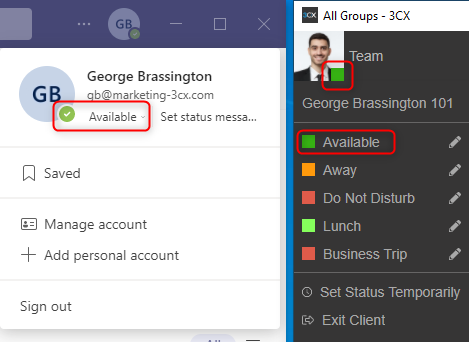
One of the most anticipated updates will be to link your 3CX profile status to the Microsoft Teams presence. This will allow users working predominantly in the Teams app to set the 3CX forwarding rules from their Teams application. Additionally, it will let 3CX know if a Teams user calls another Teams user or if they have just entered a Teams meeting. This will indicate to all 3CX users that that user is currently in a call and the correct forwarding will be applied. The same will apply in reverse. i.e. When a Teams user picks up a call from an IP phone connected to 3CX, users in Microsoft will be informed that that user is on a call.
Meeting Scheduling 2.0
We are already able to control the 3CX status from Outlook calendar events. Next, we will also be adding a more linked experience for users scheduling a conference bridge or 3CX Video Conference. Once a meeting is scheduled, the event will be created directly in your Outlook calendar. From here you will be able to take control over who to invite, move the date/time or cancel the event altogether while keeping the schedule in sync in 3CX.
Lastly, while scheduling an event the user can be assisted to display already scheduled events on that date to avoid overlapping.
Group Synchronisation
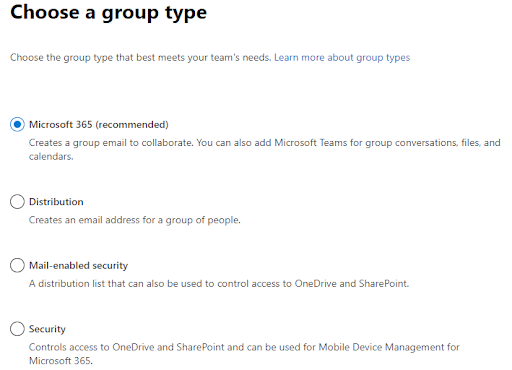
To further limit the administrative overhead of managing two systems, Microsoft Teams groups can be used to replicate user group assignments in 3CX. Teams group owners will be assigned an admin role, and members will be assigned the user role within the 3CX groups. This also allows owners of the Teams group to add and remove users from the Teams group which could have a dynamic effect if a user is to use a 3CX outbound rule or not.
Extension Number Generation
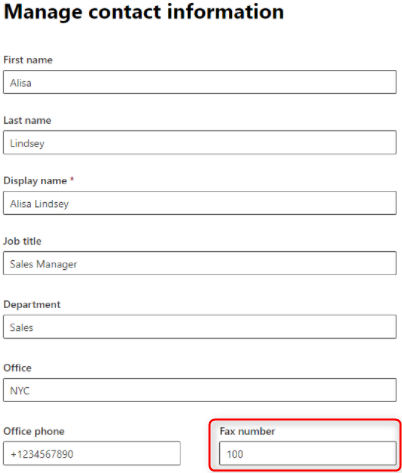
A general request was to control the assigning of a 3CX extension number from the admin portal of Microsoft. Unlike in a local Active Directory, in an Azure Active Directory (AAD), the IP phone field is no longer an easily consumable field. Therefore to provide a solution for this request, an option will be added to use the FAX number in AAD as the 3CX extension number.
Give us your Feedback
We love your feedback on our product updates, releases and plans for the future. Don’t forget that you can submit ideas for future enhancements via our community forum. In the meantime, let us know your feedback on this Microsoft integration road map via the comments link below!









 Copyright © 2026