No audible alert for new chats

Status
Not open for further replies.

EHO

New User
Joined
Oct 7, 2021
Messages
4
Reaction score
0
Perhaps this issue has been covered previously. We, nor our client, are getting audible desktop alerts when new chats are received. The only way we see them is by constantly checking the WordPress area of the client's website. This issue is experienced on both PC and Mac, using both Safari and Chrome. All the correct boxes have been checked in the Settings section (as far as we can tell). Is there a fix? We're not techies so any answers need to be dumbed down! Thanks in advance.
 
Hi!

OK, the first and most important thing we need to understand it, in what mode did you install the Live Chat plugin?
When you first activated it, you can either choose "Standalone" or "3CX". What did you choose?

If you are unsure, send us a screenshot of what the plugin settings look like inside the WP Admin of your wordpress site, hiding any sensitive information of course.
 
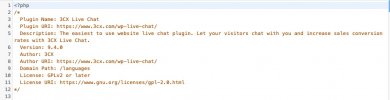
Sorry, we had a contractor do the install and she can't remember. Attached are the settings. Thanks for your help!2021-10-07_14-57-06.jpg
 
When I said the settings, I meant when you log into the WP Admin page of your site. Usually this is accessed from prepending /wp-admin at the end of your website URL.

Another question, the Web Visitors open the chat and contact the staff. How do the staff respond? using a 3CX client, or by being logged into Wordpress website?
 
We respond using the functionality on WP.

Apologies, but can you be a bit more specific about where in the admin section of WP you need to see?

Attached is what we see when 'Live Chat' is clicked which suggests the '3CX' version was installed but wouldn't swear on it.

2021-10-07_15-08-47.jpg
 
This is actually the Standalone version, but at least we know now.

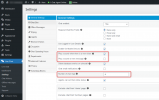
The Settings of the plugin that relate to sound and notifications are these here:
1633616721743.png

I tried it just now, and when a new message arrives, there is a 'clicking' sound.
Also, when this happens, you should see a notification appear right above the notification area in Windows.
If you aren't seeing the notification, this may have something to do with Windows, or the browser the agents are using.
 
  • Like
Reactions: Evolute IT
Thanks for confirming. Both of those boxes are ticked but still not hearing any audible clicks on new chats. Also ticked is 'Play a sound on new message:' but guessing that isn't causing the problem. Could it be something else within the settings of Live Chat, WP or general PC/Mac settings?
 
I would guess general PC/Mac, but the easiest thing I could suggest is try with a new different browser. E.g. if you used Chrome so far, close it down and install and try Firefox.
 
Status
Not open for further replies.

Forum statistics

Threads
112,149
Messages
590,965
Members
165,171
Latest member
Mahlon