No history Call in 3CX 16.0.8.9

Status
Not open for further replies.

C-Cure

Customer
Basic Certified
Joined
Jun 25, 2020
Messages
2
Reaction score
0
Hi,

We upgrade a windows 3CX server to 16.0.8.9.

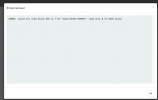
We cant go to CALL HISTORY on the serveur we got this error message: "XX001: could not read block 897 in file "base/16451/59940": read only 0 of 8192 bytes"

and no more history on phone history ?????
 

Attachments

  • Capture d’écran 2021-06-10 à 15.06.40.png
    Capture d’écran 2021-06-10 à 15.06.40.png
    28.6 KB · Views: 3
Hi @C-Cure,

This looks like a database corruption error, which is not good. To try to save as much data as you can, I suggest taking a full Backup, don't uninstall the instance though. Once done, power off the server (don't delete it or uninstall it) in case the backup fails.

Create a clean install on another server, install using the backup you've made. Once installed, log in and see what data has been retained.
 
The problem is:

- Its a production server.
- An automatic backup is done every night (its working), before upgrade backup are 244 mo after upgrade backup are 96 mo.
- The problems its not to see log, its to make history call works !

do we have to restore a old backup (before upgrade) on the production server 16.0.8.9 ?
 
Hi @C-Cure,

do we have to restore a old backup (before upgrade) on the production server 16.0.8.9 ?

No, that isn't a supported backup scenario. Best to install on a new machine and restore using the backup prior to the upgrade, then try to upgrade again. If the database issue doesn't occur, switch the new machine over as your primary.
 
Status
Not open for further replies.