No sound on incoming calls, webclient and mobile app

Status
Not open for further replies.

DiegoNPS

New User
Joined
Apr 6, 2023
Messages
11
Reaction score
0
Hey I think I'm in the wrong category, but for some reason the forum thinks I'm on a hosted system when it's hosted on DigitalOcean.

I added a second SIP Trunk to 3cx. This one is generic and came with basic instructions from the provider. I am getting calls and receiving calls, but on incoming calls there is no sound. Neither end hears anything. In the activity log I get this message:

[CM503003]: Call(C:7): Call to <sip:[email protected]:0> has failed; Cause: 487 Request Terminated/INVITE from 127.0.0.1:5483

I don't know what could be causing it. I've opened all ports 5060-5090 as per the SIP Provider to troubleshoot. I tried a network capture and opened it with wireshark but I have no idea what I'm looking at.

Any help is appreciated.
 
5060 and 5090 are not a range…see https://www.3cx.com/docs/ports/

Does the firewall checker pass?
I'm not too knowledgeable on this, but the SIP provider asked me to open all ports in that range just to be sure that the firewall wasn't an issue. On DigitalOcean I have an inbound rule allowing all udp and tcp traffic across all ports from 5060 to 5090.

The firewall checker passes, or at least I think so if that's what "done" means on all results. The only different result is for "detecting SIP ALG... not detected"
 
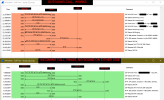
I found a thread where they mentioned the SIP provider might be blacklisted, but I couldn't see anything like that on our system. I got this from wireshark. Can someone troubleshoot from this?


Wireshark Capture.png
 
Voice packets are going to be using the 90XX ports as shown in your posts. However it seems that there is some port substitution going on. Port 9012 becomes 50790, and port 9010 becomes 21790, and vice versa. So... there may be something in your firewall that need correcting. There is a list of ports (UDP) used for voice, that was provided in a link, earlier. You need to confirm that these are open on your firewall.

https://www.3cx.com/docs/manual/firewall-router-configuration/

https://www.3cx.com/support/firewall-configuration/
 
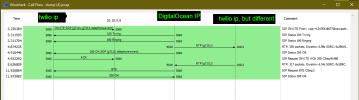
All the ports are open as per the required configuration. It was set up with pbxexpress on DO. The firewall checker passes fine. As a comparison, I tried a call through one of our Twilio numbers and it worked fine. Here is what that call looked like:
Wireshark Capture 2.png

If the issue is with the SIP Provider then I will reach out. But I'd like to know that it's not some config issue I caused first.
 
If possible, I would eliminate the firewall, and/or router, after hours, while you made some test calls. If calls did work, you'd know that it was a firewall, or "provider interaction with the firewall" issue
 
@leejor The provider I'm working with originally emailed me some info for connecting their SIP trunk with 3cx. I filled in their data and immediately I got an automated call saying the connection has been completed. Normally I would have access to the info I have to fill in but I'm in on like a trial account. Just now they've asked for my IP address after looking at the screen shots I shared here earlier, so I wonder if that's something that didn't get set up correctly on their end that I would normally have access to fix myself if I was on a normal account. Hopefully them having my IP address fixes this issue.

Will update here if anything, thanks.
 
The fact that another provider is working properly. leads me to believe that it very well may be a provider issue. If they are helping to rectify the issue, great. Some providers are more reluctant to spend time troubleshooting with you, and prefer to point the finger.
 
@leejor I got it working. But the think the root cause of the problem is deeper and I don't know how to fix that part.

I have a hosted system originally that I turned off and reinstalled using pbxexpress onto DigitalOcean. When doing this, the droplet on DO was set up automatically with a random IP address. I have a reserved IP on DO that I added to 3cx in the static IP section and it did work as an alternate IP, but all call traffic was still going through the original IP. I have no idea how to change this IP in 3cx. I even tried DO's guide on getting outbound traffic to go through the reserved IP but 3cx doesn't seem to look at that. It's like it gets set once and then no way to change it.

Anyways, the issue was when I registered the SIP Trunk, they saw my IP address as the reserved IP, and this somehow prevented RTP data from being routed correctly. I removed my static IP from 3cx and re-register the SIP trunk and now everything is working fine.

The only problem I still have now is figuring out how to change 3cx to use the static IP only. Not a big problem but I will have to quickly reconfigure my trunks if the IP ever changes to avoid downtime.
 
Status
Not open for further replies.

Forum statistics

Threads
111,974
Messages
590,081
Members
164,899
Latest member
mazet