- Joined
- Nov 25, 2020
- Messages
- 27
- Reaction score
- 1
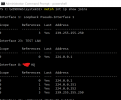
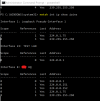
Hi so I have an issue that I am trying to solve. I searched the forums and internet and followed suggestions in in these two pages https://www.3cx.com/docs/plug-and-play-ip-phone/ and https://www.3cx.com/community/threads/multicast-group-missing-from-nic-driver.61131/ When I ran the netsh command I do not see the multicast group on the NIC for the phone system.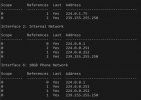
All interfaces are used, I have tried to change the metric from Automatic to 1 for IF 6 and rebooted the system but it did not show up. I tried to follow the suggestions in the plug and play IP Phone page, but it looks to be based off of Windows 7 since Windows 10 removed the adaptors and bindings configuration. To get around this issue I tried to add the route using the route add command but that did not solve the issue. I did a packet capture with Wireshark on the PBX and I am seeing the broadcast from the phone asking to subscribe but no response.
I did find this page https://www.3cx.com/community/threa...ausing-local-provisioning-to-also-fail.61212/ which may explain my problem, but it only gives the solution for a Linux based system. I am using a Windows 10 system for the PBX. Has anyone found a solution to this issue that is Windows 10 based?
Thanks in advance for any help.
All interfaces are used, I have tried to change the metric from Automatic to 1 for IF 6 and rebooted the system but it did not show up. I tried to follow the suggestions in the plug and play IP Phone page, but it looks to be based off of Windows 7 since Windows 10 removed the adaptors and bindings configuration. To get around this issue I tried to add the route using the route add command but that did not solve the issue. I did a packet capture with Wireshark on the PBX and I am seeing the broadcast from the phone asking to subscribe but no response.
I did find this page https://www.3cx.com/community/threa...ausing-local-provisioning-to-also-fail.61212/ which may explain my problem, but it only gives the solution for a Linux based system. I am using a Windows 10 system for the PBX. Has anyone found a solution to this issue that is Windows 10 based?
Thanks in advance for any help.