O365 integration with 3CX question

Status
Not open for further replies.

PeterCheng

Forum User
Joined
Jan 5, 2021
Messages
105
Reaction score
11
Hello,
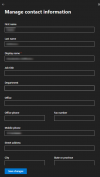
Recently we are trying the function of O365 integration with 3CX PBX. What I want to do is when there's a new comer, we will create a O365 account, filled a dedicate extension in ipphone/office number? attribute, and I want user in 3CX will be created automatically. Right now it seems that user could be able to created, but the extension will be created randomly or auto assigned by 3CX. I hope that once I have created a new user in O365 and set his extension, we can see a new user with set extension will show up in 3CX itself once synced.
Right now is it possible for such function ? What should I do? Thanks a lot.

Peter
 
How to Integrate your PBX with Microsoft 365 | 3CX

Code:
User Sync - 3CX extensions synced from Microsoft 365 are grouped in the 3CX Extension Group called “Azure AD”. A starting extension number may be given, otherwise, the extension will be created from the lowest available extension number in the system. .
 
  • Like
Reactions: PeterCheng
Hello sir,
As I mentioned, I've integrated 3CX with O365. I don't want to use default auto-assigned extension number to my new created user. My wish is that once new user created in O365 with extension filled, 3CX will generate this user by itself. Is it possible? How to do? Thanks.

Peter
 
As @cobaltit already mentioned, you can only specify the starting extension number, meaning that users synced from O365 will start being created with that specific extension number and then move upwards from there.

You may want to consider having a look at our blog post: https://www.3cx.com/docs/office-365-integration/
 
Thanks cobaltit & ChrisC_3CX, May I ask that such feature I mentioned has the possibitliy to be appeared in your roadmap? Since #CX has synced O365 related attributes, it should be able to create a user with specific extension no. instead of aoto-assigned no. Then what admin need to do is to take care O365 accounts well, the accounts will synced well to 3CX automatically.

Thanks.

Peter
 
The road map can be found here 3CX V18 Alpha - A future proof Communications System for what to expect in the next version, but the issue here is the 365 user accounts do not have an IP Phone section as do the Active directory user accounts which are used to create extensions with a specific number when using Ad sync (offered only with the windows version of the PBX). You can import extensions also via CSV import thus creating the extension this way first and then adding them into the 365 integration to sync contacts and calendars only, controlling which extension number to assign via the CSV.
 

Attachments

  • 1610698331743.png
    1610698331743.png
    41.3 KB · Views: 12
  • Like
Reactions: PeterCheng
Thanks charles.
So Linux base 3cx PBX could not integrate with O365? I mean account sync, thanks.

Peter
 
Linux-based PBX can sync users with 365, there is no issue with this, it simply can not be set to import to specific extension numbers in either version, you can only set which extension range to start from. The version comment was regarding the Linux version which can not import extensions from Active Directory, as this feature is only available with the windows PBX version, which allows extensions to be created from active directory accounts that can be assigned specific extension numbers using the Active directory IP phone attribute found within the AD account telephone numbers tab, of which 365 user accounts do not have.
 
Last edited:
Linux-based PBX can sync users with 365, there is no issue with this, it simply can not be set to import to specific extension numbers in either version, you can only set which extension range to start from. The version comment was regarding the Linux version which can not import extensions from Active Directory, as this feature is only available with the windows PBX version, which allows extensions to be created from active directory accounts that can be assigned specific extension numbers using the Active directory IP phone attribute found within the AD account telephone numbers tab, of which 365 user accounts do not have.
Hello Charles,

Thanks for your reply.
So
1. both Linux and Windows based 3CX PBX cannot be set to import specific ext. no. from Azure AD ?
2. Only Windows based PBX is allowed to import csv file generated by local(on premise) AD . Right now we use Azure AD connect tool to sync AD data between local AD and Azure AD. Becasue locla AD includes ip phone attribute. There's no way for Linux based PBX even I have the same csv file from local AD?

What we want is
1. integrate with O365, when O365 accounts created/updated/deleted, 3CX PBX accounts will also be synced.
2. AsI know right now is that PBX will assign ext. no. automatically itself instead of sync from O365, because Azure AD do not have such ip phone attribute. If my understanding is correct, I will modify the new created account with specific ext. no. one-by-one by myself. But it is possible that I can generate a csv file to import into 3CX PBX when bulk change. With what tool can I do it?

For my requirement, both Linux based and Windows based PBX can do it, or only Windows based can fulfill my requirement, thanks.

Peter
 
You are correct on the AD import part, this is only available with the windows OS version of PBX.

Assigning specific extension numbers with the 365 integration is not possible for either version but you can import and sync your Azure AD users as extensions in 3cx with both versions setting an extension range to start from.

see the guide here: https://www.3cx.com/docs/office-365-integration/

Both Windows and Linux version can import extensions via csv, you do this by exporting one extension then using this exported CSV to populate with your extensions assigning them with the required extension number and all other required fields then import back in,

see full guide here: https://www.3cx.com/docs/bulk-extension-import/
 
Hi Charles,

Thanks for your feedback.
Because right now I'm assessing what version I should use, could you tell me more about AD import with Windows version? Any recommend?

As far as I know, if I choose Windows version PBX, because we have 600 users in our company, what I can do is integrate with O365 first, and then 3CX will sync those users first , and assign ext. no. to the users. And if ipphone attribute in my AD has been filled, I can then use "Import AD" feature to update the existing users' ext. no. , or, there is no way to update extension item in 3CX PBX, I must change it manually ? Or use "import csv"?

if I choose Linux version PBX, I will also integrate with O365, and I will have synced users with defined ext. no. And then I can export those extension information csv file, then I manually update the ext. part of the csv and then import it again back yo the PBX.

Could you tell me whether my idea is correct or not?
Thanks.

Peter
 
Last edited:
Actually once an extension is created the extension number can’t be updated.

So as you have on prem active directory then with the pbx installed on windows machine you can first import the user accounts as extensions in 3cx, using the AD import feature, assigning them to the extension number, and importing them in with their 365 email addresses then simply using the 365 integration to update and sync contacts & calendars. This will be the easiest option to achieve your requirement.
 
Actually once an extension is created the extension number can’t be updated.

So as you have on prem active directory then with the pbx installed on windows machine you can first import the user accounts as extensions in 3cx, using the AD import feature, assigning them to the extension number, and importing them in with their 365 email addresses then simply using the 365 integration to update and sync contacts & calendars. This will be the easiest option to achieve your requirement.
Hello Charles,

Thanks.
So you would recommecnd me to use windows-based pbx to achieve such feature?
if I use linux-based pbx, maybe I need to create accounts /import accounts from csv , and then turn on o365 integration for those accounts to sync.

May I know your idea? When we have on premise AD server, we can choose windows based pbx, and from your point of view, regarding to the stability, both versions are similar, excep that windows version need almost double throughput server to operate the system normally. Thanks.

Peter
 
From another thread: https://www.3cx.com/community/threads/3cx-sync-with-azure-ad-connect.71867/ , Maybe it could be one of the workaround:
For linux version, Import from Office 365, then export to csv, modify your extension numbers etc in the csv, delete all extensions on 3cx, import extensions from csv. I think maybe for the initial deployment I can use this method, and then stop user sync. When new comers arrive, just use extension copy to mosify or csv upload for multiple users.
 
Yes absolutely this is another way when AD import is not an option like with a Linux version of the pbx.
 
Hi Matthew,

Right now 3CX cannot sync extension number from O365 (AAD) because it uses ip phone attribute, but local AD does not sync this attribute to AAD.
If in the future there's some methods 3CX can use to create extension number from O365 (maybe you can use office phone number instead),
it will be convenient to all users.
From my point of view, V18 has not implemented sunch function yet.

Peter
 
Hi Matthew,

Right now 3CX cannot sync extension number from O365 (AAD) because it uses ip phone attribute, but local AD does not sync this attribute to AAD.
If in the future there's some methods 3CX can use to create extension number from O365 (maybe you can use office phone number instead),
it will be convenient to all users.
From my point of view, V18 has not implemented sunch function yet.

Peter
Hi Peter, if Azure AD ever introduces a dedicated parameter for an extension number, then this will be something we will consider.
 
  • Like
Reactions: PeterCheng
Status
Not open for further replies.

Forum statistics

Threads
111,986
Messages
590,148
Members
164,917
Latest member
Oliver Hastedt