Office Schedule

kitosch

Bronze Partner
Joined
May 15, 2024
Messages
5
Reaction score
0
What is the best method to have the following Ring Groups:
Morning Group: receive calls 7-8 (Ring All)
Day Group: receive calls 8-5 (Ring All)
Day Group: Lunch Break at 12:45 to 1:45

Current workaround:
Created Office Schedule to 7-5
Created a Break 7-8 and used to break to route to Morning Group
Can't add Lunch Break since it will also route to Morning Group

Please help,
John
 
I have a same sort situation at one of our customers. I have set openings hours on DEFAULT department 7:00 - 17:00. On opening hours go to morning ringgroep. This one is member of morning group with openings hours 7:00 - 8:00. On closed go to ringgroup Lunch Break. On closed on lunch goto ringgroup day. You can combine lunch and day in one department "day" if prefered.
For holiday use the DEFAULT deparment.
 
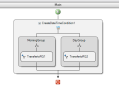
Utilise CFD - whilst I'm no good at this by any means... i've been able to create the scenario you wanted and tested.

1777626920567.png
Specify the time for MorningGroup 0700-0800
Specify the time for DayGroup 0800-1700

Add your "Transfer" function to Group1 and Group2 for each branch and then build the CFD.

Import your custom script to 3CX and route your DDI to it.

Ensure that you have your break time configured within office hours and your RG destinations are in it.

This will achieve what you want.

if you like.. you can take the ZIP i've attached, open it up in CFD and modify the RG destinations.
 

Attachments

Hi, As you have only one switch to manage you could try with exceptions on a dummy extension
on dummy extension create business hours 7 to 17, create your first office hours 7-8 and route to your morning group, create break hours and check to change status automatically. finally add one exception to route to the other group during the time you need.
in OOH send to what you want , IVR, VM ....
 
What is the best method to have the following Ring Groups:
Morning Group: receive calls 7-8 (Ring All)
Day Group: receive calls 8-5 (Ring All)
Day Group: Lunch Break at 12:45 to 1:45

Current workaround:
Created Office Schedule to 7-5
Created a Break 7-8 and used to break to route to Morning Group
Can't add Lunch Break since it will also route to Morning Group

Please help,
John
Dummy extension with exceptions for each hour range. Super easy.
 
I feel the configuration would be more readable/maintainable to have different departments with different working hours, and assigning members accordingly.
 
  • Like
Reactions: Ronaldvdv
Thank you all for the suggestions, I will test each one of them.
 

Latest Posts

Forum statistics

Threads
111,952
Messages
589,894
Members
164,844
Latest member
abctel2