


- Joined
- Jul 9, 2018
- Messages
- 698
- Reaction score
- 166
This morning hot-desking users are having problem logging in and out of certain hot-desking phones.
Further investigation shows that those problem phones will not reprovision, even if factory reset. If factory reset they do appear in "Phones" as "New" but assigning them to hot-desking or a user results in nothing happening.
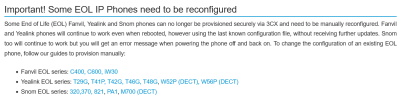
I've noticed that all of the newest Yealink phones we have are working fine but anything T41P or older has simply stopped provisioning or being able to be used for hot-desking.
My first thought was certificates (as that was the problem when we needed the certificates hot fix a while ago) so I tried disabling "Only Accept Trusted Certificates" on an affected T41P but that has not made any difference.
Also, as part of troubleshooting I tried deleting and recreating a hot-desking account for a phone and noticed that T41 has now disappeared from the list of possible hot-desking phones. This is weird, I know it was there because I have quite a few hot desking phones listed as T41 but I can't create any new ones, only T41S and T41U.
Can anyone suggest the best thing for me to try next?
We're on 18.0 (Build 415) hosted on Google, using SBC (18.1.36). All of our phones are Yealink, about half pretty new (and working) and half T41P or older (not working).
edit: I notice T41P is not longer in the 'supported' phones list either... If I look at the 'legacy' list it's listed in the heading "Yealink T4 Series: T41P, T42G, T46G, T48G" but when you click through it isn't mentioned, only "How to Configure Yealink T46S, T42S, T48S - Also applies to Yealink T48S/U, T46S/U, T43U, T42S/U, T41S/U, T40G/P"...
Further investigation shows that those problem phones will not reprovision, even if factory reset. If factory reset they do appear in "Phones" as "New" but assigning them to hot-desking or a user results in nothing happening.
I've noticed that all of the newest Yealink phones we have are working fine but anything T41P or older has simply stopped provisioning or being able to be used for hot-desking.
My first thought was certificates (as that was the problem when we needed the certificates hot fix a while ago) so I tried disabling "Only Accept Trusted Certificates" on an affected T41P but that has not made any difference.
Also, as part of troubleshooting I tried deleting and recreating a hot-desking account for a phone and noticed that T41 has now disappeared from the list of possible hot-desking phones. This is weird, I know it was there because I have quite a few hot desking phones listed as T41 but I can't create any new ones, only T41S and T41U.
Can anyone suggest the best thing for me to try next?
We're on 18.0 (Build 415) hosted on Google, using SBC (18.1.36). All of our phones are Yealink, about half pretty new (and working) and half T41P or older (not working).
edit: I notice T41P is not longer in the 'supported' phones list either... If I look at the 'legacy' list it's listed in the heading "Yealink T4 Series: T41P, T42G, T46G, T48G" but when you click through it isn't mentioned, only "How to Configure Yealink T46S, T42S, T48S - Also applies to Yealink T48S/U, T46S/U, T43U, T42S/U, T41S/U, T40G/P"...


 .
.


