Solved One way audio only on desk phones

Status
Not open for further replies.

D_IT

Premier Customer
Joined
Dec 7, 2015
Messages
4
Reaction score
1
Hello, I am really stumped on what is going on so hoping to get some help on here.
The problem I am facing is that all of our physical desk phones are getting one-way audio, the caller can hear us but we can't hear the caller. We have no problems with the audio on the 3CX softphone only the desk phones. The firewall checker passes successfully on all parts. I have tried multiple phone types but the primary one I am testing with is a Polycom VVX 250. Firewall that we have is a Sophos XGS. I took a packet capture from the activity log and I don't see any issues there, the audio can actually be heard in wireshark.

Edit: narrowed it down to the issue being that the audio is not crossing over the different VLANs. I have a separate VLANs for the deskphones and the 3CX server is on our server VLAN. When I have the phone and the server on the same VLAN then the audio works.
 
Last edited:
Regarding your question and issue, you must ensure that UDP traffic is allowed through your VLANs, particularly UDP ports 7000-8999, the internal audio ports for locally provisioned devices to PBX, enabling PBX delivers audio under the extension settings > options tab so that the audio will pass through the PBX and not end to end directly to and from the divide as these are going to use random ports to send and receive audio to and from.

But do also please note the Polycom VVX 250 devices are now also marked as 3rd party supported and end of life, which means they are no longer supported by 3cx.

Also see here: https://www.3cx.com/sip-phones/polycom-vvx/
 
Last edited:
Regarding your question and issue, you must ensure that UDP traffic is allowed through your VLANs, particularly UDP ports 7000-8999, the internal audio ports for locally provisioned devices. But do also please note the Polycom VVX 250 devices are now also marked as 3rd party supported and end of life which means they are no longer supported by 3cx.

Also see here: https://www.3cx.com/sip-phones/polycom-vvx/
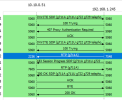
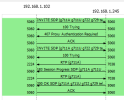
Confirmed that the UDP ports are being allowed. Attached a screenshot of the packet capture call flow, 1 is from the phone being on a different vlan and the other is while it is on the same vlan.
 

Attachments

  • 3CX wireshark capture.PNG
    3CX wireshark capture.PNG
    11.7 KB · Views: 36
  • 3CX wireshark capture 2.PNG
    3CX wireshark capture 2.PNG
    9.3 KB · Views: 30
Although RTP packets seem to be passing through the 3cx system in both cases, and your captures show RTP traffic both ways in both, which would indicate that the audio is passing through the 3cx system, you would need to analyze the RTP to check whether there is actual audio contained within the RTP packets, to begin with, and to rule out the issue here, especially with the capture where the devices are on separate VLANs, and check if audio is present, if so, then move to check the network.

Try enabling and disabling PBX to deliver audio on the extensions, noting that device-to-device calls on lan will send audio directly to each other. If call recording or PBX delivers audio options are unchecked.
 
Last edited:
Try enabling PBX to deliver audio on the extensions, noting that device-to-device calls on lan will send audio directly to each other.

Audio will not pass through the PBX unless the call recording option is enabled on the extensions or PBX delivers audio is checked. This will rule out any end-to-end issues.

Although your captures show RTP traffic both ways in both the captures, you would need to analyze the RTP to check whether there is actual audio contained within the RTP packets, with the one that devices are on separate vlans.
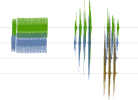
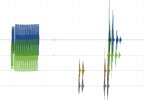
I have the PBX delivering audio on both the extensions and the SIP trunk, tried with it on and off, and the same thing. I verified that there is actual audio in the packet captures on both sets, I can hear the audio from my cell on the capture but it does not make it to the phone itself.
Does the change to the PBX delivers audio take place after the phone is rebooted or is it per call? I've been rebooting each time but want to make sure
 

Attachments

  • Capture3.PNG
    Capture3.PNG
    148.1 KB · Views: 11
  • Capture4.PNG
    Capture4.PNG
    111 KB · Views: 8
In this case, you need to go back to the network level, as audio traveling through the 3cx system is ok, and not reaching the Phones means it is not traversing the network VLANs. This, though, I'm afraid we can't help you with.

My only advice is to take packet captures on the phones themselves as well as on the 3cx system, with PBX delivers audio enabled, and check the captures for where the audio is not present this will give you an indication of where to start checking.
 
Last edited:
  • Like
Reactions: JohnS_3CX
Was able to figure it out today. It was caused by a NAT rule on the Sophos firewall being applied to the traffic from 3CX to anywhere so I limited it to match the outbound interface of the WAN port (Just in case anyone else runs into this.)
 
  • Like
Reactions: alanjmcfL
Status
Not open for further replies.

Forum statistics

Threads
111,974
Messages
590,081
Members
164,899
Latest member
mazet