Open tel links not in browser

Status
Not open for further replies.

vic-t

SOHO User
Joined
Feb 23, 2021
Messages
11
Reaction score
3
I understand that the web client and its extensions are the preferred client for 3CX, over the Windows client for example. That's why we work with the Edge extension. It was my understanding that both extensions, Chrome and Edge, offer the same feature set.

Now, my goal is that I can initiate a call directly with a "tel:" link. This works fine as long as I press such links within pages opened in Edge but as soon as I'm in another software (another browser, Outlook etc), I'm asked which application should handle the link and I cannot choose the extension (since it's not a local application).

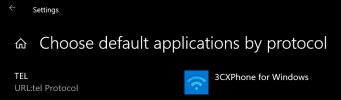
I even tried setting the protocol handler for "tel" links to Microsoft Edge in the system settings but that just opens an Edge window, it does not engage the extension.

Is there a solution for this?
 
The browser extension is just that, an extension that can pick up links from your browser.

If you need to pick up links from other applications (handled on the OS level) then you might need to use the 3CX Windows client.

1614162498769.png
 
Thanks for the quick reply, John.

The way the extension is marketed is a bit misleading then. "Launch calls from any CRM/web page". Our CRM is not web based, so clearly, calling from any CRM is not possible.

The main reason we're using the web client extension is because, in my understanding of the documentation, querying CRM data and showing the respective name/number combination in the call log is only possible with the web client and not supported by the Windows client. Can you confirm this?

If that's true, then we're between a rock and a hard place.
 
You could potentially use a different method so you can still stay within the webclient.
Try and setup your CRM to call using this URL format whenever a number is clicked:

https://mypbx.3cx.com:5001/webclient/#/call?phone=123456

And your webclient should load up a browser window like so, ready to make your call

1614169554628.png

Does this help?
 
In our case, that's unfortunately not a workaround we can use, it's a closed source system and we cannot change the way phone numbers are represented.

I'm thinking, though, it shouldn't be too difficult for 3CX to create a very simple link handler exe that could be configured as the default app in Windows for tel links (you clearly already have the code for that in your Windows app). All this handler would do is receive the tel instruction and rewrite it as the URL you mentioned and call up a browser window, quite simple.

In a second iteration, there would hopefully be a way to pair the handler with the web extension as that's just so much more convenient than the regular web client. And then there'd really be almost no reason to use the Windows client anymore.

What's your view on this?
 
It sounds like you have a CRM that is different from the ones most our customers use. That's perfectly fine, but ultimately it's something you have to find a way to work with.

Currently we are not looking at going in that direction, but it's not a bad idea. You could recommend it to your 3CX Partner to post it in our ideas section. If you don't have a 3CX Partner, it might be a good idea to find one. They may actually be able to help you integrate the CRM in a way that works better for you once they get a look at it.

https://www.3cx.com/ordering/find-reseller/
 
It's a fair point about the CRM but I think it's a bigger issue than just that. Especially for Windows users, it's just not possible to assume they will do everything in one single browser. Most of the calls I'd like to initiate are from within Outlook. In my understanding, there is a plugin for Outlook but it requires the 3CX Windows Client. But there are other situations where a click to call feature would be appreciated, from within a PDF, within a Word document, a Powerpoint presentation etc etc. With my previous software (which was really sub-par in almost all other aspects compared to 3CX), I was able to just select any phone number anywhere, press a custom button such as F7 and a call was initiated.

If your Windows application had the exact same feature set as the web client extension, this discussion would be moot. Unfortunately, however, that's not the case, you need the web client to get some features such as a CRM integration and you need the Windows client to get other features such as call from Outlook. You'll have to agree that this is really not very customer friendly.

Thus my suggestion, you could very easily solve all of these issues by simply extracting the call handler part from the Windows application and have it communicate with the web client. But, of course, just improving on the Windows client would be the other route to go, probably requiring a lot more development effort.
 
  • Like
Reactions: bobscrew
For the time being the options you have are the ones we have already discussed, but yes I understood, and we are planning on further improving the Chrome Extension and Webclient going forward. Your feedback is appreciated!
 
Status
Not open for further replies.

Forum statistics

Threads
112,349
Messages
592,026
Members
165,512
Latest member
gmacinit