Solved Option to enable and disable Q has gone in V18

Status
Not open for further replies.

davidsimcox

Premier Customer
Joined
Feb 11, 2021
Messages
19
Reaction score
3
Hi

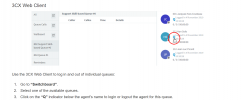
I have looked everywhere since moving to V18 but we can not see where the switchboard has moved to and and as we enable users Q option from the web client we need to know where this option has moved to can anyone please help
1635071919201.png
 
Hi

I have looked everywhere since moving to V18 but we can not see where the switchboard has moved to and and as we enable users Q option from the web client we need to know where this option has moved to can anyone please help

View attachment 25389
Same place, it's just called Logged In or Logged Out now. (under Panel > chose a queue.)
 
  • Like
Reactions: VasilisV_3CX
There is no option to log in and out other agents only yourself also this does not show all agents in it for all Queues
 
Hi @davidsimcox,

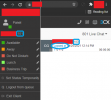
If the extension you're logging in with is a queue manager, following @Frederick Marcoux's post above, you'll be able to log any extensions in and out of the queue explicitly. Below, I've logged in as extension 101, a queue manager of my 801 Live Chat queue. As you can see he has the ability (highlighted blue) to log extension 103 out of the queue.

2.png
 
  • Like
Reactions: Evolute IT
Where do you enable and disable that option for a user now I have full admin rights across the 3cs and I can not see this option the change only happened on the upgrade to V18
 
Hi @davidsimcox,

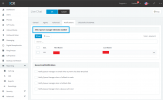
From the Management Console, if you navigate to Call Queues, each queue will need you to set who the queue administrator is from the Notifications Tab in the Queue Settings:

Untitled.png
 
Hi

That's the new bit and the bit I was missing thanks for your help
 
No problem @davidsimcox, feel free to open a new thread if you require further assistance or information.
 
Status
Not open for further replies.

Forum statistics

Threads
112,025
Messages
590,368
Members
164,978
Latest member
FringeIT-Eric