Solved Outbound Caller ID says unknown

Status
Not open for further replies.

citg

Free User
Joined
Sep 16, 2016
Messages
12
Reaction score
4
I have been jumping through hoops testing this all day long today. We are using Skyetel for SIP trunks. Outbound calls work fine but we cannot get the caller ID to show a number or a name, it just shows "unknown"

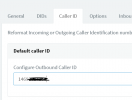
I workd with Skytel support for about 3 hours back and forth and have done everything suggested in this article but nothing has fixed the issue. https://support.skyetel.com/hc/en-us/articles/360041177133-3CX-Outbound-Caller-ID ...They say we are still passing text in the SIP header instead of the phone #. I don't know what else to try. The caller ID setting in our SIP trunk, user extension is set to the correct number. The outbound parameter From : Display Name is set to Custom Field and used our business name, From : User Part is set to "OutboundCallerID" Outbound caller ID is taken from extension settings in managment console..... which is our business phone #, the only number we have.

 
1619547837521.png
That's what is in the trunk template by default. If you only have one phone number there's no need to have anything set for CID at the extension level. Set your CID on the trunk, delete all extension level CIDs and change that setting.
 
View attachment 21809
That's what is in the trunk template by default. If you only have one phone number there's no need to have anything set for CID at the extension level. Set your CID on the trunk, delete all extension level CIDs and change that setting.
Ok I deleted the CID on the extensions, so it's only in the SIP trunk now. Also reset the From: User Part back to the default setting. Will test soon as reply back. Thanks for your help.
 
View attachment 21809
That's what is in the trunk template by default. If you only have one phone number there's no need to have anything set for CID at the extension level. Set your CID on the trunk, delete all extension level CIDs and change that setting.
Unfortunately, I am still getting an unknown caller ID shown when calling outbound from our main number. I'm not really sure where to go from here. The SIP provider says it's probably a 3CX issue, but I feel like everything is set correctly in 3CX. I have other clients running 3CX with Skyetel SIP trunks that don't have this issue.... I've compared settings and everything looks correct.
 
OK. Be sure the CID is only numbers, no spaces or dashes
 
OK. Be sure the CID is only numbers, no spaces or dashes
Blacked out some of the digits, but yes it s only numbers....nothing else.
 

Attachments

  • hra6.PNG
    hra6.PNG
    17.1 KB · Views: 60
Hey @citg

In your initial description of the issue you mention that the "From: Display Name" field carries a custom value which is the company name. Is this still the case?

Try setting it to carry the exact same value as the "From: User Part". Set it to:
"OutboundCallerID" Outbound caller ID is taken from extension settings in management console

Let us know if you still get the same issue after doing so.
 
Hey @citg

In your initial description of the issue you mention that the "From: Display Name" field carries a custom value which is the company name. Is this still the case?

Try setting it to carry the exact same value as the "From: User Part". Set it to:
"OutboundCallerID" Outbound caller ID is taken from extension settings in management console

Let us know if you still get the same issue after doing so.
I removed the number from the Outbound caller ID field under the extensions as the first reply above basically said that was redundant and not necessary if we only have 1 phone number. I changed it to OriginatorCallerID to match the From: User Part yesterday per advice from @cobaltit
 

Attachments

  • hra7.PNG
    hra7.PNG
    11.4 KB · Views: 40
In that case, what I would recommend is performing a packet capture on the 3CX PBX while making the call, replicate the issue and then stop the packet capture. Open the packet capture in wireshark and check the SIP INVITE message sent to the provider. You'll be able to see exactly what is being sent and therefore determine where the issue lies.

You could check our training material on how to perform a capture here(slide 9-11): https://www.3cx.com/3cxacademy/videos/advanced/basic-troubleshooting/

Note: Click on the three dots and then "Open Speaker Notes" for additional information or watch the Video.

You could always contact a 3CX Partner should you require additional assistance on this.
 
In that case, what I would recommend is performing a packet capture on the 3CX PBX while making the call, replicate the issue and then stop the packet capture. Open the packet capture in wireshark and check the SIP INVITE message sent to the provider. You'll be able to see exactly what is being sent and therefore determine where the issue lies.

You could check our training material on how to perform a capture here(slide 9-11): https://www.3cx.com/3cxacademy/videos/advanced/basic-troubleshooting/

Note: Click on the three dots and then "Open Speaker Notes" for additional information or watch the Video.

You could always contact a 3CX Partner should you require additional assistance on this.
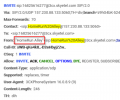
This is what the carrier says they are seeing, so they do not see the number even though I followed all the setup guides to send the number. I reached out to @cobaltit to see if he would be willing to consult with me to resolve the issue.
 

Attachments

  • hra4.PNG
    hra4.PNG
    93.5 KB · Views: 42
In that case, what I would recommend is performing a packet capture on the 3CX PBX while making the call, replicate the issue and then stop the packet capture. Open the packet capture in wireshark and check the SIP INVITE message sent to the provider. You'll be able to see exactly what is being sent and therefore determine where the issue lies.

You could check our training material on how to perform a capture here(slide 9-11): https://www.3cx.com/3cxacademy/videos/advanced/basic-troubleshooting/

Note: Click on the three dots and then "Open Speaker Notes" for additional information or watch the Video.

You could always contact a 3CX Partner should you require additional assistance on this.
Where is the correct place within 3CX to edit that SIP header info to the phone number instead of SIP:HomeRun%[email protected] ??
 
I think I may have figured it out. In my Outbound Rules, the outbound caller ID setting for Route 1 was still text instead of the number. I changed it and will test again this afternoon when I get to the office.
 
That could very well be the cause of the issue, please let us know if all is okay once you test it.
 
If this is the case, then perhaps, in a 3CX update, this field can be restricted to numeric input only (or a warning), preventing a future issue.
 
That could very well be the cause of the issue, please let us know if all is okay once you test it.
Sorry I forgot to come back to this. Yes, the problem is resolved... it was the caller ID setting in the outbound rules.
 
  • Like
Reactions: ChrisC_3CX
If this is the case, then perhaps, in a 3CX update, this field can be restricted to numeric input only (or a warning), preventing a future issue.
That would be a great idea.
 
@citg
Glad to hear you got this resolved! Please feel free to start a new thread if you need additional info or assistance!
 
Status
Not open for further replies.

Forum statistics

Threads
111,974
Messages
590,081
Members
164,899
Latest member
mazet