Solved Outbound calls work fine, inbound calls only go to busy signal

Status
Not open for further replies.

TotalTechTeam

Free User
Joined
Jun 30, 2014
Messages
30
Reaction score
2
v16 running in Azure. Nothing was changed in configuration before this happened.

I checked with my SIP provider (Skyetel) and they ran tests that determined the issue was internal to my 3CX.

Inbound calls all go to a busy signal.

Things I have tried to fix it:
  • changing the inbound route to go directly to a ring group extension, instead of an IVR, and it still happens.
  • changing the inbound route to go directly to a single extension, instead of an IVR, and it still happens.
  • changing the inbound route to forward to an outside number (cell phone) and it still happens
Any ideas?

Thanks!
 
Check the 3CX Activity Log to see exactly where the calls are routing, and/or if there are any error messages.
 
Here's a small sample, but there's a bunch more before Call(257)
Numbers have been obscured but they are numbers belonging to myself, my girlfriend, and a couple of clients
Call Count seems to have been reset after I rebooted the PBX
For these calls, the PBX is setup normally - Inbound Route is set to my in-office IVR

Device +16235555555@(Ln.10003@Skyetel Outbound Priority 3) had no available outgoing trunk(s) for Call(14)
SIP Server ID: 12289 10/22/2021 3:40:07 PM
Device +15165555555@(Ln.10004@Skyetel Outbound Priority 4) had no available outgoing trunk(s) for Call(13)
SIP Server ID: 12289 10/22/2021 3:38:40 PM
Device +19285555555@(Ln.10002@Skyetel Outbound Priority 2) had no available outgoing trunk(s) for Call(258)
SIP Server ID: 12289 10/21/2021 8:19:59 AM
Device +19285555555@(Ln.10003@Skyetel Outbound Priority 3) had no available outgoing trunk(s) for Call(257)
SIP Server ID: 12289 10/21/2021 8:13:09 AM
 
All of those logs are outbound calls that fail because there are no trunks available. That may be because all trunks are busy, or there is a restriction, in the settings, limiting the number of calls over those trunks.
If those logs are associated with the failing incoming calls, then I have to assume that there is forwarding, to an outside number involved, and therefor each call will be using two trunks, one incoming, and one outgoing.
 
All of those logs are outbound calls that fail because there are no trunks available. That may be because all trunks are busy, or there is a restriction, in the settings, limiting the number of calls over those trunks.
If those logs are associated with the failing incoming calls, then I have to assume that there is forwarding, to an outside number involved, and therefor each call will be using two trunks, one incoming, and one outgoing.
That is indeed what the log says, but I promise that those are all inbound calls. No forwarding is enabled that I can find anywhere, and the earlier logs (257-258) are before I rebooted and tested with call forwarding turned on.

Also, outbound calls work fine. Here's call logs from three simultaneous outbound calls I just made, including putting one in a parking orbit:

Date/TimeFromToTalking
10/23/2021 11:50:29 AMEXTENSION (000)516555555500:00:01
10/23/2021 11:50:29 AMEXTENSION (000)Parking orbit (SP1)00:00:00
10/23/2021 11:49:33 AMEXTENSION (000)800555555500:00:07
10/23/2021 11:49:02 AM5165555555Parking orbit (SP1)00:01:27
10/23/2021 11:48:57 AMEXTENSION (000)516555555500:00:05
10/23/2021 11:48:34 AMEXTENSION (000)623555555500:01:59

These are obviously in call log format, not event log format, since there were no errors and the calls completed successfully!!
 
Last edited:
Make an incoming test call from outside the PBX. In the Activity Log, if things are working as they should you will see an Invite, coming from your provider, at the time the call began ringing. You may have to set the logging level to Verbose. The call will have a number assigned to be able to keep track of all the logs, associated with that call. Follow the logs to see where the call ends up.
 
Have you tried roll back to a snapshot or restoring a backup from before the issue happened? That will tell you whether nothing changed or not.
 
Make an incoming test call from outside the PBX. In the Activity Log, if things are working as they should you will see an Invite, coming from your provider, at the time the call began ringing. You may have to set the logging level to Verbose. The call will have a number assigned to be able to keep track of all the logs, associated with that call. Follow the logs to see where the call ends up.
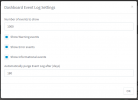
Where do I change the setting for Verbose logging level? The only way I see to get to the Event Log is from the dashboard, and I have all three categories turned on (Warnings, Errors, Informational)
 
Have you tried roll back to a snapshot or restoring a backup from before the issue happened? That will tell you whether nothing changed or not.
Apparently my backups got set to shorter retention, so I don't have a backup from before that....... grrrrr. I don't know how or when that happened, either.
 
Where do I change the setting for Verbose logging level? The only way I see to get to the Event Log is from the dashboard, and I have all three categories turned on (Warnings, Errors, Informational)
Dashboard -> Activity Log -> Settings

You could purge the log, set to verbose, make the inbound call, and post all the entries here (redact private info).
 
Dashboard -> Activity Log -> Settings

You could purge the log, set to verbose, make the inbound call, and post all the entries here (redact private info).
I don't have an option for verbose. This screenshot shows all of my options.
 

Attachments

  • Event Log Settings.PNG
    Event Log Settings.PNG
    11.7 KB · Views: 16
Hi @TotalTechTeam ,

I have a feeling, judging form the names of your SIP Trunk entries, that you have multiple entries from the same provider (Skyetel).

Have you read and followed this guide exactly?
https://www.3cx.com/docs/us-sip-trunk-skyetel/

Specifically, have you added all your DIDs to all SIP Trunk entries in the correct specified number format?
Do you happen to have the same DIDs in multiple SIP Trunks entries of the same provider?
 
After a long week of handling other emergencies, with all inbound calls forwarded to my cell phone, I was able to handle this.

Hi @TotalTechTeam ,

I have a feeling, judging form the names of your SIP Trunk entries, that you have multiple entries from the same provider (Skyetel).

Have you read and followed this guide exactly?
https://www.3cx.com/docs/us-sip-trunk-skyetel/

Specifically, have you added all your DIDs to all SIP Trunk entries in the correct specified number format?
Do you happen to have the same DIDs in multiple SIP Trunks entries of the same provider?

I was using the old manual IP authentication from before Skyetel was an official partner with SIP authentication setup. Instructions were, at the time, to have multiple outbound trunks to different IP addresses for failover purposes. It was working fine for 2.5 years, then it broke, inexplicably, and without any warning. Again though, the issue was with inbound calls basically dropping off to a busy signal or "call cannot be completed as dialed".

Setting the trunk up as per the guide you linked did fix things, however I'd still like to know why my old settings broke! I didn't make any changes, it just happened randomly! Was it perhaps something to do with the LetsEncrypt update that I've seen other threads about? Auto-updates were turned on.

Dashboard -> Activity Log -> Settings

You could purge the log, set to verbose, make the inbound call, and post all the entries here (redact private info).
After fixing things with my trunks, I updated to v18. I now see Activity Log... I'm sure it was there in v16 also, but I must've missed it somehow. Stress, maybe? Anyways, now it's a moot point, since everything is working, but I would've LOVED to see those logs to try and figure everything out. Even though the problem is solved, and I should have the trunks setup properly as per best practices, I'd still like to know why things broke to begin with!!
 
Last edited:
I'm glad to hear that everything is up and running now!

I can't be sure why everything suddenly stopped working. My guess would have been that because you have multiple IP based SIP Trunks, you may have accidentally at some point added the same DIDs to more than one SIP Trunks without defining Call Source Identification settings, causing this issue.

The other explanation of course is that something may habve changed slightly in the Skyetel end for IP Based trunks.

All of this matters little though as it's working now when setup per the guide.

I will set this as 'Solved'.
 
Status
Not open for further replies.

Latest Posts

Forum statistics

Threads
112,325
Messages
591,898
Members
165,478
Latest member
postmaster@studiolegaleda